
Gzini.6
Associate II
May 31, 2019
Solved

application template auto generated code problem

  • May 31, 2019
  • 2 replies
  • 1742 views

I've a problem with the generation of the code for the application template. Following the steps, i've generate a blank code, but there's a weird problem, maybe something about linker.

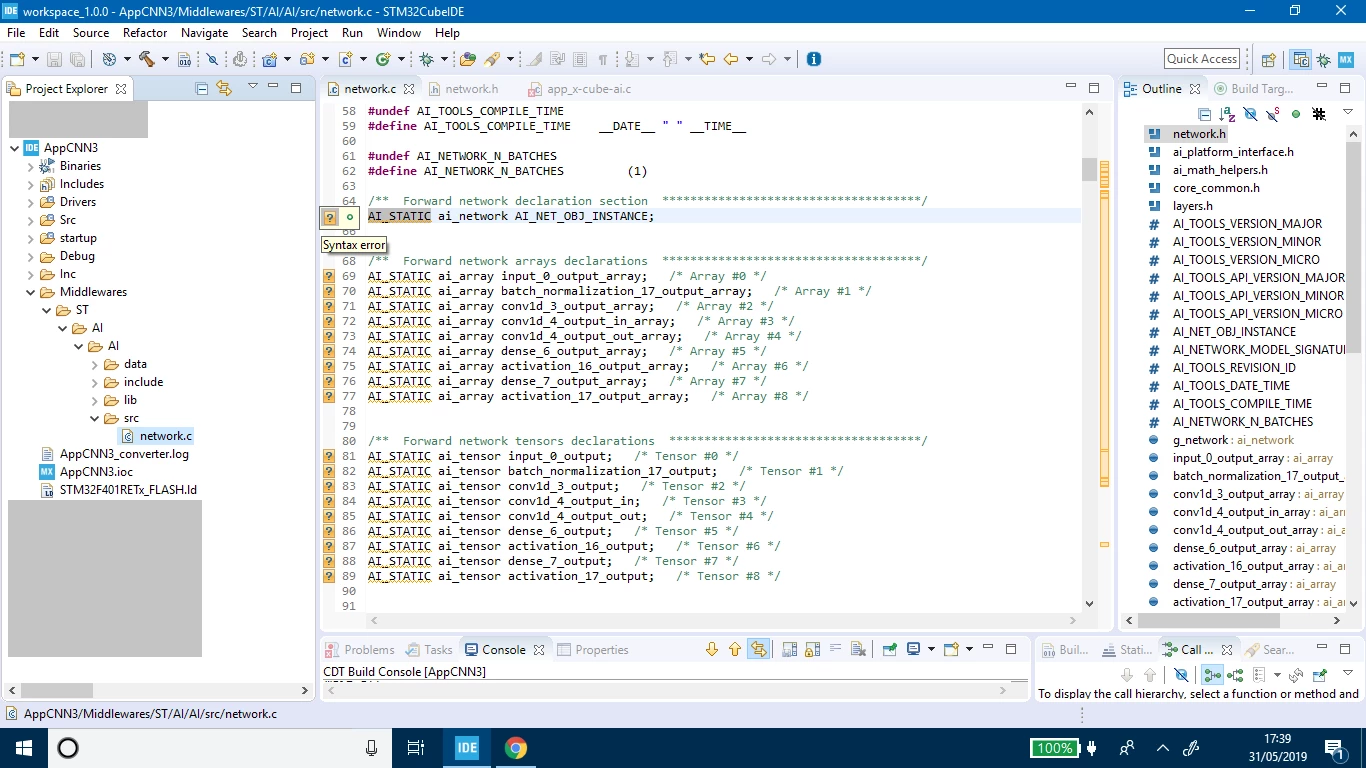
In fact looking in Middlewares/ST/AI/AI/src/network.c there are a lot of syntax errors, like if the variables defined in "network.h" wouldn't be considered, even with #include "network.h".

besides, calling a function that is defined in network.h, like ai_network_create for example, i get this error "Undefined reference to ai_network_create".

With validation template i haven't any problems, i can load the network and validate it both from pc that on the board.

here the blank project:

https://drive.google.com/open?id=1uMNyChclq7Rt7NMQVxcdyMxSpfZNgoHN

here some errors in network.c
0690X000008aHpfQAE.png

    This topic has been closed for replies.
    Best answer by Gzini.6

    i've solved

    the problem was in the code generation spec

    i had to select True studio as IDE, uncheck Generate under root and select copy only the necessary library files.

    in this way i was able to load and run an application template on my board without linker problems.

    instead for validation template generate under root must remain selected.

    2 replies

    fauvarque.daniel
    ST Employee
    June 3, 2019

    In the project properties can you verify that the include paths have been generated properly.

    You should have something like

    ../Inc

    ../Middlewares/ST/AI/AI/include

    ../Middlewares/ST/AI/AI/data

    then the regular HAL and CMSIS includes

    Regards

    ​In order to give better visibility on the answered topics, please click on 'Accept as Solution' on the reply which solved your issue or answered your question.
    Gzini.6
    Gzini.6AuthorAnswer
    Associate II
    June 4, 2019

    i've solved

    the problem was in the code generation spec

    i had to select True studio as IDE, uncheck Generate under root and select copy only the necessary library files.

    in this way i was able to load and run an application template on my board without linker problems.

    instead for validation template generate under root must remain selected.