
Question
SPWF01SA firmware update issue
Posted on October 17, 2016 at 10:59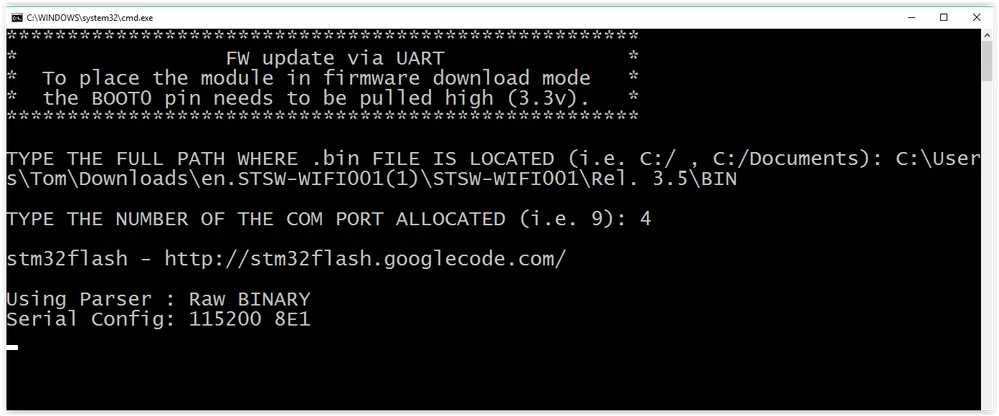 Any pointers on either method? Here are my AT&V and AT+S.STS♯ Dumping All Configuration Keys:<CR><LF> ♯ nv_manuf = ST<CR><LF> ♯ nv_model = SPWF01SA1<CR><LF> ♯ nv_serial = 3514D37752<CR><LF> ♯ nv_wifi_macaddr = 00:80:E1:B4:A4:F1<CR><LF> ♯ blink_led = 0<CR><LF> ♯ wind_off_low = 0x00000000<CR><LF> ♯ wind_off_medium = 0x00000000<CR><LF> ♯ wind_off_high = 0x00000000<CR><LF> ♯ user_desc = anonymous<CR><LF> ♯ escape_seq = at+s.<CR><LF> ♯ localecho1 = 0<CR><LF> ♯ console1_speed = 115200<CR><LF> ♯ console1_hwfc = 0<CR><LF> ♯ console1_enabled = 1<CR><LF> ♯ sleep_enabled = 0<CR><LF> ♯ standby_enabled = 0<CR><LF> ♯ standby_time = 10<CR><LF> ♯ wifi_tx_msdu_lifetime = 0<CR><LF> ♯ wifi_rx_msdu_lifetime = 0<CR><LF> ♯ wifi_operational_mode = 0x00000011<CR><LF> ♯ wifi_beacon_wakeup = 1<CR><LF> ♯ wifi_beacon_interval = 100<CR><LF> ♯ wifi_listen_interval = 0<CR><LF> ♯ wifi_rts_threshold = 3000<CR><LF> ♯ wifi_ssid = 42:54:48:75:62:33:2D:57:52:48:38:00:00:00:00:00:00:00:00:00:00:00:00:00:00:00:00:00:00:00:00:00<CR><LF> ♯ wifi_ssid_len = 11<CR><LF> ♯ wifi_channelnum = 6<CR><LF> ♯ wifi_opr_rate_mask = 0x00003FCF<CR><LF> ♯ wifi_bas_rate_mask = 0x0000000F<CR><LF> ♯ wifi_mode = 1<CR><LF> ♯ wifi_auth_type = 0<CR><LF> ♯ wifi_atim_window = 0<CR><LF> ♯ wifi_powersave = 0<CR><LF> ♯ wifi_tx_power = 18<CR><LF> ♯ wifi_rssi_thresh = 0<CR><LF> ♯ wifi_rssi_hyst = 0<CR><LF> ♯ wifi_ap_idle_timeout = 120<CR><LF> ♯ wifi_beacon_loss_thresh = 10<CR><LF> ♯ wifi_priv_mode = 2<CR><LF> ♯ wifi_wep_keys[0] = 12:34:56:78:90:5C:40:00:00:00:00:00:00:00:00:00<CR><LF> ♯ wifi_wep_keys[1] = 00:00:00:00:00:00:00:00:00:00:00:00:00:00:00:00<CR><LF> ♯ wifi_wep_keys[2] = 00:00:00:00:00:00:00:00:00:00:00:00:00:00:00:00<CR><LF> ♯ wifi_wep_keys[3] = 00:00:00:00:00:00:00:00:00:00:00:00:00:00:00:00<CR><LF> ♯ wifi_wep_key_lens = 05:00:00:00<CR><LF> ♯ wifi_wep_default_key = 0<CR><LF> ♯ wifi_wpa_psk_raw = XXXXXXXXX<CR><LF> ♯ wifi_wpa_psk_text = XXXXXXXXX<CR><LF> ♯ ip_use_dhcp = 1<CR><LF> ♯ ip_use_httpd = 1<CR><LF> ♯ ip_mtu = 1500<CR><LF> ♯ ip_hostname = embeddedbrd<CR><LF> ♯ ip_apdomainname = captiveportal.net<CR><LF> ♯ ip_ipaddr = 255.255.255.255<CR><LF> ♯ ip_netmask = 255.255.255.255<CR><LF> ♯ ip_gw = 255.255.255.255<CR><LF> ♯ ip_dns = 255.255.255.255<CR><LF> ♯ ip_http_get_recv_timeout = 3000<CR><LF> ♯ ip_dhcp_timeout = 20<CR><LF> ♯ ip_sockd_timeout = 250<CR><LF>♯ Status & Statistics:<CR><LF> ♯ version = 141106-0950875-SPWF01S <CR><LF> ♯ reset_reason = 0<CR><LF> ♯ conf_flag = 5<CR><LF> ♯ system_uptime = 3017<CR><LF> ♯ system_sleeptime = 0<CR><LF> ♯ gpio_enable = 0<CR><LF> ♯ captiveportal = 0<CR><LF> ♯ wifi_state = 10<CR><LF> ♯ wifi_bssid = 00:01:3B:9F:1A:82<CR><LF> ♯ wifi_aid = 2<CR><LF> ♯ wifi_channelnum = 11<CR><LF> ♯ wifi_sup_rate_mask = 0x003FFFCF<CR><LF> ♯ wifi_bas_rate_mask = 0x0000000F<CR><LF> ♯ wifi_chan_activity2 = 0x00003FFF<CR><LF> ♯ wifi_max_tx_power = 18<CR><LF> ♯ wifi_reg_country = GB <CR><LF> ♯ wifi_dtim_period = 3<CR><LF> ♯ wifi_sleeping = 1<CR><LF> ♯ wifi_num_assoc = 0<CR><LF> ♯ ip_ipaddr = 192.168.1.94<CR><LF> ♯ ip_netmask = 255.255.255.0<CR><LF> ♯ ip_gw = 192.168.1.254<CR><LF> ♯ ip_dns = 192.168.1.254<CR><LF> ♯ ip_sock_open = 0<CR><LF> ♯ ip_sockd_port = 0<CR><LF> ♯ free_heap = 20752<CR><LF> ♯ min_heap = 20008<CR><LF> ♯ current_time = 3017<CR><LF> #spwf01sa #ota
Hi,
I am working on win10 using the STEVAL-IDW001V1 Evaluation module. Application development has been fine, but now I would like to update the firmware to the latest to use the extra features. I have tried both the UART bootloader method and the AT command OTA using Apache server and both have their own problems. I reverted to trying the UART method because I could not get the OTA method to work.OTA Method - I am not able to tell whether my module is *.11 or *.21
1. Connect module to Wifi network 2. Start Apache 2.4 server on PC (also connected to same network) 3. Confirm server running by opening browser 127.0.0.1 4. Place .ota file in htdocs folder of the server 5. Use AT+S.FWUPDATE=127.0.0.1,/SPWF01S-160129-c5bf5ce-RELEASE-main.ota What returns is: ERROR: connect() failed, aborting<CR><LF>
UART Method
1. Place J4 so BOOT 0 is high. 2. HW reset the module 3. Run the FW_update.bat 4. I make the on screen selection as follows, but it hangs here
Any pointers on either method? Here are my AT&V and AT+S.STS♯ Dumping All Configuration Keys:<CR><LF> ♯ nv_manuf = ST<CR><LF> ♯ nv_model = SPWF01SA1<CR><LF> ♯ nv_serial = 3514D37752<CR><LF> ♯ nv_wifi_macaddr = 00:80:E1:B4:A4:F1<CR><LF> ♯ blink_led = 0<CR><LF> ♯ wind_off_low = 0x00000000<CR><LF> ♯ wind_off_medium = 0x00000000<CR><LF> ♯ wind_off_high = 0x00000000<CR><LF> ♯ user_desc = anonymous<CR><LF> ♯ escape_seq = at+s.<CR><LF> ♯ localecho1 = 0<CR><LF> ♯ console1_speed = 115200<CR><LF> ♯ console1_hwfc = 0<CR><LF> ♯ console1_enabled = 1<CR><LF> ♯ sleep_enabled = 0<CR><LF> ♯ standby_enabled = 0<CR><LF> ♯ standby_time = 10<CR><LF> ♯ wifi_tx_msdu_lifetime = 0<CR><LF> ♯ wifi_rx_msdu_lifetime = 0<CR><LF> ♯ wifi_operational_mode = 0x00000011<CR><LF> ♯ wifi_beacon_wakeup = 1<CR><LF> ♯ wifi_beacon_interval = 100<CR><LF> ♯ wifi_listen_interval = 0<CR><LF> ♯ wifi_rts_threshold = 3000<CR><LF> ♯ wifi_ssid = 42:54:48:75:62:33:2D:57:52:48:38:00:00:00:00:00:00:00:00:00:00:00:00:00:00:00:00:00:00:00:00:00<CR><LF> ♯ wifi_ssid_len = 11<CR><LF> ♯ wifi_channelnum = 6<CR><LF> ♯ wifi_opr_rate_mask = 0x00003FCF<CR><LF> ♯ wifi_bas_rate_mask = 0x0000000F<CR><LF> ♯ wifi_mode = 1<CR><LF> ♯ wifi_auth_type = 0<CR><LF> ♯ wifi_atim_window = 0<CR><LF> ♯ wifi_powersave = 0<CR><LF> ♯ wifi_tx_power = 18<CR><LF> ♯ wifi_rssi_thresh = 0<CR><LF> ♯ wifi_rssi_hyst = 0<CR><LF> ♯ wifi_ap_idle_timeout = 120<CR><LF> ♯ wifi_beacon_loss_thresh = 10<CR><LF> ♯ wifi_priv_mode = 2<CR><LF> ♯ wifi_wep_keys[0] = 12:34:56:78:90:5C:40:00:00:00:00:00:00:00:00:00<CR><LF> ♯ wifi_wep_keys[1] = 00:00:00:00:00:00:00:00:00:00:00:00:00:00:00:00<CR><LF> ♯ wifi_wep_keys[2] = 00:00:00:00:00:00:00:00:00:00:00:00:00:00:00:00<CR><LF> ♯ wifi_wep_keys[3] = 00:00:00:00:00:00:00:00:00:00:00:00:00:00:00:00<CR><LF> ♯ wifi_wep_key_lens = 05:00:00:00<CR><LF> ♯ wifi_wep_default_key = 0<CR><LF> ♯ wifi_wpa_psk_raw = XXXXXXXXX<CR><LF> ♯ wifi_wpa_psk_text = XXXXXXXXX<CR><LF> ♯ ip_use_dhcp = 1<CR><LF> ♯ ip_use_httpd = 1<CR><LF> ♯ ip_mtu = 1500<CR><LF> ♯ ip_hostname = embeddedbrd<CR><LF> ♯ ip_apdomainname = captiveportal.net<CR><LF> ♯ ip_ipaddr = 255.255.255.255<CR><LF> ♯ ip_netmask = 255.255.255.255<CR><LF> ♯ ip_gw = 255.255.255.255<CR><LF> ♯ ip_dns = 255.255.255.255<CR><LF> ♯ ip_http_get_recv_timeout = 3000<CR><LF> ♯ ip_dhcp_timeout = 20<CR><LF> ♯ ip_sockd_timeout = 250<CR><LF>♯ Status & Statistics:<CR><LF> ♯ version = 141106-0950875-SPWF01S <CR><LF> ♯ reset_reason = 0<CR><LF> ♯ conf_flag = 5<CR><LF> ♯ system_uptime = 3017<CR><LF> ♯ system_sleeptime = 0<CR><LF> ♯ gpio_enable = 0<CR><LF> ♯ captiveportal = 0<CR><LF> ♯ wifi_state = 10<CR><LF> ♯ wifi_bssid = 00:01:3B:9F:1A:82<CR><LF> ♯ wifi_aid = 2<CR><LF> ♯ wifi_channelnum = 11<CR><LF> ♯ wifi_sup_rate_mask = 0x003FFFCF<CR><LF> ♯ wifi_bas_rate_mask = 0x0000000F<CR><LF> ♯ wifi_chan_activity2 = 0x00003FFF<CR><LF> ♯ wifi_max_tx_power = 18<CR><LF> ♯ wifi_reg_country = GB <CR><LF> ♯ wifi_dtim_period = 3<CR><LF> ♯ wifi_sleeping = 1<CR><LF> ♯ wifi_num_assoc = 0<CR><LF> ♯ ip_ipaddr = 192.168.1.94<CR><LF> ♯ ip_netmask = 255.255.255.0<CR><LF> ♯ ip_gw = 192.168.1.254<CR><LF> ♯ ip_dns = 192.168.1.254<CR><LF> ♯ ip_sock_open = 0<CR><LF> ♯ ip_sockd_port = 0<CR><LF> ♯ free_heap = 20752<CR><LF> ♯ min_heap = 20008<CR><LF> ♯ current_time = 3017<CR><LF> #spwf01sa #ota