Dave Nadler
Senior III
October 24, 2018
Question

Atollic bugs: Convert to C++ (add C++ nature) fails to add C++ language to #Symbols tab

  • October 24, 2018
  • 14 replies
  • 7015 views

Atollic TrueSTUDIO® for STM32, Built on Eclipse Neon.1a.

Version: 9.1.0

Build id: 20181011-1241

Added C++ nature to a working C project.

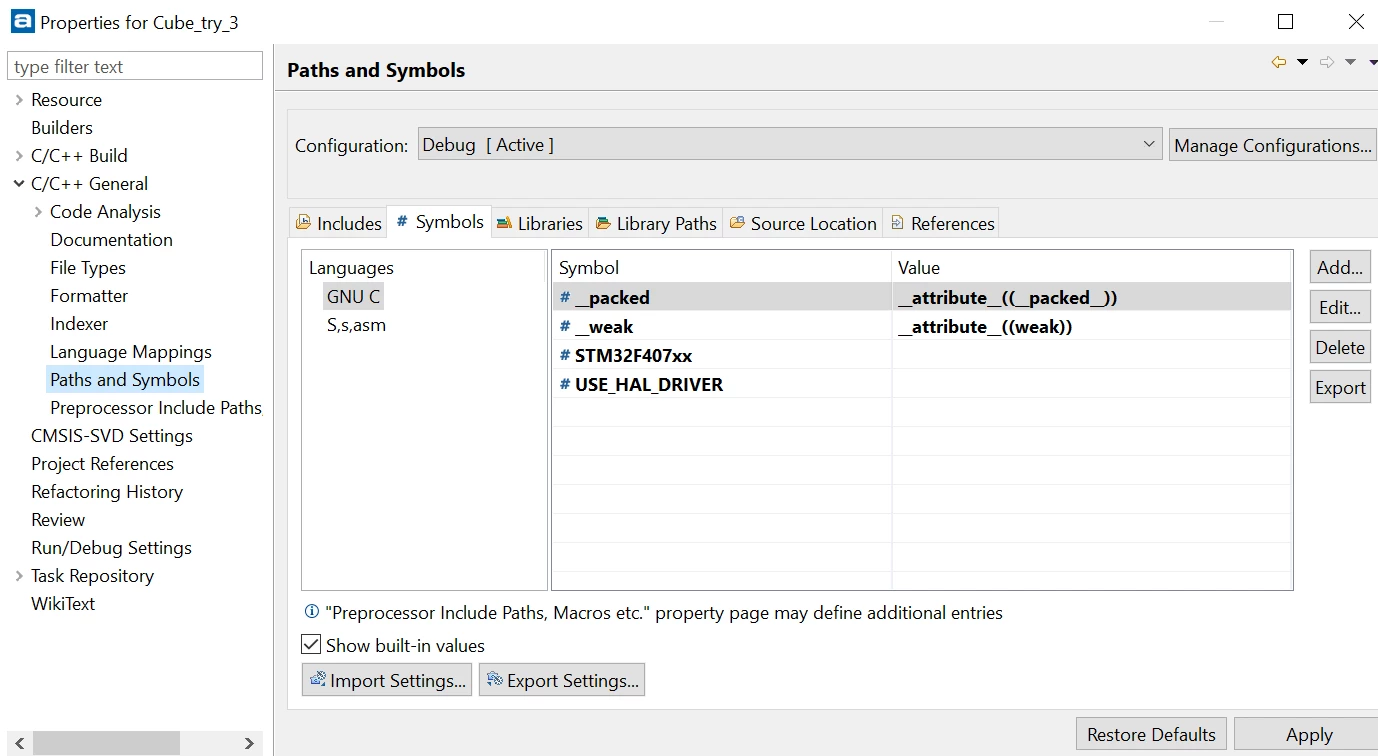
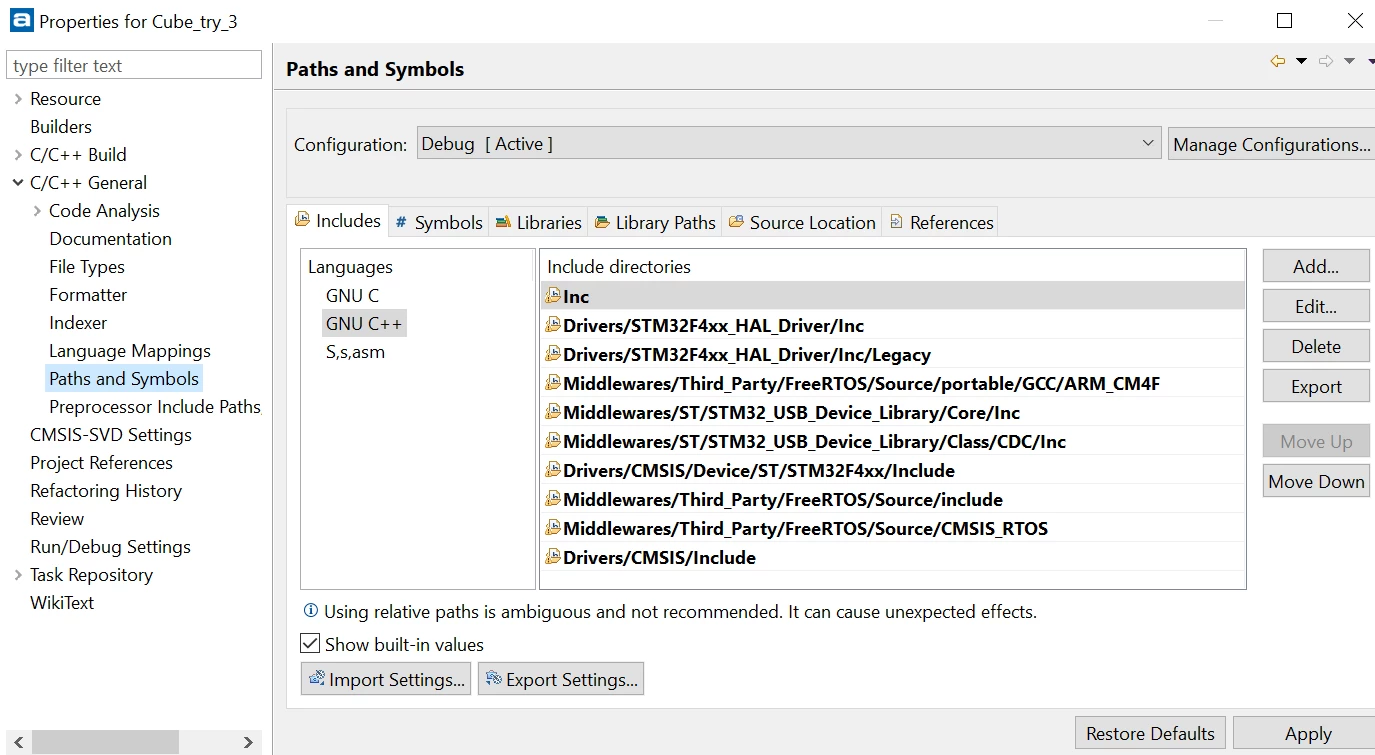
Serious Bug 1: In Properties -> C/C++ General -> Paths and Symbols:

The Includes tab has added GNU C++ in the Languages column as it should.

Bug: In the # Symbols tab, GNU C++ is not added in the Languages column.

The additional language should be added, and initial values copied from the C language.

Extremely Annoying Bug 2: In Properties -> C/C++ General -> Paths and Symbols:

The Includes tab has added GNU C++ in the Languages column as it should.

Unfortunately, it is blank, where it should be initialized to a copy of the C language settings.

User has to copy and paste the entire list! Please fix initialization...

How do I work around bug 1?

Thanks!
0690X000006CFTBQA4.png

0690X000006CFTLQA4.png

This topic has been closed for replies.

14 replies

Dave Nadler
Senior III
January 14, 2019

@Markus GIRDLAND​ - Any update? 3 months since this bug was reported...

Thanks!

Best Regards, Dave

Markus GIRDLAND
ST Employee
January 15, 2019

Nothing as of yet. It's up to the development team which tickets they prioritize.

Markus GIRDLAND
ST Employee
January 15, 2019

I should probably add that as a workaround you can still use Properties -> C/C++ Build -> Settings -> Tool Settings -> Copy C compiler Symbols and paste to C++ compiler Symbols.

This has the same functionality and appears unaffected by the way the CubeMX projects are generated.

Dave Nadler
Senior III
January 15, 2019

@Markus GIRDLAND​ - "...as a workaround you can still use Properties -> C/C++ Build -> Settings -> Tool Settings -> Copy C compiler Symbols and paste to C++ compiler Symbols" is absolutely incorrect.

The reason this is a serious bug is the C++ compiler options are not shown at all (only C and assembler are shown).

There is no place to insert the settings.

Please see the original post pictures if you're not clear on this.

And for heaven's sake, let's get this fixed! 3 months already!!

Thanks,

Best Regards, Dave

Dave Nadler
Senior III
February 25, 2019

@Markus GIRDLAND​ , @Imen DAHMEN​ - 4 months now.

When is this going to be fixed?

Thanks!

Best Regards, Dave

Markus GIRDLAND
ST Employee
February 26, 2019

Hey Dave,

We have not had full resources working on TrueSTUDIO so we had to prioritize the most blocking bugs and this ticket has not been on top of the priority list.

The reason for the limitation in resources (which I can finally mention due to it being Embedded Worlds first day) is that we're working on a new tool, STM32CubeIDE, and most of our resources are going to that project.

POsyp
Visitor II
March 27, 2019

I had the same problem. After installing new version CubeMX conversation works.

Dave Nadler
Senior III
March 27, 2019

@POsyp​ - what version of Atollic and version of CubeMX???

On 4-March I received the following email from ST:

"As I mentioned previously, the Atollic group is aware of the problem, unfortunately, there is no timeline for when it will be addressed at this time. If this is a blocking point for you, I would suggest to consider using a different IDE from a 3rd party (IAR, Keil, etc). Keep in mind that we provide free tools as a courtesy but the customer is not forced to use these, and at times, we refer them to 3rd party partners when more capability than is currently offered, free of charge, is required. "

Lots of excuses, no fix coming on 5 months ;-(

Thanks,

Best Regards, Dave