
Dave Nadler
Senior III
December 6, 2018
Question

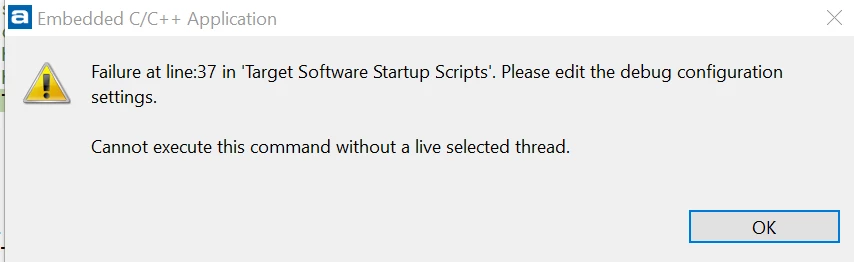
Atollic debug: Failure at line:37 in 'Target Software Startup Scripts'

  • December 6, 2018
  • 2 replies
  • 1764 views

I'm using Atollic 9.1 with a Cube-generated project on F413 Nucleus board. When I debug (clicking on green bug icon), I get a message that debug failed, with debug context stopped wherever it stopped in the previous debug session. If I click on the green 'continue' arrow, debugging then stops at the breakpoint in 'main' as expected. What's going on? Did not see this problem with the previous project using F407 (F4 Discovery board). Here's the error it pops:
0690X000006ClF6QAK.png

This topic has been closed for replies.

2 replies

stikla
Visitor II
December 11, 2018

In Atollic, go to Run->Debug Configurations

Under Embedded C/C++ Applications choose your debug configuration, then go to

Startup Scripts->Target Software Startup Scripts

There you will find script that looks like this.

Find line 37, and

  • correct line (if you know what is wrong), or
  • comment out line (with #, if you do not know what is wrong)

0690X000006CnKXQA0.png

Dave Nadler
Senior III
January 18, 2019

@stikla​ - Unfortunately it is failing on the "continue" (with error: cannot execute this command without a live selected thread). This seems to be a well-known problem at least for Segger users, and there seem to be some GDB patches related to the problem. Erich recommended adding a wait, but that didn't work. Any other ideas? Thanks!