
zedeg
Associate III
December 4, 2018
Solved

Can't compile any HAL/Cube project

  • December 4, 2018
  • 4 replies
  • 1919 views

Hello everyone. I facing next problem:

Just yesterday, TrueStudio worked perfectly, but program lost its lost capability to compile anything (not older project, that I compiled nicely till yesterdey, not new, CubeMX-generated projects).

I'm getting build output just like on attached screenshot with every project.

Also, I've got one of compile outputs, that consisted of messages like this: junk at end of line, first unrecognized character is '*'

Only thing I could tie to what's happend, is that I've installed ASAP Excel utility, BUT I've DELETED it already, REINSTALLED TrueStudio, and getting same result.

Also, CubeMX has updated it's libs today, but since older projects don't work as well, I don't suppose that it's him...

No one beside's me didn't touched computer, so I'm pretty sure, that no preferences was changed manually.

Any help/hints, what could it be? Thank you.

Truestudio 32bit

Version: 9.1.0

Build id: 20181011-1241
This topic has been closed for replies.
Best answer by zedeg

SO, OK, I've found a solution

Somehow, TrueStudio's workspace have been glitched.

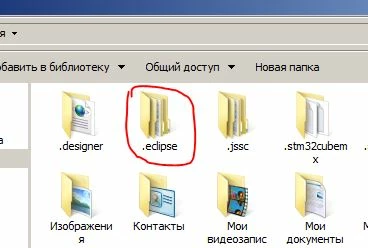
I've deleted .eclipse folder in my Users directory,

0690X000006CiX2QAK.jpg

and Studio compile everything just right, now.

As for CubeMX project, that all is started with - it still generates same issue, yet it don't crush down compiler for every project any more.

4 replies

AvaTar
Senior III
December 4, 2018

I would guess your ... Excel tool messed up some registry entries or system variables Truestudio is relying upon.

> BUT I've DELETED it already, REINSTALLED TrueStudio, and getting same result.

That points to the registry, Windows' (TM) most famous Single-Point-Of-Failure (TM).

I would try a registry cleaner, there are several good freeware apps around.

zedeg
zedegAuthor
Associate III
December 4, 2018

So yes, I've tried it: Installed CCleaner, uninstalled TrueStudio, rebooted, installed TrueStudio again... Still same output

After Forever
Senior III
December 4, 2018

Is that the only type of error you are getting? Try to include the <stdint.h> header in your *.c files before including cmsis headers.

zedeg
zedegAuthor
Associate III
December 4, 2018

It's only type of error I see in build output, however... First error True Studio highlights in code

editor to me is:

#else

 #error "Define according the used Cortex core ARM_MATH_CM7, ARM_MATH_CM4, ARM_MATH_CM3, ARM_MATH_CM0PLUS or ARM_MATH_CM0"

#endif​

I Guess, that ARM_MATH is somehow undefined, but where can I define it for project (in Keil it's posible in project's properties).

Including <stdint.h> seems not possible to me, since CubeMX projects are too big, and I can't search for every use of cmsis libs.

Tesla DeLorean
Guru
December 4, 2018

Check also Environment Variables

Try creating another User instance on the machine and install and test in that.

Watch also for AV software playing interference. ​

Tips, Buy me a coffee, or three.. PayPal VenmoUp vote any posts that you find helpful, it shows what's working..
zedeg
zedegAuthorAnswer
Associate III
December 4, 2018

SO, OK, I've found a solution

Somehow, TrueStudio's workspace have been glitched.

I've deleted .eclipse folder in my Users directory,

0690X000006CiX2QAK.jpg

and Studio compile everything just right, now.

As for CubeMX project, that all is started with - it still generates same issue, yet it don't crush down compiler for every project any more.