
Spectramax
Associate II
September 21, 2018
Solved

Connecting STM32 NUCLEO board to an external debugger (ARM Keil ULinkPlus)?

  • September 21, 2018
  • 9 replies
  • 7548 views

Hello,

I'm following this guide (https://mcuoneclipse.com/2015/08/22/debugging-stm32f103rb-nucleo-board-with-with-segger-j-link/)

The board I am using is NUCLEO-L4R5ZI. I've connected the following pins to the 10-pin ARM connector:
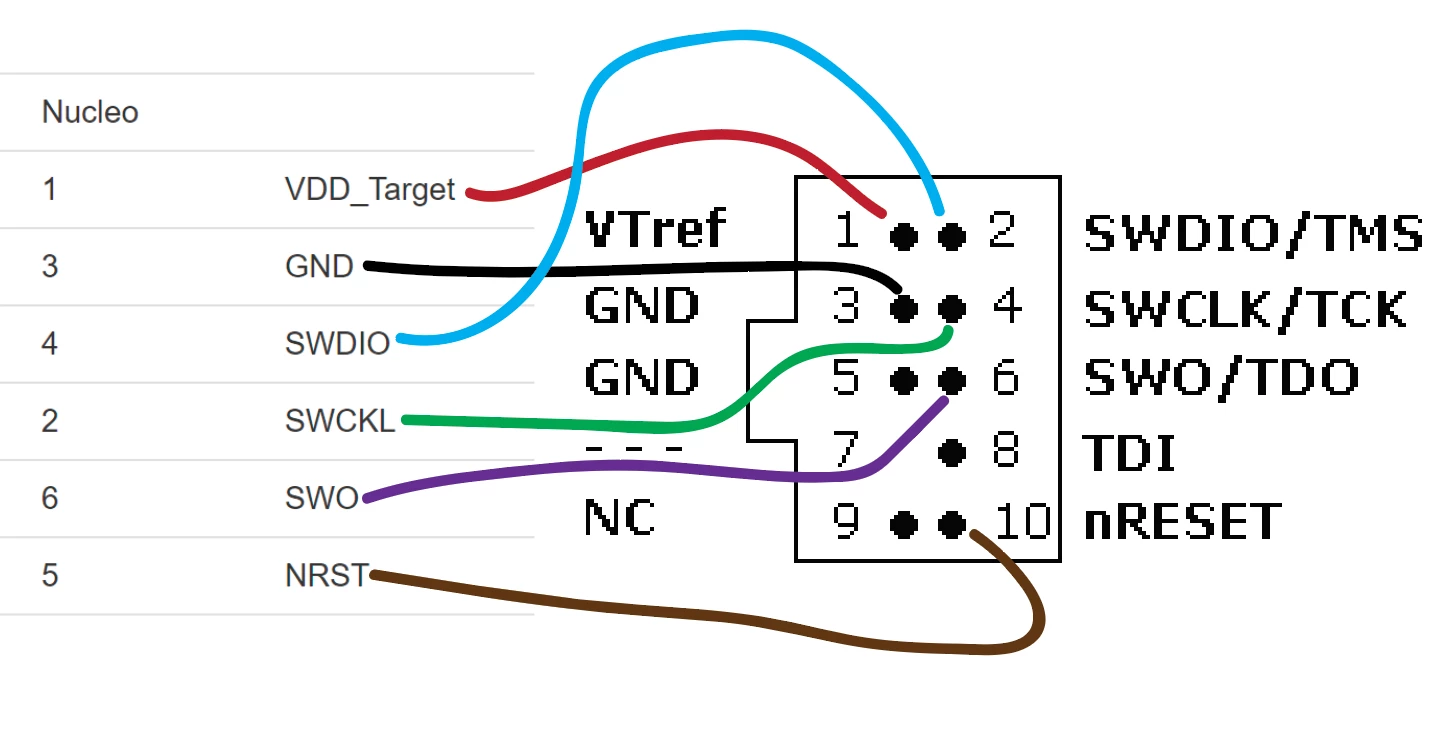
 0690X000006C3jZQAS.png

I've also tied the VDD_Target/VTref pin to 3.3V.

When I launch Keil uVision5, I go to Project options and select the debugger. I am getting a "RDDI-DAP Error".
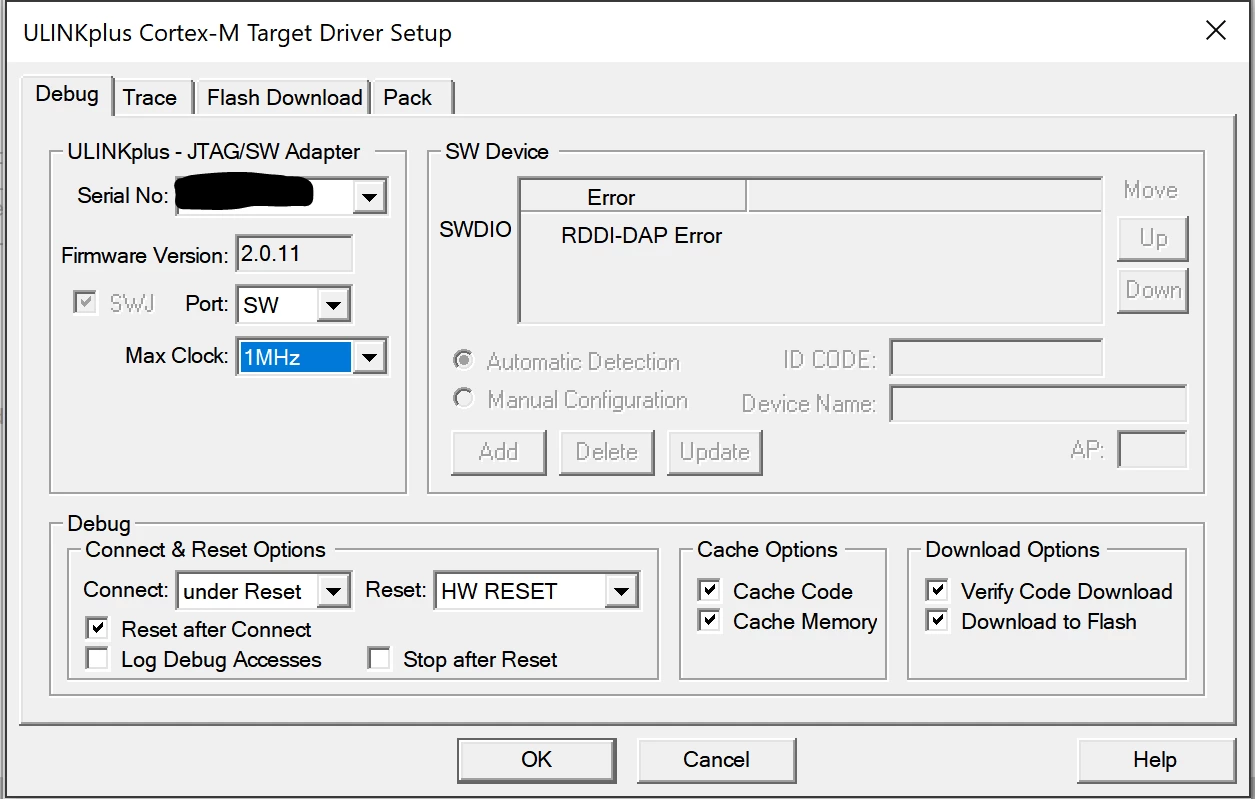
0690X000006C3jyQAC.png

Please do not suggest I use the built in ST-LinkV2 debugger as a solution.

Thank you for your help!
This topic has been closed for replies.
Best answer by Spectramax

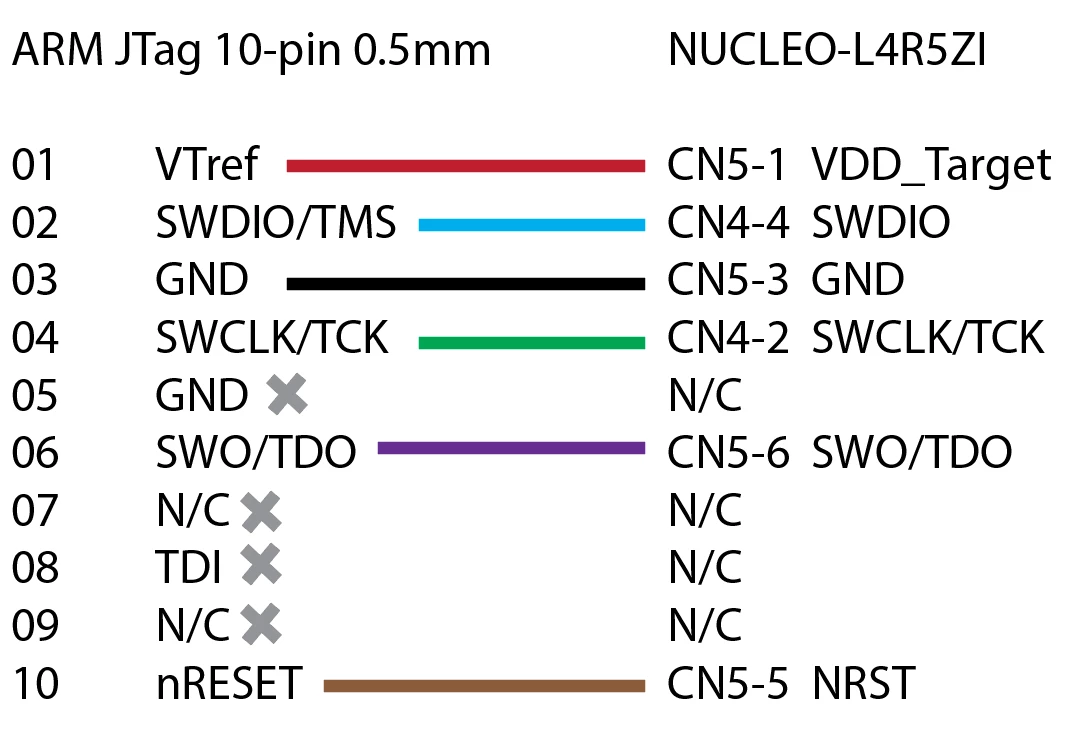
0690X000006C4DzQAK.png@Community member​ No, I think it is correct. Anyhow, I also swapped them and no luck. Here is a cleaner pinout and connections.

Is there a problem with CMSIS-DAP compatibility? I am curious why this won't work :(

9 replies

AvaTar
Senior III
September 21, 2018

> Please do not suggest I use the built in ST-LinkV2 debugger as a solution.

Why not ...?

Have you verified that all SWD connections from the target to the ST-Link are really separated ?

How long are the cables ?

And using the internal ST-Link, have you verified the target works fine ?

Tesla DeLorean
Guru
September 21, 2018

Don't use that connection for SWDIO and SWCLK, go in via the target side of the jumper pins.​

Tips, Buy me a coffee, or three.. PayPal VenmoUp vote any posts that you find helpful, it shows what's working..
Spectramax
Associate II
September 21, 2018

Thanks. I have already checked that the Target is working well with the built in ST Link.

@Clive Two.Zero : I will try this out and report back!

Tesla DeLorean
Guru
September 21, 2018

Specifically CN4, the lower pin on each pair connects to Target SWCLK (NORTH), SWDIO (SOUTH)

0690X000006C4A1QAK.jpg

Tips, Buy me a coffee, or three.. PayPal VenmoUp vote any posts that you find helpful, it shows what's working..
Spectramax
Associate II
September 21, 2018

I just connected the SWDIO and SWCLK to the target side through CN4 with the rest of the stuff still in the CN5 connector.

I also have another board NUCLEO-F030R8 with the Stlink portion of the board snapped off. Perhaps I should try connecting directly without the STlink MCU messing up the signals?

Still no luck :( here is the pic:

Tesla DeLorean
Guru
September 21, 2018

You seem to have 2 and 4 switched in your picture vs your chart 2=SWCLK, 4=SWDIO, would me easier if you'd draw them in numeric/pin order

Tips, Buy me a coffee, or three.. PayPal VenmoUp vote any posts that you find helpful, it shows what's working..
Spectramax
SpectramaxAuthorAnswer
Associate II
September 21, 2018

0690X000006C4DzQAK.png@Community member​ No, I think it is correct. Anyhow, I also swapped them and no luck. Here is a cleaner pinout and connections.

Is there a problem with CMSIS-DAP compatibility? I am curious why this won't work :(

Spectramax
Associate II
September 21, 2018

0690X000006C4E9QAK.jpgLooks like I might have found the problem. The 10-pin fanout cable's pin 1 (Red wire) is not on the same side as the 10-pin socket on the ARM UlinkPlus debugger.

Here is a picture of how the cable connects to the socket.

Spectramax
Associate II
September 21, 2018

Yep, that was indeed the problem. I am now able to connect.

Anyone who is reading this thread in the future, please use the diagram above to connect to your STM32 Nucleo board and Ulink/Ulink2 or UlinkPlus debuggers from ARM Keil.

Everything is working great. Thanks for the help from @Community member​ and @Community member​ .

FYI - The reason why I'd like to use the ARM UlinkPlus debugger is first of all, I paid $700 for this so I might as well use it for faster flashing and debugging. It had trace functionality as well as power metrics, discrete IO for production testing. It is a great little ******!

Closing this thread, thanks.