Manuel Illueca
Associate II
May 24, 2018
Solved

Error when updating project configuration from Cube to Workbench

  • May 24, 2018
  • 1 reply
  • 2359 views
Posted on May 24, 2018 at 20:06

Hi there,

I've been working with eclipse-workbench for half a year now, creating my projects from STM32Cube tab inside eclipse and exporting them to eclipse. Until now everything was working fine, I could edit the .ioc file and update the configuration to eclipse without any problem.

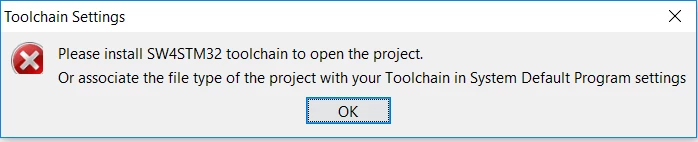
Don't know why, but since today, when I try to create a new project or edit the ones already were working, I have the following error:

0690X0000060BMgQAM.png

''Please install SW4STM32 toolchain to open the project.

Or associate the file type of the project with you Toolchain in System Default Program Settings''

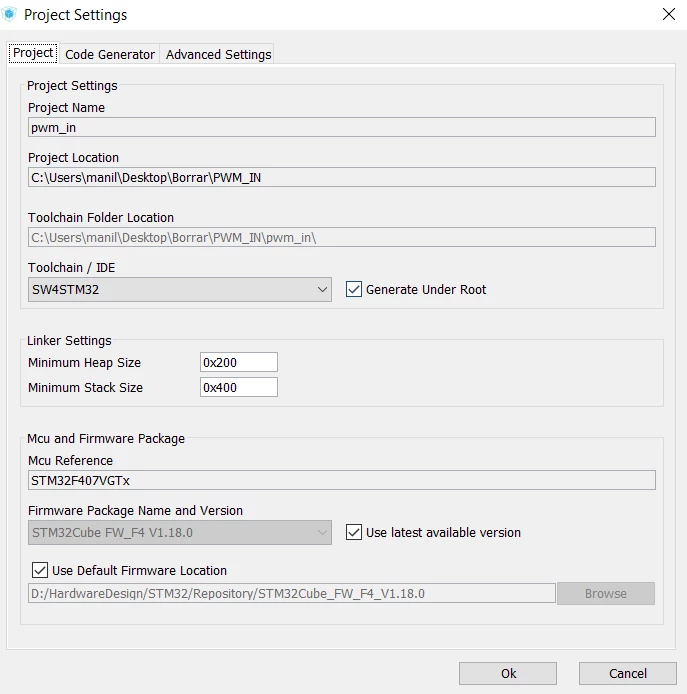
0690X0000060BMhQAM.png

Any clue how to solve it?

Thanks

#stm32 #workbench #error #eclipse
This topic has been closed for replies.
Best answer by Manuel Illueca
Posted on May 27, 2018 at 15:40

Hi,

I installed latest version of CUBE with no succeed. I've installed  â€œSystem Workbench for STM32â€� again, keeping the previous installation (now I have 2 Workbenchs) and both are working now, so I'm going to keep it.

1 reply

Nesrine M_O
Associate
May 25, 2018
Posted on May 25, 2018 at 11:56

Hi

maniljo

,

Do you face the issue with the latest version of CUBEMX (4.1)?

-Nesrine-

Manuel Illueca
Associate II
May 25, 2018
Posted on May 25, 2018 at 12:17

Hi

ELMHIRI.Syrine

Thanks for you answer. Right now I'm not in front of my computer, but pretty sure is above 4.

I've been using Workbench/CUBEMX oftenly for almost a year and it worked perfectly.

Quite extrange problem since it is reproduced on the projects that previously worked fine.

Nesrine M_O
Associate
May 25, 2018
Posted on May 25, 2018 at 12:56

Hi

maniljo

,

Please try to use the latest version and tel us if the issue still again.

-Nesrine-