kent gu
Associate III
November 29, 2017
Solved

how to use st-LINK v2 in Ac6 System Workbench for STM32 environment?

  • November 29, 2017
  • 3 replies
  • 2240 views
Posted on November 29, 2017 at 10:00

Hi?

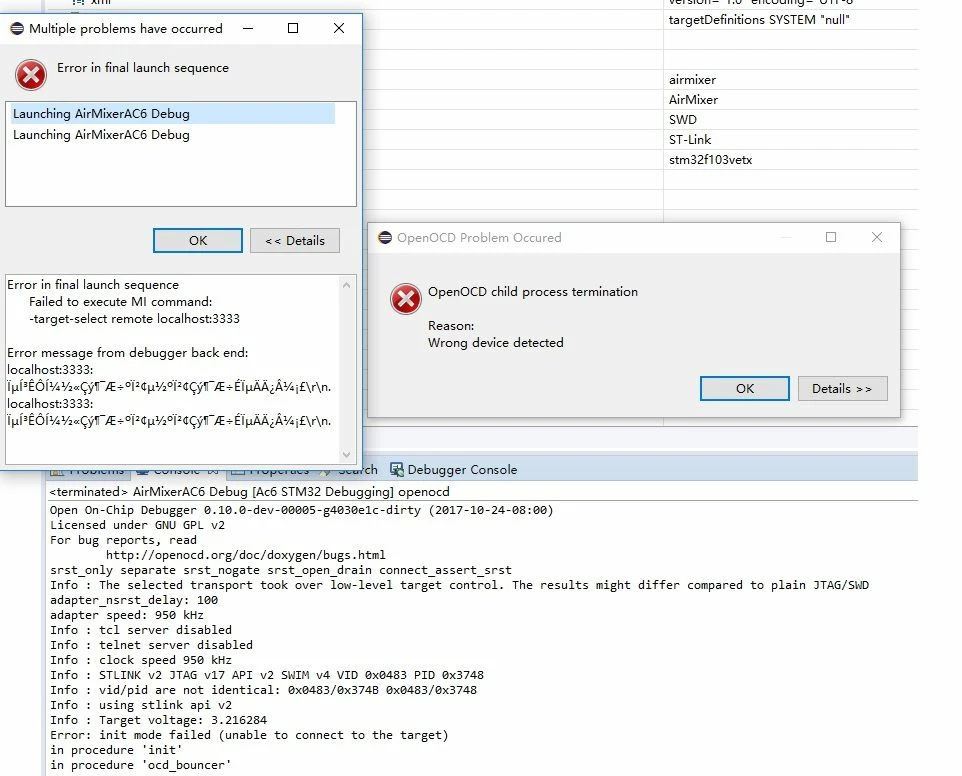
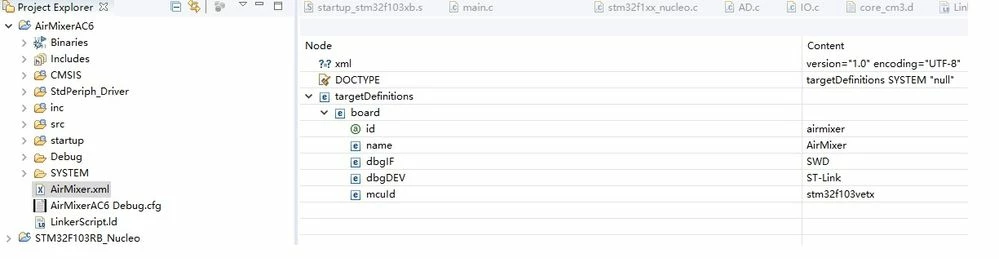
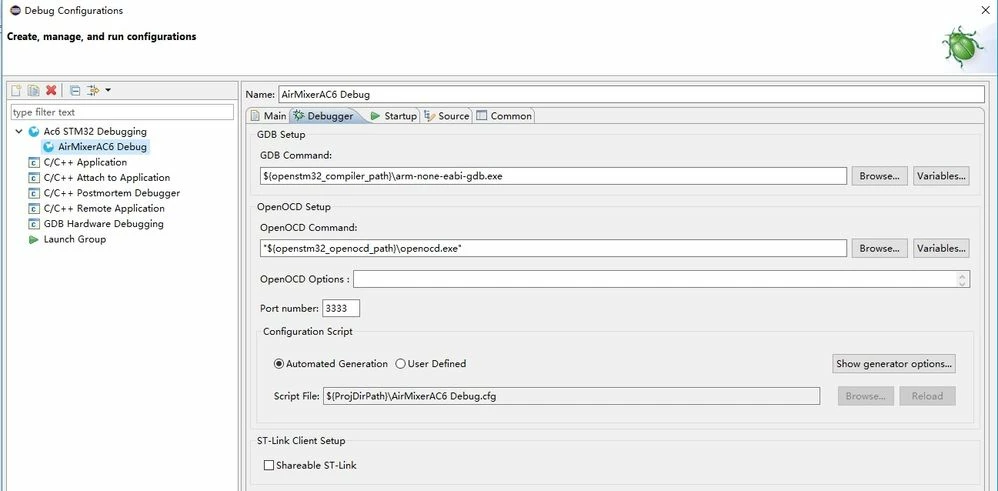
 Now I try to use ST-link V2 to debug in AC3 System Workbench, but can't  debug.  0690X00000604F4QAI.jpg0690X00000604FEQAY.jpg0690X00000604F9QAI.jpg

Best Regards,

Kent

#system-workbench-ide #debug-stm32-using-st-link/v2
This topic has been closed for replies.
Best answer by LaurentL
Posted on November 30, 2017 at 10:33

Hi,

You can try to upgrade the STLink firmware first, you have JTAG v17 which is an old version.

You can do this with stlink upgrade tool available on st web site.

Then, for the debug, it is better to connect the Reset line comming from STlink to target mcu.

If you can't, use the 'software reset system' in SW4STM32 debug configuration (debugger tab and click 'show generator options').

Rgds,

Laurent

3 replies

kent gu
kent guAuthor
Associate III
November 30, 2017
Posted on November 30, 2017 at 05:58

0690X00000604HoQAI.jpg0690X00000604AoQAI.jpg0690X00000604HPQAY.jpg

Add more information, just DIO, CLK, GND connectioned between ST-link V2 and STM32F103 board. 

From the latest error, seems that just reset and halt issue, but I enable & disable Rest and Halt setting, the error is same.

Best Regards,

Kent

Tesla DeLorean
Guru
November 30, 2017
Posted on November 30, 2017 at 14:33

Need NRST connected for Reset connection options to function.

Tips, Buy me a coffee, or three.. PayPal VenmoUp vote any posts that you find helpful, it shows what's working..
LaurentL
ST Employee
November 30, 2017
Posted on November 30, 2017 at 14:43

Not really, the choice 'software system reset' is indeed not using the reset line.

But it is preferable to connect Reset line to avoid being blocked if using SWD pins as GPIOs or low power modes in your appli...

Or even if you want to use the Reset button on your Ide.

Rgds,

Laurent

To give better visibility on the answered topics, please click on Accept as Solution on the reply which solved your issue or answered your question.
LaurentL
LaurentLAnswer
ST Employee
November 30, 2017
Posted on November 30, 2017 at 10:33

Hi,

You can try to upgrade the STLink firmware first, you have JTAG v17 which is an old version.

You can do this with stlink upgrade tool available on st web site.

Then, for the debug, it is better to connect the Reset line comming from STlink to target mcu.

If you can't, use the 'software reset system' in SW4STM32 debug configuration (debugger tab and click 'show generator options').

Rgds,

Laurent

To give better visibility on the answered topics, please click on Accept as Solution on the reply which solved your issue or answered your question.
kent gu
kent guAuthor
Associate III
November 30, 2017
Posted on November 30, 2017 at 13:39

Laurent,

Do you means that update STJlink firmware using the below SW?0690X000006045UQAQ.jpg

Best Regards,

Kent

LaurentL
ST Employee
November 30, 2017
Posted on November 30, 2017 at 14:15

Hi,

You can use this way if the Stlink utility software is not too old.

I was refering to the appli stlink fw upgrade available here :

http://www.st.com/content/st_com/en/products/development-tools/software-development-tools/stm32-software-development-tools/stm32-programmers/stsw-link007.html

Rgds,

Laurent

To give better visibility on the answered topics, please click on Accept as Solution on the reply which solved your issue or answered your question.
dan239955_st
Associate
January 8, 2019

I have the same problem on a STM32F746BGT6. I updated the F/W on ST-Link/V2. And still can not debug my board. FRUSTRATING!