antonio rueda
Associate II
February 5, 2018
Question

PWM input from Simulink-> PWM output TIM1

  • February 5, 2018
  • 1 reply
  • 2453 views
Posted on February 05, 2018 at 22:08

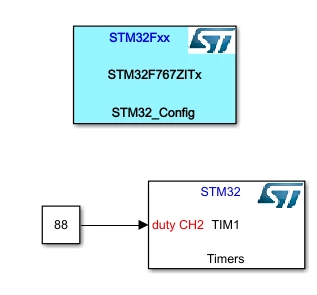
Hi, after some problems with the interface between Simulink and CubeMX, I've managed to get the TIM1 of the STM32F767ZIT working at a desired frequency and duty cycle using the next blocks:

0690X00000609cdQAA.png

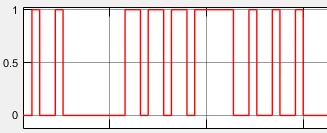
My question is, is there any way to input a PWM signal to modify the duty output of the timer instead of inputting the duty cycle to the TIM1 block as a constant? I need to use the next signal from Simulink for example to modify the duty of the TIM1.

0690X00000609bKQAQ.png

Thanks!

#stm32-mat/target-matlab #simulink #tim1 #tim-pwm #nucleo-stm32f7
This topic has been closed for replies.

1 reply

T J
Senior III
February 5, 2018
Posted on February 05, 2018 at 22:25

there are 2 classic timer functions:

input Capture :  Time Capture from a pin toggled externally

output Compare: Timed controlled output to a pin. ( PWM uses this style)

If you wanted to capture the timing of an external PWM, you could use the input capture method.

You can capture on rising or falling edges or both.

antonio rueda
Associate II
February 5, 2018
Posted on February 05, 2018 at 22:28

Thanks for your answer, but the PWM that I need to use as input is not external, it is generated by Simulink.

T J
Senior III
February 5, 2018
Posted on February 05, 2018 at 22:34

generally, we use a serial terminal to input commands.

it connects directly to your code, through Uarts 1,2,3,4,5,6,or 7

then the commands are given to change/debug and adjust 'on the fly' the things, like your PWM frequency/dutycycle