nobody102
Associate II
March 9, 2019
Question

Run vs Debug configurations issue

  • March 9, 2019
  • 3 replies
  • 2368 views

Running Version: 9.3.0 Build id: 20190212-0734

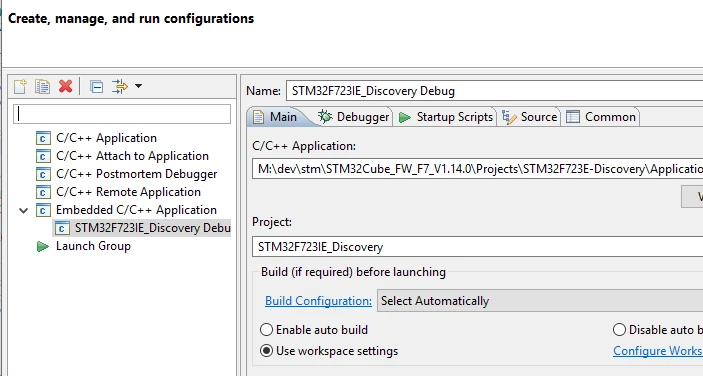
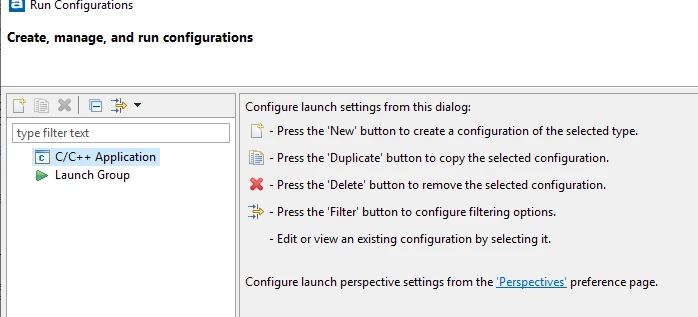
After I compile a sample project from the STM HAL driver examples, when I select a debug configuration, the proper options are available, as shown in the attachment, debug.png. However when I try to setup a Run configuration, the only options is "C/C++ Application" and "Embedded C/C++ Application" is not available.0690X0000087i06QAA.png0690X0000087i01QAA.png
This topic has been closed for replies.

3 replies

nobody102
nobody102Author
Associate II
April 8, 2019

Hello, anyone there?

Tesla DeLorean
Guru
April 8, 2019

Not a huge amount of participation by Atollic staff or users.

Tips, Buy me a coffee, or three.. PayPal VenmoUp vote any posts that you find helpful, it shows what's working..
alister
Senior III
April 8, 2019

The first attachment shows a Run Configuration with none defined. It looks normal. It's same as mine.

The second attachment shows a Debug Configuration with one configuration defined.

I've used Eclipse for embedded development for a long while without needing a Run Configuration. (TrueSTUDIO is based on Eclipse.) Anyway, if you need one you can create it by right-clicking "C/C++ Application", clicking New and entering appropriate parameters. Don't worry that it's not called "Embedded C/C++ Application".

If you're a beginner (sorry if you're not) use the Debug Configuration that's already defined to load the example and try it out.

nobody102
nobody102Author
Associate II
April 8, 2019

Ah ok thanks. will try that.

nobody102
nobody102Author
Associate II
April 8, 2019

thanks