Sebastian K.
Associate III
February 6, 2017
Solved

STM32 Embedded Matlab target complaining about ''quote mismatch'' when building Simulink model

  • February 6, 2017
  • 3 replies
  • 2190 views
Posted on February 06, 2017 at 11:53

Hello,

I am having a problem getting the STM32 Embebbed Matlab/Simulink Target to run. I am following the example in the STM32_MAT-TARGET_HandsOn.pdf document for the third example (everything on STM32) step by step, but whenever I try to build the model from Simulink I get the error:

=== Build (Elapsed: 0.840 sec) ===

    ♯♯♯ Real-Time Workshop build procedure for method: 'entry

    ♯♯♯ modelName: 'Test3

    ♯♯♯ gcs: 'Test3

    ♯♯♯ bdroot: 'Test3


    ♯♯♯ Starting Real-Time Workshop build procedure for model: Test3

    ♯♯♯ Windows version:win64

    ♯♯♯ Model connectivity is: normal

    ♯♯♯ Create verification block: None

    ♯♯♯ Real-Time Workshop build procedure for method: 'error

    ♯♯♯ modelName: 'Test3

    ♯♯♯ gcs: 'Test3

    ♯♯♯ bdroot: 'Test3

    ♯♯♯ Real-Time Workshop build procedure for model: 'Test3' aborted due to an error.

    Error: Syntax error while setting code generation options string: quote mismatch

and no code is generated. I have played around with most of the STM-specific options, but it makes no difference. I am using Matlab R2015b, Win7, Nucleo-F767ZI board and Matlab Target v4.4.1.

Did anyone else encounter that error, or has an idea what could cause it?

#simulink #stm32-mat/target-matlab
This topic has been closed for replies.
Best answer by Nesrine M_O
Posted on February 09, 2017 at 14:05

Hi

Kauertz.Sebastian

,

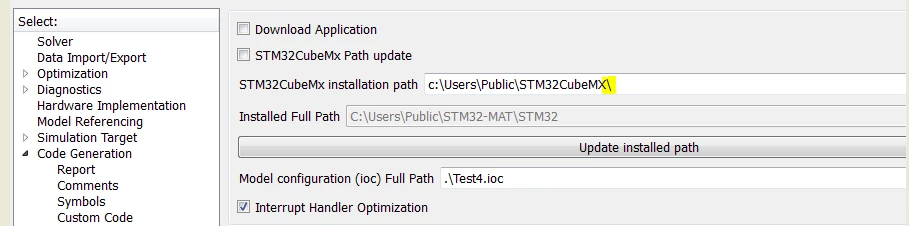
Could you please try to remove the '\'at the end of the

STM32CubeMx

path, then tel us about the result :

0690X00000606HHQAY.png

-Nesrine-

3 replies

Sebastian K.
Associate III
February 8, 2017
Posted on February 08, 2017 at 11:36

Nobody? I'd ask in the Mathworks forums as well, but there was one guy who had the exact same issue already with an F4 Discovery board two years ago, and he never got an answer...

Nickname12840_O
Associate
February 8, 2017
Posted on February 08, 2017 at 18:13

Hi,

what is your MATLAB 'current folder' when you start build?

Best regards

Sebastian K.
Associate III
February 8, 2017
Posted on February 08, 2017 at 18:30

Hello,

the current folder is the one that contains the Simulink model, as well as the ioc file created by CubeMX. Both the model and ioc file have the same name as the folder.

Nesrine M_O
Associate
February 9, 2017
Posted on February 09, 2017 at 09:48

Hi

Kauertz.Sebastian

,

Could you please share your .ioc file and

Simulink model for check?

-Nesrine-

Sebastian K.
Associate III
February 9, 2017
Nesrine M_O
Associate
February 9, 2017
Posted on February 09, 2017 at 14:05

Hi

Kauertz.Sebastian

,

Could you please try to remove the '\'at the end of the

STM32CubeMx

path, then tel us about the result :

0690X00000606HHQAY.png

-Nesrine-