
Md Mubdiul Hasan
Associate III
December 6, 2016
Solved

While using same project in SW4STM32

  • December 6, 2016
  • 1 reply
  • 3391 views
Posted on December 06, 2016 at 09:45

Dear Sir,

As we discussed earlier, difficulties on adapting project in SW4STM32 and mdk-keil, things might related to compiler, including paths, wrong pre-processors, undefined characters, unresolved items, miss-matching of slandered files/states with HAL libraries, we did not find any particular clue.

https://community.st.com/thread/32323

Lets see the difficulties accordance with

SW4STM32 because mdk-keil and coo-cox is failed!! (AC6,

http://www.openstmorg/

,

https://community.arm.com

,

https://www.eclipse.org/

All are not usefull)

Right at the moment, the error console says,

arm-none-eabi-gcc -mthumb -mfloat-abi=soft -E ''-IC:\\Ac6\\SystemWorkbench\\plugins\\fr.ac6.mcu.externaltools.arm-none.win32_1.7.0.201602121829\\tools\\compiler\\bin'' ''-IC:\\STM32_toolchain\\lib\\gcc'' -IC:/STM32_toolchain/common/Drivers/STM32F0xx_HAL_Driver/Inc -IC:/STM32_toolchain/common/Drivers/STM32F0xx_HAL_Driver/Src -O0 -g3 -Wall -fmessage-length=0 -ffunction-sections -c -o ''startup\\Src\\stm32f0xx_ll_utils.o'' ''..\\startup\\Src\\stm32f0xx_ll_utils.c''

..\startup\Src\stm32f0xx_ll_utils.c:39:32: fatal error: stm32f0xx_ll_utils.h: No such file or directory

compilation terminated.

Kindly take a look the project properties setting, things might skip from my eyes.
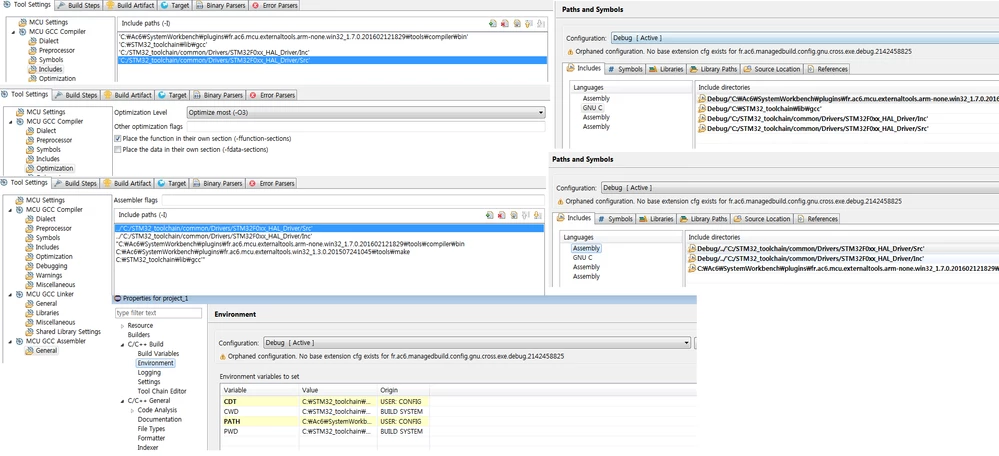
0690X00000605d4QAA.png

#sw4stm32 #hal-diver #stm32

Note: this post was migrated and contained many threaded conversations, some content may be missing.
This topic has been closed for replies.
Best answer by Tesla DeLorean
Posted on December 07, 2016 at 05:47

Ok, read the error

..\startup\Src\stm32f0xx_ll_utils.c:39:32: fatal error: stm32f0xx_ll_utils.h: No such file or directory


compilation terminated.

The C file exists, it is trying to compile it, and tries to &sharpinclude a file it can't find on line 39

It can't find it, because a) it doesn't exist anywhere in your project tree or b) it exists but not in a path /sub-directory you are specifying correctly. For a) you'd need to physically add the file, for b) you'd need to fix the pathing, something like '../Inc' might suffice for a Src and Inc directory pairing.

I'm not going to suggest you remove the LL files, you've tried a bunch of tool chains, but still have some systemic problem with managing/creating a functioning project. I'd much rather you start studying some documentation for one chain, and create simple projects until you understand how to use the tools instead of spending weeks going in circles. Your boss needs to provide you with support, or staffing, to achieve the goals if this is a critical project.

You need to think about a different way to attach screen shots, either the source image or the forum software is decimating the image to a point that it is very hard to read/decipher.

1 reply

aaron239955_stm1_st
Senior
December 6, 2016
Posted on December 06, 2016 at 22:08

looks like the error is saying that it can't find the file:

stm32f0xx_ll_utils.h which is referenced at line 39 in the file: \startup\Src\stm32f0xx_ll_utils.c.  Probably in an #include statement.  It seems like the directory that this file exists in is not listed in your list of places to look to resolve include requests by the compiler preprocessor.

First, take a look in the actual directory structure near the source file referenced above (the .c file) and find the .h file it is looking for.  It might be in the same directory as the .c file but it might be in a separate inc directory nearby.  wherever it is, you need to add this search path to your project. 

Once you know the path you need to add, on SW4STM32:

  1.    Right click on the project folder in the Project Explorer pane at the left.  At the bottom of the drop down menu click Properties

  2. Expand down the menu item for C/C++ Build and select Settings.  In the panel of folders in the middle select Includes

  3. In the include pane at the top right, click the green + icon, and when the dialog appears type in the new path and add it.  look at the format of the existing search paths to put in a relative path (../../etc) or use an absolute path starting with C:/

If you were using CoIDE before, that IDE automatically uses any files imported into your project structure as searchable for include files.  So if that .h file was in your project under CoIDE, you wouldn't have had to do anything to explicitly tell CoIDE where it was.  However with SW4STM32, and other current Eclipse-based IDE's this is not the case.  Even if you have all of your include directories showing up in the Project Explorer, they are not include paths unless explicitly added in this way.

Md Mubdiul Hasan
Associate III
December 7, 2016
Posted on December 07, 2016 at 01:13

Dear Sir Aaron,

Thank you a lot. 

I will follow your suggestion for sure. This is undoubtedly a good instruction. 

An STM expert told me from his experience,

'

After realizing that CubeMX did not meet everybody's expectations, the came up with the 'Low Level' library.

This 'Low Level' lib is part of CubeMX, or a sub-set thereof, and are labelled with this '_ll_' part in their name.

However, in some cases (especially for the STM32F7 I checked), this Low Level lib is nothing but a sorry stub (i.e. unusable fragments).

According to some comments on other threads, it is supposed to be complete for the STM32L4, 'with support for other MCUs in progress' - whatever this means.'

I will come back soon after getting something new from your guidance.

Regards

Hasan