Associate III
May 12, 2026
Solved

Can't flash STM32H7B3I-EVAL Hex Demo Code

  • May 12, 2026
  • 1 reply
  • 201 views

Hello,

I am using the STM32H7B3I-EVAL board with STM32H7B3LIH6Q controller.

The board revision I am using is MB1370-lcd-b02 a254300030.

I downloaded the official demo package from the ST website:
STM32H7B3I-EVAL → Tools & Software → Demo Code Package.

After extracting the ZIP file, I tried flashing the provided  .hex demo file into the controller using STM32CubeProgrammer.

However, programming fails with the following errors:

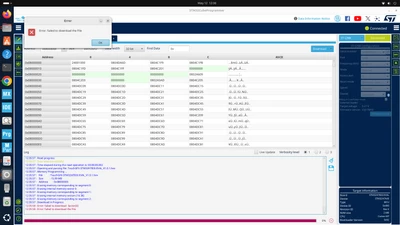
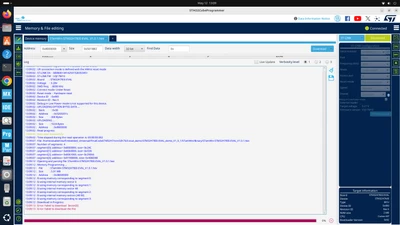
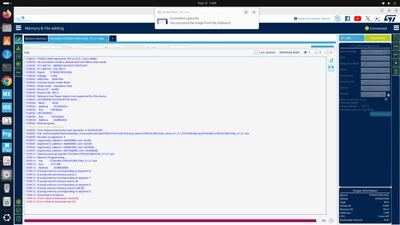
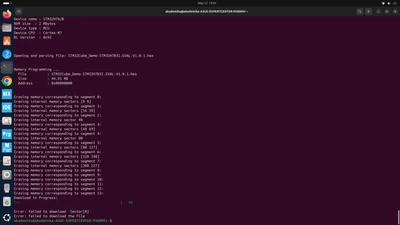
  • Error: failed to download Sector[0]

  • Error: failed to download the File

The board is detected correctly through ST-LINK, and connection is successful. I already tried:

  • Reducing SWD frequency

  • Full chip erase

  • Hardware reset / Under reset mode

But the issue still occurs.

Could anyone please suggest:

  1. Whether the provided demo .hex file is directly compatible with STM32H7B3LIH6Q?

  2. If any special option bytes or external memory configuration is required?

  3. Whether the demo depends on external QSPI/OSPI memory or specific boot settings?

Thank you.
vijayajangam_1-1778572681232.png


vijayajangam_2-1778572698527.png

vijayajangam_3-1778572719711.pngvijayajangam_4-1778572731939.png

vijayajangam_0-1778573288526.png


Best answer by MOBEJ

Hello @vijayajangam ,

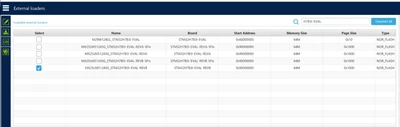
This demo requires an external QSPI memory to be present and properly initialized.
For the STM32H7B3I-EVAL board, please use the correct OSPI flasher:

MX25LM51245G_STM32H7B3I-EVAL

To program the board, open STM32CubeProgrammer, go to External loaders, and select the QSPI/external loader matching your board configuration, as shown in your screenshot.

MOBEJ_0-1778574153666.png

Once the correct external loader is selected, you should be able to flash and run the demo properly.

Br

1 reply

MOBEJ
MOBEJAnswer
ST Employee
May 12, 2026

Hello @vijayajangam ,

This demo requires an external QSPI memory to be present and properly initialized.
For the STM32H7B3I-EVAL board, please use the correct OSPI flasher:

MX25LM51245G_STM32H7B3I-EVAL

To program the board, open STM32CubeProgrammer, go to External loaders, and select the QSPI/external loader matching your board configuration, as shown in your screenshot.

MOBEJ_0-1778574153666.png

Once the correct external loader is selected, you should be able to flash and run the demo properly.

Br

To give better visibility on the answered topics, please click on Accept as Solution on the reply which solved your issue or answered your question.
Associate III
May 13, 2026

vijayajangam_0-1778654229640.pngvijayajangam_1-1778654239173.pngvijayajangam_2-1778654248224.pngvijayajangam_3-1778654256798.pngvijayajangam_4-1778654266263.png

Hello,

I am using the STM32H7B3I-EVAL board with STM32H7B3LIH6Q controller.

I downloaded and flashed the official demo HEX files from the STM32H7B3I-EVAL package provided on the ST website. Programming is now successful, but I am facing an issue with the TFT display.

Problem:

  • TFT backlight turns ON
  • No graphics, logo, GUI, or display output appears on screen
  • Screen remains blank/black
  • In some demo files (for example: STemWin-STM32H7B3I-EVAL_V1.0.1.hex), all 4 user LEDs              PG13(1) LED1
      MFX IO11 LED2
      MFX IO12 LED3
      MFX IO13 LED4  turn ON after boot

I already checked:

  • TFT ribbon/cable connection
  • Successful flashing through STM32CubeProgrammer
  • Multiple demo HEX files from the package
  • Power supply and ST-LINK connection

Still, nothing is displayed on TFT.

Could anyone please suggest:

  1. Whether external memory (OSPI/QSPI SDRAM) initialization may be failing?
  2. Whether this issue is related to LTDC/display clock configuration?
  3. Whether all 4 LEDs ON indicates a BSP/display initialization failure?
  4. Whether any specific boot switch or hardware revision dependency exists for these demo HEX files?

Thank you.


MOBEJ
ST Employee
May 13, 2026

Hello @vijayajangam , 

To help identify the issue more accurately, could you please provide:

  1. The board revision
  2. The LCD revision

These details are important because different hardware revisions may behave differently.

For example, in the screenshot:

MOBEJ_0-1778683557361.png


  • LCD daughterboard: MB1370 B01 — shown in the red rectangle
  • Main board: MB1331 H7B3LIQ-D03 — shown in the yellow rectangle
    You can also find this information on the back side of the board

If you can share both revisions, we will be able to investigate the issue more effectively.

Thank you.
Br

To give better visibility on the answered topics, please click on Accept as Solution on the reply which solved your issue or answered your question.