
FSULE.1
Associate II
March 10, 2021
Solved

Error when including FatFs.h >> No such file or directory

  • March 10, 2021
  • 4 replies
  • 2785 views

Deer electronicians,

I was following the video "STM32 – Creating a File System on a SD card" from the ST Youtube channel.

I done stricty the same things as in the video but an error occurs.

../Core/Src/main.c:22:10: fatal error: fatfs.h: No such file or directory
 22 | #include "fatfs.h"
 | ^~~~~~~~~
compilation terminated.

I tried to enter manually the include path for all the files concened but many new errors are rising.

My config :

  • STM32F746-DISCO (the same as in the video)
  • STM32CubeIDE 1.6.0
  • Firmware F7 1.16.1
  • Windows 10 64 bits

I stay reachable for any questions or precisions.

Cordialement,

François
This topic has been closed for replies.
Best answer by FSULE.1

Issue solved !!!!

I just changed some parameters :

1 - change the repository path (mine was a problem because i was having a "ç" in the name via the firmware updater

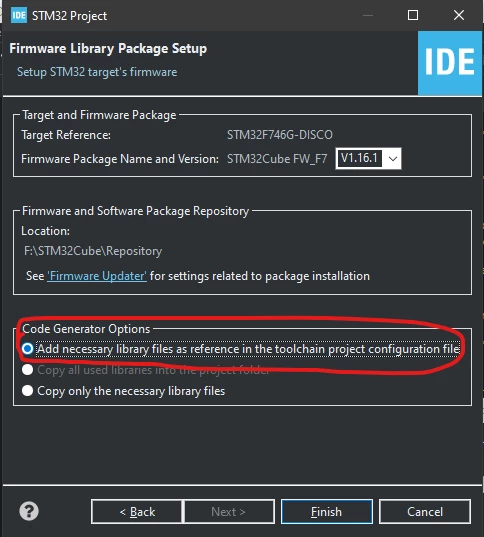
2 - when creating a project : select the first option : add necessary library ....

0693W000008wWPkQAM.png 

Tadam !!

4 replies

Tesla DeLorean
Guru
March 10, 2021

Should be able to add include paths to project for compiler to search on.

Show compiler command line, and configuration pane with paths.​

Tips, Buy me a coffee, or three.. PayPal VenmoUp vote any posts that you find helpful, it shows what's working..
FSULE.1
FSULE.1Author
Associate II
March 10, 2021

the text is too lon to be pasted here.

is it what yous asked ? or do you want something particular in the properties tab ?0693W000008wW8AQAU.png

FSULE.1
FSULE.1Author
Associate II
March 10, 2021
-mcpu=cortex-m7 -std=gnu11 -g3 -DDEBUG -DUSE_HAL_DRIVER -DSTM32F746xx -c -I../Core/Inc -I../Drivers/STM32F7xx_HAL_Driver/Inc -I../Drivers/STM32F7xx_HAL_Driver/Inc/Legacy -I../Drivers/CMSIS/Device/ST/STM32F7xx/Include -I../Drivers/CMSIS/Include -O0 -ffunction-sections -fdata-sections -Wall -fstack-usage --specs=nano.specs -mfpu=fpv5-sp-d16 -mfloat-abi=hard -mthumb

took on the project properties > C/C+ build > Settings

Tesla DeLorean
Guru
March 10, 2021

That doesn't look to have paths to the Middleware directories

Tips, Buy me a coffee, or three.. PayPal VenmoUp vote any posts that you find helpful, it shows what's working..
FSULE.1
FSULE.1AuthorAnswer
Associate II
March 10, 2021

Issue solved !!!!

I just changed some parameters :

1 - change the repository path (mine was a problem because i was having a "ç" in the name via the firmware updater

2 - when creating a project : select the first option : add necessary library ....

0693W000008wWPkQAM.png 

Tadam !!