
CLeo.1
Senior II
March 22, 2021
Solved

How to get USB-DFU working on STM32H743IIT6

  • March 22, 2021
  • 3 replies
  • 2508 views

Hi guys!

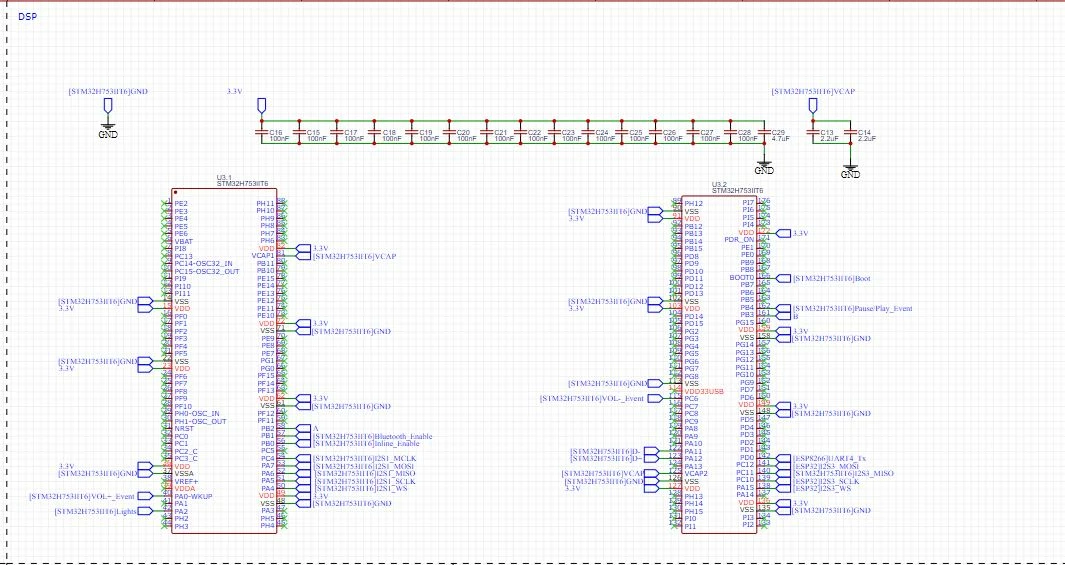
I am trying to flash code via the USB-DFU but every time I tied BOOT0 to GND and connect a MicroUSB from the STM32 chip to the computer it does not detect it at all.

I have no idea what's going on here?

I am assuming its because I dont have VDD33USB Connected ? Otherwise I am out of ideas. I installed all needed drivers and what not.

Any info would be helpful as this is my first time trying to use the bootloader of the STM32.

Here's the schematic of the STM32 and what pins I used.
0693W000008xWOeQAM.jpg

This topic has been closed for replies.
Best answer by Peter BENSCH

Yes, in your case VD33USB is required as stated in the datasheet, table 24:

VDD33USB - Standard operating voltage, USB domain

USB used: min 3.0V, max 3.6V

USB not used: min 0 max 3.6V

Regards

/Peter

3 replies

Peter BENSCH
Technical Moderator
March 22, 2021

Yes, in your case VD33USB is required as stated in the datasheet, table 24:

VDD33USB - Standard operating voltage, USB domain

USB used: min 3.0V, max 3.6V

USB not used: min 0 max 3.6V

Regards

/Peter

In order to give better visibility on the answered topics, please click on Accept as Solution on the reply which solved your issue or answered your question.
CLeo.1
CLeo.1Author
Senior II
March 22, 2021

Thank you for the response, perfect it's what I expected then. Ill keep you updated as everything is already soldered. Gonna need to order magnetic wire to hotfix it.

PMath.4
Senior III
March 28, 2021

Looking at your schematic you don't seem to have VDDA connected - should be tied to VCC or powered through a filter

Peter BENSCH
Technical Moderator
April 12, 2021

@CLeo.1​,

when your question is answered, please close this topic by choosing Select as Best for the appropriate answer. This will help other users find that answer faster.

Thanks

/Peter

In order to give better visibility on the answered topics, please click on Accept as Solution on the reply which solved your issue or answered your question.