Associate
May 11, 2026
Solved

"LL_TIM_GetCounter(const TIM_TypeDef *TIMx)" return wrong ticks

  • May 11, 2026
  • 5 replies
  • 226 views
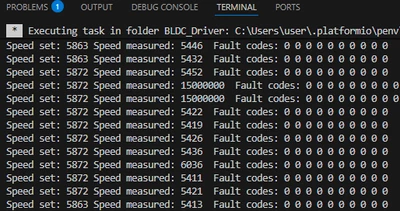
Hello everyone! I have a problem with reterning ticks in line "measure_speed_rpm = speed_reference / LL_TIM_GetCounter(TIM2);". speed_reference is const variable and equals 15000000. When I looked at Serial Monitor, it's indicated: (picture)
FreshDin_0-1778496772503.png

That's mean that LL_TIM_GetCounter(TIM2) returns '1' sometimes. Nothing in my code not calling void EXTI1_IRQHandler(void), except EXTI Interrupt. And the main question is - Why it reterns only '1'??? Not 2,3 e.t.c.

Thank you for help!

 
void EXTI1_IRQHandler(void)
{
 if (LL_EXTI_IsActiveFlag_0_31(LL_EXTI_LINE_1))
 {
 LL_EXTI_ClearFlag_0_31(LL_EXTI_LINE_1);
 
 static uint8_t edge_switch = 0;

 if (!edge_switch)
 { 
 edge_switch = 1;
 LL_TIM_SetCounter(TIM2, 0);
 
 }
 else
 {
 edge_switch = 0;
 measure_speed_rpm = speed_reference / LL_TIM_GetCounter(TIM2);
 
 NVIC_SetPendingIRQ(SPI1_IRQn); // SPI1_IRQHandler is free vector in list, that's why I use it for PID update trigger
 }

 uint8_t hall_index = HALL_Read();
 SixStep_SetPhase(duty, hall_index);
 }
}
 

Edited to apply source code formatting - please see How to insert source code for future reference.

Best answer by FreshDin

Thank you so fast helpfull answers! But when I sent my TIM2 setting, I have noticed one mistake; the "TIM2_InitStruct.Autoreload" must be 0xFFFF max, but my setting is  0xFFFFFFFF. Sorry for the comparison, but it's "magicaly" start working, and the error did not appear! But can you please expalin me how 0xFFFFFFFF was interpreted by programm and how could this lead to an error "return 1"?

5 replies

T_Hamdi
ST Employee
May 11, 2026

Hello @FreshDin 

First, based on your code, the observed behavior is consistent with the fact that LL_TIM_GetCounter(TIM2) is being read almost immediately after the counter has been reset to zero. This explains why the returned value is often 1.

if (!edge_switch)
{ 
 edge_switch = 1;
 LL_TIM_SetCounter(TIM2, 0);
}
else
{
 edge_switch = 0;
 measure_speed_rpm = speed_reference / LL_TIM_GetCounter(TIM2);
}

This is the most likely cause. If EXTI is configured on both edges, rising and falling, you may be measuring two transitions that are very close to each other instead of a real useful period.

"To give better visibility on the answered topics, please click on ""Accept as Solution"" on the reply which solved your issue or answered your question.Hamdi Teyeb"
FreshDinAuthor
Associate
May 11, 2026

Thank you for your explanation! But in my case your gess do not realistic. Both edges generated by Hall Sensor in BLDC Motor and have 180 degrees constatly. Also, on the picture in the head meassage you can see, that error of "return 1"  is happennig between normal measuring. Can I make some mistakes in TIM2 setting or functions  LL_TIM_SetCounter(TIM20) and LL_TIM_GetCounter(TIM2) have some peculiarities?

PS: Picture is the wave one of the Hall Sensors. Below you can see my TIM2 setting.

Thank you!

pic_160_1.bmp


TIM2 setting:
uint32_t TIM2_SpeedCounter_Init (uint32_t tim_freq_hz)
{
 uint32_t psc = (SystemCoreClock / tim_freq_hz) - 1;

 LL_APB1_GRP1_EnableClock(LL_APB1_GRP1_PERIPH_TIM2);

 LL_TIM_InitTypeDef TIM2_InitStruct = {0};
 LL_TIM_StructInit(&TIM2_InitStruct);
 TIM2_InitStruct.Prescaler = psc;
 TIM2_InitStruct.CounterMode = LL_TIM_COUNTERMODE_UP;
 TIM2_InitStruct.Autoreload = 0xFFFFFFFF;
 TIM2_InitStruct.ClockDivision = LL_TIM_CLOCKDIVISION_DIV1;
 LL_TIM_Init(TIM2, &TIM2_InitStruct);

 LL_TIM_EnableIT_UPDATE(TIM2);
 NVIC_SetPriority(TIM2_IRQn, 1);
 NVIC_EnableIRQ(TIM2_IRQn);
 LL_TIM_SetCounter(TIM2, 0);
 LL_TIM_EnableCounter(TIM2);

 return tim_freq_hz * 30;
}
 

Edited to apply source code formatting - please see How to insert source code for future reference.

waclawek.jan
Super User
May 11, 2026

> That's mean that LL_TIM_GetCounter(TIM2) returns '1' sometimes.

It may be also 0. Division by zero may be handled by simply returning the numerator (that's consistent with "undefined behaviour" prescribed by C99 6.5.5#5 for the case when denominator is zero). You have some nonzero prescaler at the timer, so it may quite well take some time until it overflows, that can cover the rest of the ISR's duration.

@T_Hamdi is probably right. EXTI is asynchronous and fires both edges upon a few ns pulse. It's enough to have some noise superimposed at the signal, or the edge bouncing due to improper termination and/or ground/return arrangement. This whole event may be short enough so that it won't impact visibly the "correct" measurements around it.

Instead of EXTI, use some of TIMx_CHx input capture. That's synchronous and you can also switch on a digital filter on it.

JW


FreshDinAuthorAnswer
Associate
May 11, 2026

Thank you so fast helpfull answers! But when I sent my TIM2 setting, I have noticed one mistake; the "TIM2_InitStruct.Autoreload" must be 0xFFFF max, but my setting is  0xFFFFFFFF. Sorry for the comparison, but it's "magicaly" start working, and the error did not appear! But can you please expalin me how 0xFFFFFFFF was interpreted by programm and how could this lead to an error "return 1"?

waclawek.jan
Super User
May 11, 2026

> the "TIM2_InitStruct.Autoreload" must be 0xFFFF max

Why do you think so? TIM2 is a 32-bit timer.

> how could this lead to an error "return 1"?

It won't. You may have made some other coincidental change, e.g. moved a cable.

JW

FreshDinAuthor
Associate
May 11, 2026

> the "TIM2_InitStruct.Autoreload" must be 0xFFFF max

I have to disagree. In STM32F103 timers are 16-bits

FreshDin_0-1778524182419.png

> how could this lead to an error "return 1"?

I dont know))) That's why I asked about it in previous message


waclawek.jan
Super User
May 11, 2026

> In STM32F103 timers are 16-bits

Oh, okay, I've learned something new then :)

It won't influence the readout, though. Put it back if you want to check that.

JW