Associate II
April 25, 2025
Question

SDIO FATFS FR_NOT_READY - fails to mount SD card

  • April 25, 2025
  • 2 replies
  • 5186 views

Hello,

I have a NUCLEO-F767ZI I am trying to integrate an SD card with for data storage. The SD card is a Kingston CANVAS Select Plus 64GB in ExFAT format.

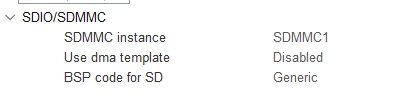
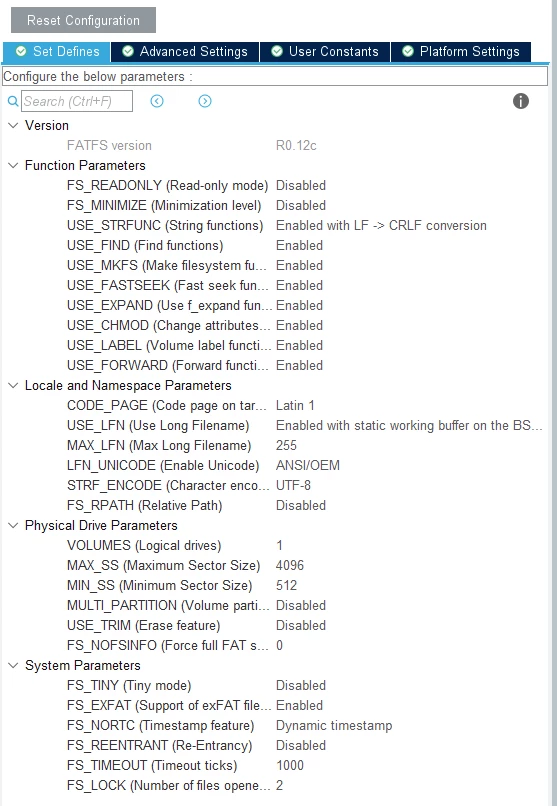
I am connecting it to the NUCLEO board through an Adafruit SD card module which has pullup resistors on all lines, including the detect pin, and I am using the internal GPIO pullup resistors too for D0, CMD and SD_DET to make sure the communication is uninterrupted. Below you can see the FATFS configuration fatfs_config1.pngfatfs_config2.png
 

printf("Mounting filesystem...\r\n\n");

FR_Status = f_mount(&FatFs, "", 1);

if (FR_Status != FR_OK)

{

printf("Error mounting SD card! Code: %d\r\n\n", FR_Status);

break;

}

printf("SD card mounted successfully\r\n\n");


FR_Status returns FR_NOT_READY (3 in console). 

The hardware configuration is correct as I can read the capacity and some other data from the SD card, but I cannot access the card itself.

Does anyone have any suggestions?


2 replies

Andrew Neil
Super User
April 25, 2025

Welcome to the forum.

For best results, please see How to write your question to maximize your chances to find a solution; in particular, How to insert source code.


Please give a link to the "Adafruit SD card module", and a schematic of how you have it connected.


@bog201 wrote:

FR_Status returns FR_NOT_READY (3 in console). 


So have you used the debugger to step into the code to find out why it does that?

A complex system that works is invariably found to have evolved from a simple system that worked.A complex system designed from scratch never works and cannot be patched up to make it work.
bog201Author
Associate II
April 28, 2025

Hi Andrew,

Thank you for reaching back fast and for the forum post tips. Here is the relevant piece of code. 

printf("Mounting filesystem...\r\n\n");
FR_Status = f_mount(&FatFs, "", 1);
if (FR_Status != FR_OK)
{
 printf("Error mounting SD card! Code: %d\r\n\n", FR_Status);
 break;
}
printf("SD card mounted successfully\r\n\n");

Here is the link to the Adafruit 4682 SD card module.


I unfortunately do not have a schematic for it, but here are the connections:

sdmmc1_pinout.png

NUCLEO board -> SD card module:

3V3 -> 3V

GND -> GND

PC12 -> CLK

PC8 -> D0

PD2 -> CMD

PG3 -> DET (Active high, internal resistors pulled up)


I've used the debugger but it is still unclear for now why I get FR_NOT_READY. Stepping into line 2 redirects me to ff.c (code excerpt shown below), where vol stays at 0 until I step into line 38. 

FRESULT f_mount (
	FATFS* fs,			/* Pointer to the file system object (NULL:unmount)*/
	const TCHAR* path,	/* Logical drive number to be mounted/unmounted */
	BYTE opt			/* Mode option 0:Do not mount (delayed mount), 1:Mount immediately */
)
{
	FATFS *cfs;
	int vol;
	FRESULT res;
	const TCHAR *rp = path;


	/* Get logical drive number */
	vol = get_ldnumber(&rp);
	if (vol < 0) return FR_INVALID_DRIVE;
	cfs = FatFs[vol];					/* Pointer to fs object */

	if (cfs) {
#if _FS_LOCK != 0
		clear_lock(cfs);
#endif
#if _FS_REENTRANT						/* Discard sync object of the current volume */
		if (!ff_del_syncobj(cfs->sobj)) return FR_INT_ERR;
#endif
		cfs->fs_type = 0;				/* Clear old fs object */
	}

	if (fs) {
		fs->fs_type = 0;				/* Clear new fs object */
#if _FS_REENTRANT						/* Create sync object for the new volume */
		if (!ff_cre_syncobj((BYTE)vol, &fs->sobj)) return FR_INT_ERR;
#endif
	}
	FatFs[vol] = fs;					/* Register new fs object */

	if (!fs || opt != 1) return FR_OK;	/* Do not mount now, it will be mounted later */

	res = find_volume(&path, &fs, 0);	/* Force mounted the volume */
	LEAVE_FF(fs, res);
}

Stepping into line 2 redirects me to ff.c (code excerpt shown above), where it fails the check, and goes to line 38, where I again step into it (code excerpt below). 

	/* Get logical drive number */
	*rfs = 0;
	vol = get_ldnumber(path);
	if (vol < 0) return FR_INVALID_DRIVE;

	/* Check if the file system object is valid or not */
	fs = FatFs[vol];					/* Get pointer to the file system object */
	if (!fs) return FR_NOT_ENABLED;		/* Is the file system object available? */

	ENTER_FF(fs);						/* Lock the volume */
	*rfs = fs;							/* Return pointer to the file system object */

	mode &= (BYTE)~FA_READ;				/* Desired access mode, write access or not */
	if (fs->fs_type) {					/* If the volume has been mounted */
		stat = disk_status(fs->drv);
		if (!(stat & STA_NOINIT)) {		/* and the physical drive is kept initialized */
			if (!_FS_READONLY && mode && (stat & STA_PROTECT)) {	/* Check write protection if needed */
				return FR_WRITE_PROTECTED;
			}
			return FR_OK;				/* The file system object is valid */
		}
	}

	/* The file system object is not valid. */
	/* Following code attempts to mount the volume. (analyze BPB and initialize the fs object) */

	fs->fs_type = 0;					/* Clear the file system object */
	fs->drv = LD2PD(vol);				/* Bind the logical drive and a physical drive */
	stat = disk_initialize(fs->drv);	/* Initialize the physical drive */
	if (stat & STA_NOINIT) { 			/* Check if the initialization succeeded */
		return FR_NOT_READY;			/* Failed to initialize due to no medium or hard error */
	}

This is where it gets to line 30 in the above code, returning FR_NOT_READY.

Do you have any suggestions? 


Andrew Neil
Super User
April 28, 2025

So the find_volume() call in f_mount() is returning an error.

What error code, exactly, does it return?

Try stepping into find_volume() to see where & why it returns that error code.


A complex system that works is invariably found to have evolved from a simple system that worked.A complex system designed from scratch never works and cannot be patched up to make it work.
Technical Moderator
May 8, 2025

Hello @bog201 

Did you attempt to follow the example below and find inspiration from it?

STM32CubeF7/Projects/STM32F769I_EVAL/Applications/FatFs/FatFs_uSD at master · STMicroelectronics/STM32CubeF7 · GitHub

"To give better visibility on the answered topics, please click on ""Accept as Solution"" on the reply which solved your issue or answered your question.Saket_Om"