Associate II
May 20, 2026
Question

STM32 HAL SPI driver: Question on transferring the SPI Bus command

  • May 20, 2026
  • 5 replies
  • 204 views

I am using the Analog Devices EVAL-ADE9430 Evaluation board for testing one of their devices. The Evaluation board uses the NUCLEO-144 STM32F413ZH processor. I am using the Keil uVision development setup to run and debug code.  I am specifically concentrating on the SPI Bus Driver and the timing. I have no previous experience with STM Devices and how the SPI transfers happen in the processor.  

While walking through the code and following it on my scope to see the SPI Bus timing I am seeing something that does not make sense.  The AFERead32BitBuffer() function is called when you read a 32-bit register from the SPI Device which is an Analog Devices ADE9430 Chip (see Below). 

  1. The code calls HAL_SPI_Transmit() with the number of bytes it needs to transmit (see line 9 below). In this case it is transmitting a two byte command header where bits [15:04] are the register address and bits [3:0] is the R/W command, see example timing below.
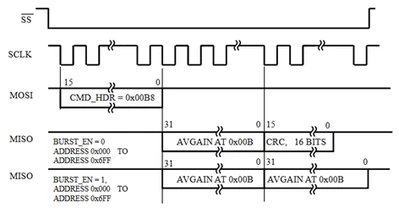
  2. mike_m_0-1779289372569.png


  3. When I capture the actual timing, I would expect to see a 16Bit transfer of the command header. instead this is what I am seeing.
    • Timing shows a 24 bit transfer which I believe should only be the 16 bit command header. Instead it appears the SPI bus is starting to immediately read the first 8-bits of the 32bit data riight after sending the command header.   
    • This is followed by the next three bytes of data to make up the 32 bits.
    • Then finally the 16bit CRC is returned from the ADE9430 Chip.
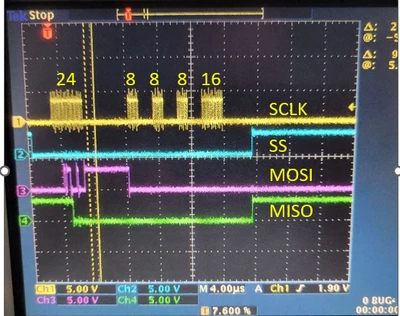
  4. mike_m_3-1779289558775.png
  5. Next I wanted to only execute that single line so I added a breakpoint on this line 9 and single stepping over it while capturing the timing on the scope (see timing below). I would expect to only see two bytes transferred on the SPI Bus after its execution. Instead, I always see the timing for three bytes, even though line 9 clearly says transfer two bytes.  This was the only line of code that was executed. 
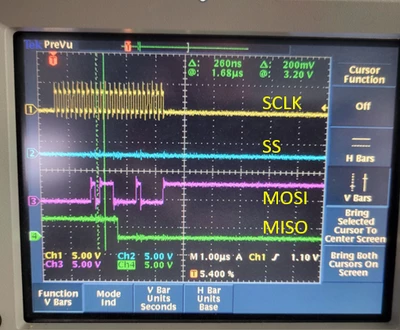
  6. mike_m_5-1779290931755.png


    I am trying to understand what is causing the SPI Bus to generate the timing for this third byte when the code is only transmitting a 2 byte command header.  

Thanks - mike

uint32_t AFERead32BitBuffer(uint16_t addr, uint16_t numSamples, uint32_t *pData)
{
 int32_t status = SYS_STATUS_SUCCESS;

 cmdBuffer[0] = (addr >> 4);
 cmdBuffer[1] = ((addr & 0x0F) << 4) + 8;

 HAL_GPIO_WritePin(GPIOD, GPIO_PIN_14, GPIO_PIN_RESET);
 status = HAL_SPI_Transmit(&hSPI, (uint8_t *)&cmdBuffer, 2, SPI_TIMEOUT);
 /* FIXME : Handling SPI_Transmit error*/
 if (status != 0)
 {
 status = HAL_SPI_Transmit(&hSPI, (uint8_t *)&cmdBuffer, 2, SPI_TIMEOUT);
 }
 if (status == 0)
 {
 status = HAL_SPI_Receive(&hSPI, (uint8_t *)&pData[0], 4 * numSamples, SPI_TIMEOUT);
 }
 HAL_GPIO_WritePin(GPIOD, GPIO_PIN_14, GPIO_PIN_SET);
 SwapEndian32Bit(&pData[0], numSamples);

 DEBUG_MSG("REG32RD,0x%x,0x%x", addr, pData[0]);

 return status;
}


5 replies

Associate II
May 20, 2026

Hi Mike,

How is your SPI configured?

Did you enable CRC for the transfer?

mike_mAuthor
Associate II
May 20, 2026

Hi,

Yes CRC is enabled. 

    • Open the afe_config.c file
    • Go to line ~552, you should see the following statement disabling CRC
      • hSPI.Init.CRCCalculation = SPI_CRCCALCULATION_DISABLE;
    • Enable it CRC by changing it as follows
      • hSPI.Init.CRCCalculation = SPI_CRCCALCULATION_ENABLE;

The SPI Clock is running at 6.25 MHz here is the contents of the hspi structure which I think has the SPI Configuration information. If not let me know what I can provide. 

mike_m_0-1779299189918.jpeg

mike_m_1-1779299215856.jpeg

I took a picture of the same read with CRC is not enabled it looks to be what I would expect. The command from the processor to the ADE9430 is a 16bit wide command. Followed by four 8 bit transfers which make up the 32bit register data.  

mike_m_2-1779299377457.png

I just can't figure out how and why it is sending the 24bits as a group when CRC is enabled and the code indicates send 2 bytes.  

Thanks - mike

Pavel A.
Super User
May 20, 2026

@mike_m Where could we find these files? Not attached here.

> Open the  afe_config.c


If you keep the SPI registers open in the debugger, as on your screenshot (the Instance pointer expanded) - the debugger reads may interfere. 

mike_mAuthor
Associate II
May 21, 2026

Hi Pavel, 

Thank you for your response. I was also thinking the debugger may not be operating as expected. i see the 24 clocks even when running without the debugger. Again it does not happen if I disable CRC. 

I also tried the following experiment where i inserted a 1 second delay after it sends the command. Thinking that it would completely separate the 2 byte command from the rest of the transfer.  I still see the 24 bit transmission of the 2 byte command and the read of the first data byte. 

Makes no sense to me. 

Thanks again, - mike

uint32_t AFERead32BitBuffer(uint16_t addr, uint16_t numSamples, uint32_t *pData)
{
 int32_t status = SYS_STATUS_SUCCESS;

 cmdBuffer[0] = (addr >> 4);
 cmdBuffer[1] = ((addr & 0x0F) << 4) + 8;

 HAL_GPIO_WritePin(GPIOD, GPIO_PIN_14, GPIO_PIN_RESET);
 status = HAL_SPI_Transmit(&hSPI, (uint8_t *)&cmdBuffer, 2, SPI_TIMEOUT);
 HAL_DELAY(1000); 
 /* FIXME : Handling SPI_Transmit error*/
 if (status != 0)
 {
 status = HAL_SPI_Transmit(&hSPI, (uint8_t *)&cmdBuffer, 2, SPI_TIMEOUT);
 }
 if (status == 0)
 {
 status = HAL_SPI_Receive(&hSPI, (uint8_t *)&pData[0], 4 * numSamples, SPI_TIMEOUT);
 }

I see the  

Associate II
May 21, 2026

When you DISABLE CRC and send 2 bytes then you can see 2 bytes physically sent.

When you ENABLE CRC and send 2 bytes then you can see 3 bytes physically sent: your 2 data bytes and the CRC generated automatically.


This is what I expect...

mike_mAuthor
Associate II
May 21, 2026

Thanks for the response! 

The CPU interface is generating the SPI Clock based on how much data it is trying to write. If it is told to send two bytes for a 16-Bit command I would expect to see only 16 SPI Clocks not 24.  I am doing a read of a 32 bit register over the SPI Bus which should look like this:

When CRC is Disabled it looks like this.

MOSI ----  [16-bit command]  --- [xxxxxxxx] --- [xxxxxxxx]  --- [xxxxxxxx] --- [xxxxxxxx] -- [xxxxxxxxxxx]  Processor

MISO ----  [xxxxxxxxxxxxxx]  --- [8 bit data] --- [8 bit data]  --- [8 bit data] --- [8 bit data] -- [16-bit CRC]   SLAVE Dev


When CRC is enabled it looks like this.  

MOSI ----  [16-bit command][xxxxxxxx] --- [xxxxxxxx]  --- [xxxxxxxx] --- [xxxxxxxx] -- [xxxxxxxxxxx]  Processor

MISO ----  [xxxxxxxxxxxxxx][8 bit data] --- [8 bit data]  --- [8 bit data] --- [8 bit data] -- [16-bit CRC]   SLAVE Dev

The reason I am questioning this is because the ADE9430 sends a 16-Bit CRC of all 0's instead of the CRC expected for the 32 bit data. I believe this happens when the ADE9430 losses synchronization with the SPI Bus. 

If I break the code immediately after the function that is sending the command byte I would only expect to see those 16 clock cycles and nothing else. 

The really strange thing is that this only happens when CRC is enabled. When CRC is off it does not send 24-bits it sends the expected 16-bit command headed as the code indicates it should.  

Pavel A.
Super User
May 22, 2026

Still you have not shown the SPI initialization code.


mike_mAuthor
Associate II
May 22, 2026

Hi Pavel, 

Not sure if this is what you are looking for, its the standard initialization function in afe_config.c.


/**
 * @brief SPI Initialization Function
 * @retval status 0 for success
 */
static int32_t MXSPIInit(void)
{
 int32_t status = 0;
 /* SPI1 parameter configuration*/
 hSPI.Instance = SPI1;
 hSPI.Init.Mode = SPI_MODE_MASTER;
 hSPI.Init.Direction = SPI_DIRECTION_2LINES;
 hSPI.Init.DataSize = SPI_DATASIZE_8BIT;
 hSPI.Init.CLKPolarity = SPI_POLARITY_LOW;
 hSPI.Init.CLKPhase = SPI_PHASE_1EDGE;
 hSPI.Init.NSS = SPI_NSS_SOFT;
 hSPI.Init.BaudRatePrescaler = SPI_BAUDRATEPRESCALER_16;
 hSPI.Init.FirstBit = SPI_FIRSTBIT_MSB;
 hSPI.Init.TIMode = SPI_TIMODE_DISABLE;
 hSPI.Init.CRCCalculation = SPI_CRCCALCULATION_ENABLE;
 //hSPI.Init.CRCCalculation = SPI_CRCCALCULATION_DISABLE;
 hSPI.Init.CRCPolynomial = 10;
 status = HAL_SPI_Init(&hSPI);
 return status;
}


Pavel A.
Super User
May 22, 2026

OK so the SPI is indeed configured with CRC enable mode.

The documentation (RM0090) does not mention it clearly, but it seems that number of CRC bits can be 8 for 8-bit data or 16 for 16-bit data. SPI_DATASIZE_8BIT is specified, thus the CRC is 8 bit.  This explains why the extra byte is clocked out: it is the CRC8.

As said already, please try to start without hardware CRC. Later when you get it working, optimize.


>  the standard initialization function in afe_config.c.

Unless the EVAL-ADE9430 includes example code for STM32, I could not find where this source comes from. Google only finds afe_config.c file in the context of the ESP32-S3 Audio Front-End (AFE), which is not that.