Hi @APayo.1 , Hi @YLiu.4 ,
Let me provide a more detailed explanation about STEVAL-SPIN3204 and the MCSDK.
This board does not support the FOC algorithm, but just the six-step algorithm.
So the MCSDK cannot be used to generate a FOC project.
Instead, the MCSDK can be used to load a specific example project based on the six step algorithm.
The project can be found in the main page: “Six-step drive with STSPIN3204�?.
Loading this project, a warning message appears together with a "readme.txt" file, which explains step by step how to create the six step project.
I try to summarize the most important steps here below:
Save the project in a new folder, whichever you want. The important thing is that is must be a brand new folder without any previous project inside.
Some files will be created in addition to the .stmcx project: one of these is the “extras.wb_def�?.
If you want to use the monitor of the MCSDK, open the “extras.wb_def�? file with a text editor.
Ensure that the value of SERIAL_COMMUNICATION key Is set to "true" (should be the default value).
Save and close this file, go back to the MCSDK and click to generate button in the MCSDK.
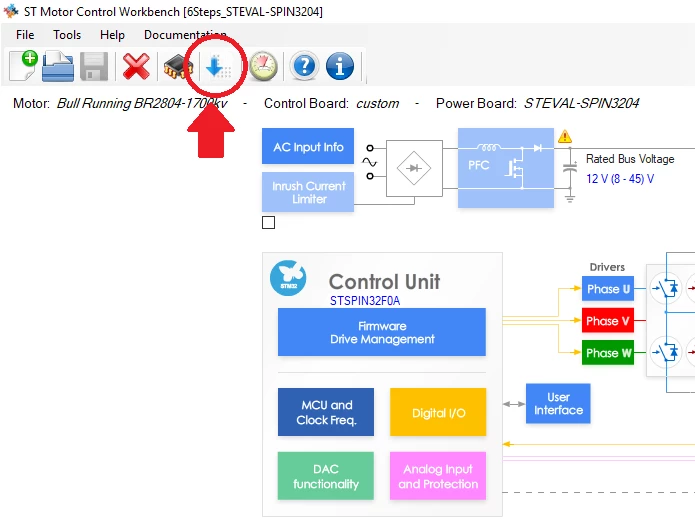
Important: in the generation window that will open, click on the UPDATE button, not on GENERATE.
IAR EWARM 8 or Keil uVision 5 Are the IDE supported, so this is your case.
Once the project is created, compile and download the firmware in the board.
Now, you can run the motor using both USER1 button on the board or using the start/stop button.
The COM port should be the one connected by the system while the baud rate to be selected is 115200 if the project (sorry, forget about the digital IO block previously mentioned)
If you need to change other parameters, for example the pole pairs of the motor, you can do it directly in the genearted C code.
Check the files “Motor_Configuration.h�? and 6step_conf.h.
To summarize, the MCSDK can be used with the STEVAL-SPIN3204 with some limitations:
- It is not possible to create a FOC porject, the six-step only can be loaded
- The MCSDK can be used to generate the source code, NOT to modify the parameters (acts directly on the code, if you want to do that)
- The MCSDK can be used to send simple commands (a reduced set of functions are supported)
Let em add one last remark: there is another way to communicate with the board, that is using a command line terminal sending strings on the COM port.
This option uses another protocol and has different commands.
If you are interested, I can discuss more about this alternative method.
I hope this explanation can help you.
Let me know if you can connect to the board and run the motor.
All the best !