
JR2963
Senior II
February 6, 2024
Solved

Fake STM32?

  • February 6, 2024
  • 1 reply
  • 2502 views

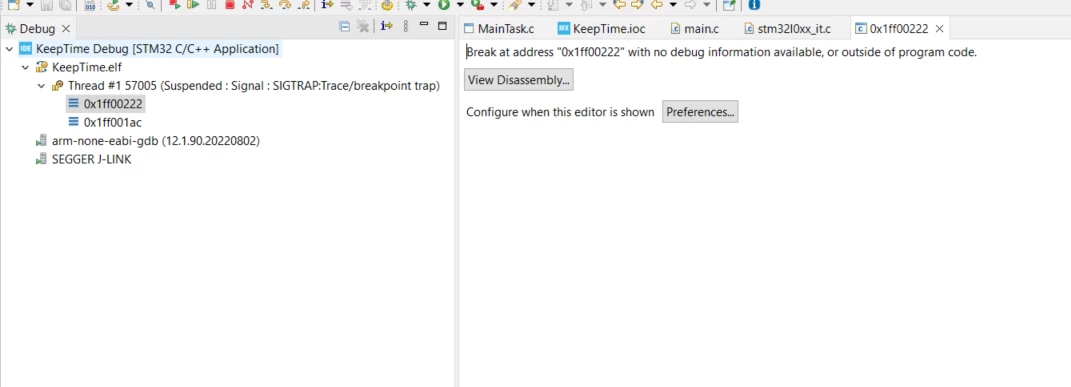
I had a board assembled through JLCPCB, which included mounting an STM32L071. When the PCB arrived, I loaded a program with a blinking LED in an infinite loop. Unfortunately, the program didn't behave as expected, and during debugging, I encountered what is shown in the image.

However, when I load the same program onto another board with an STM32 from Farnell, everything works as it should. This made me wonder if the MCU might be a clone. How can I tell? What does the error actually mean? Could it have a different vector table? I can step through a few lines, but once the program is running, I can't pause it to see where the program currently is.
JR2963_0-1707242466076.png


This topic has been closed for replies.
Best answer by gbm

Check the connection of BOOT0 to GND once again.

1 reply

Tesla DeLorean
Guru
February 6, 2024

Pictures of the device, large, close, sharp and in-focus would be most telling.

The error is more indicative of the BOOT0 pin not being pulled low, or some intrinsically different Option Bytes settings related to the boot mode, nBoot or whatever.

Open a connection to the device with STM32 Cube Programmer, screen shot of that, and the option bytes tab.

Tips, Buy me a coffee, or three.. PayPal VenmoUp vote any posts that you find helpful, it shows what's working..
JR2963
JR2963Author
Senior II
February 6, 2024

BOOT0 pin is tied to GND:

JR2963_0-1707247389279.png

and footprint:

IMG_20240206_202458.jpg

gbm
gbmAnswer
Principal
February 6, 2024

Check the connection of BOOT0 to GND once again.

My STM32 stuff on github - compact USB device stack and more: https://github.com/gbm-ii/gbmUSBdevice