
SGasp.1
Associate III
January 11, 2024
Solved

SPI pin for STM32F429

  • January 11, 2024
  • 2 replies
  • 3485 views

Hi community, just a single question as confirm. 


I am working with stm32f429.

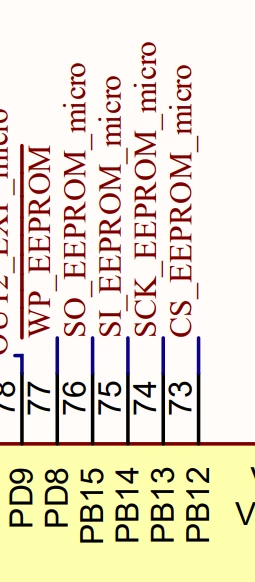
From the schematic the hw engineer decided to use the following pin for spi purpose for communicating with an eeprom 
 

SGasp1_0-1704962915971.png

Can you confirm that i cannot use those pins for spi purpose ? 

(i have tried to select sp1,sp2,sp3,sp4,sp5,sp6)


Thanks a lot 
This topic has been closed for replies.
Best answer by AScha.3

>the point is is all the pins are ok for spi and how to change the proposed pins in cube mx 

check = exactly this. Is possible ? -> ok , then click on each pin and select the function you want , spi2xxx here.

ready . Now they are "user defined" (pinned) on this position.

AScha3_0-1704966486036.png

And set in configuration SPI2 -> full duplex master (or what you need for your eeprom access ).

2 replies

AScha.3
Super User
January 11, 2024

F429  - case ?

from ds , p.62:     PB13 , should be sck_eeprom - right ?  


AScha3_0-1704965042169.png

-> spi2_sck is possible, so check , for other pins for your eeprom on SPI2 ;

pin74 --> LQFP144 .

+

When in Cube select/activate spi2 , then can choose also alternative pins for some peripherals ;

you can select them manually, click on the pin and choose..

AScha3_1-1704965464822.png


"If you feel a post has answered your question, please click ""Accept as Solution""."
SGasp.1
SGasp.1Author
Associate III
January 11, 2024

Hi @AScha.3 ,


thanks for the quick reply

case is stm32f429zit6,


what do you mean for spi2_sck is possible, so check , for other pins for your eeprom on SPI2 ;?


the point is is all the pins are ok for spi and how to change the proposed pins in cube mx 


Thanks

AScha.3
AScha.3Answer
Super User
January 11, 2024

>the point is is all the pins are ok for spi and how to change the proposed pins in cube mx 

check = exactly this. Is possible ? -> ok , then click on each pin and select the function you want , spi2xxx here.

ready . Now they are "user defined" (pinned) on this position.

AScha3_0-1704966486036.png

And set in configuration SPI2 -> full duplex master (or what you need for your eeprom access ).

"If you feel a post has answered your question, please click ""Accept as Solution""."
SGasp.1
SGasp.1Author
Associate III
January 11, 2024

IT IS ok the only thing that it ssems that mosi and miso are inverted 


Thanks @AScha.3 

AScha.3
Super User
January 11, 2024

>mosi and miso are inverted 

signal inverted ? pins exchanged ?


"If you feel a post has answered your question, please click ""Accept as Solution""."
Andrew Neil
Super User
January 11, 2024

@AScha.3 - "pins exchanged ?"

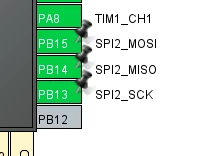
Look at the diagrams:

AndrewNeil_0-1704969279505.png AndrewNeil_1-1704969292637.png

  • PB15 is MOSI: you have that connected to "SO_EEPROM_micro" - is that correct for your system?
  • PB14 is MISO:  you have that connected to "SI_EEPROM_micro" - is that correct for your system?


This is why names like "SI" and "SO" are best avoided: they are ambiguous - does your "SO" mean output from the MCU to the EEPROM, or output from the EEPROM to the MCU?

Using MISO and MOSI*  removes this ambiguity!


* or modern alternatives alternatives like PICO and POCI: https://www.sparkfun.com/spi_signal_names 

A complex system that works is invariably found to have evolved from a simple system that worked.A complex system designed from scratch never works and cannot be patched up to make it work.