Senior
March 8, 2024
Solved

STM32F042F6P7 (TSSPOP20 package): CAN availability on CubeMx

  • March 8, 2024
  • 2 replies
  • 995 views

Using STM32CubeIDE (v1.14.0) with STM32F042F6P7 (TSSOP 20) to configure CAN pins on custom board. However the CAN peripheral is grayed-out when I open the IOC file in STM32CubeIDE. For pin assignments, PB8 is available for CAN rx but CAN tx is not show for any other pin. How do I access alternate pins for the CAN peripheral? Reference manual says PA12 should be available as alternate for CAN tx; and PA11 should be available as alternate for CAN rx.
Best answer by mƎALLEm

Hello,

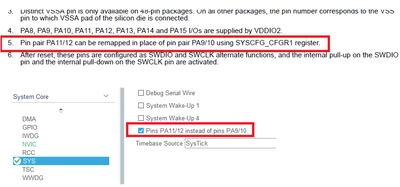
As stated in the datasheet you need to remap the IOs PA11/12 in place of IO pair PA9/10 using SYSCFG_CFGR1 register:

SofLit_0-1709933856214.png

So in CubeMx go to SYS menu and check the checkbox "Pins PA11/12 instead of pins PA9/10". CAN peripheral will be available.

2 replies

mccabehmAuthor
Senior
March 8, 2024

I was able to select alternate functions for pins on another STM32 part using <Ctrl + mouse left> when configuring pinout in IOC file. This doesn't appear to be possible with the STM32F042F6P7. Does this mean I can't use the STM32CubeIDE and HAL for the STM32F042F6P7 part?

mƎALLEm
mƎALLEmAnswer
Technical Moderator
March 8, 2024

Hello,

As stated in the datasheet you need to remap the IOs PA11/12 in place of IO pair PA9/10 using SYSCFG_CFGR1 register:

SofLit_0-1709933856214.png

So in CubeMx go to SYS menu and check the checkbox "Pins PA11/12 instead of pins PA9/10". CAN peripheral will be available.

To give better visibility on the answered topics, please click "Best answer" on the reply which solved your issue or answered your question.