Associate III
May 5, 2026
Solved

how to set PCROP Protection to default STM32H755

  • May 5, 2026
  • 7 replies
  • 569 views

hello ST Community,

I'm trying to protect sector 0 of the flash drive from mass erasure using the PCCOP Protection option on the NUCLEO-H755ZI-Q.

After tinkering around a bit to understand its functions, I can no longer reset its protection to its default state. Currently, it looks like the one in the photo:

image.png

When I try to set these values

PROT_AREA_START1 = 0x0801FF00

PROT_AREA_END1 = 0x080100FF

which i believe are their default values, both in the RDP=0xAA and RDP=0xBB states, I get this error.
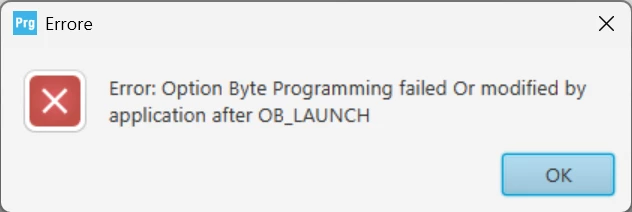
image.png

How can I fix this? Is there a way to reset PCROP Protection to its default mode?

Thanks for the support.

Best answer by Bubbles

Hello @Domy_ST,

what you describe to me looks like SBSFU application. You definitely do not need to perform RDP regression to update the Application SW. It should even work in RDP2 without any problem. Unless modification of OB is involved, of course.

Please have a look at X-CUBE-SBSFU | Product - STMicroelectronics examples, which you can use as inspiration and starting point.

It's well tested to provide security to Application SW while retaining the flexibility of secure firmware update.

BR,

J


7 replies

Bubbles
ST Employee
May 6, 2026

Hello @Domy_ST ,

yes, you can reset the PCROP, but only when the RDP is changed at the same time:

Bubbles_1-1778056620310.png

Which means that you need to set the RDP to 0xBB and then, in the same step, request both RDP=0xAA and the PCROP modification.

BR,

J

To give better visibility on the answered topics, please click on Accept as Solution on the reply which solved your issue or answered your question.
Domy_STAuthor
Associate III
May 6, 2026

@hello @Bubbles,

I managed to get PCROP to enable and disable protection depending on the size of the flash drive I wanted. But another problem arose:

The problem is that before enabling PCROP protection, you write data to the flash drive from 0x08000000 to 0x0801FFFF (a single 128KB page in sector 0). After enabling PCROP protection, you only write data to that area with DMEP = 0 to protect it from deletion. However, after enabling PCROP protection, the data is still deleted; after PCROP protection, it cannot be overwritten.

Is there a way to prevent data from being deleted while enabling PCROP?

Thanks for support

ST Employee
May 6, 2026

hello @Domy_ST , 
Enabling PCROP should not erase the data. 
The DMEP is feature that protects a PCROP-ed region from being erased by an RDP regression. 

  • DMEP = 1  (checked) the PCROP region is erased when an RDP regression is performed. 
  • DMEP = 0 (unchecked) the PCROP region is kept when RDP regression is performed. 

you have to program the flash with the your program (upload the elf to the device), then enabled the PCROP region. 
Could you clarify how you determine that the data has been deleted?

Also what do you mean by data is deleted: 

  • when you try to read a PCROP region the expected behavior is to return zeros
  • If you read 0xFF, that usually means the region has been erased.  

Possible causes of the PCROP region being erased include:

  • An incorrect configuration in the linker script.
  • A routine that erases that sector as soon as the device starts (when you are configuring and applying the PCROP region).

Best regards. 


Domy_STAuthor
Associate III
May 6, 2026

hello @Onizuka09,

Here's the sequence of how I write data to that flash area, again using the STM32Cubeprogrammer tool:

  • I load from a binary file, and that area is populated as shown in the following figure:

Immagine 2026-05-06 140603.png

  • I enable PCROP only for that area of ​​sector 0, as shown in the following figure:

Immagine 2026-05-06 142309.png

  • After that, I reread the data in that flash area. I see that we're all zero, as shown in the following figure:

Immagine 2026-05-06 141805.png

Is there a way to prevent it from returning zero, but instead return data from binary files as before, but still need to be protected by PCROP during the regression from RDP = 1 to RDP = 0?

Thanks

Bubbles
ST Employee
May 6, 2026

Hello @Domy_ST,

enabling PCROP should not erase the protected memory.

I suspect there's some other problem. How do you determine it's deleted?

BR,

J

To give better visibility on the answered topics, please click on Accept as Solution on the reply which solved your issue or answered your question.
Domy_STAuthor
Associate III
May 6, 2026

I simply write data and verify that they are populated on STM32CubeProgrammer and it's ok. Then I enable PCROP and DMEP = 0 only for that area and then I recheck that they are still populated on STM32CubeProgrammer and instead they are all populated at 0x00000000 for that area of ​​sector 0.

Bubbles
ST Employee
May 6, 2026

Hi @Domy_ST,

the very purpose of PCROP is to return zeros when being read. The fact that it's not erased during regression is secondary. Maybe you can try using secure area instead? It may be better fitting your use case.

BR,

J

To give better visibility on the answered topics, please click on Accept as Solution on the reply which solved your issue or answered your question.
Domy_STAuthor
Associate III
May 6, 2026

OK, thanks @Bubbles @Onizuka09,

So, in my case, PCROP doesn't work. What is the safe area in the flash (at least 128KB) that I can write data to and that can be accessed not only by the CPU but also externally (UART and YMODEM management) for the bootloader, and that prevents deletion during the RDP = 1 to RDP = 0 regression?

Or is there a way other than the PCROP option that permanently protects sector 0 of the flash from deletion during RDP = 1 to RDP = 0 regression?

Thanks for support

Bubbles
ST Employee
May 6, 2026

Hello @Domy_ST ,

no, there is no such setting. But let me ask, what is the use case here? You don't seem to be too concerned with security (just my impression) so what use is to you the RDP1?

If you describe the goal, we can help you find the correct means.

BR,

J

To give better visibility on the answered topics, please click on Accept as Solution on the reply which solved your issue or answered your question.
Domy_STAuthor
Associate III
May 6, 2026

hello @Bubbles,

My goal is to load two pieces of software into the flash area: in sector 0, only the Bootloader SW, and the rest of the sectors are the Application SW, which must be protected at RDP level 1 for security.

But I also need to be able to update the Application SW (reprogramming) from the Bootloader SW in sector 0. To do this, I have to reset the RDP level to 0, which involves a mass erasure, including the Bootloader SW, and I cannot reprogram.

I know that the STM32 factory bootloader exists, with BOOT0 = 1, and this is fine for updating only the Bootloader SW in sector 0 but not the Application SW. I can update the Application SW only from the Bootloader SW in sector 0, and after the update, it must be protected at level 1 for security.

This is my goal. Is there a way, like in my case, to avoid the mass erasure of just sector 0 during RDP regression?

Thanks

Bubbles
BubblesAnswer
ST Employee
May 6, 2026

Hello @Domy_ST,

what you describe to me looks like SBSFU application. You definitely do not need to perform RDP regression to update the Application SW. It should even work in RDP2 without any problem. Unless modification of OB is involved, of course.

Please have a look at X-CUBE-SBSFU | Product - STMicroelectronics examples, which you can use as inspiration and starting point.

It's well tested to provide security to Application SW while retaining the flexibility of secure firmware update.

BR,

J


To give better visibility on the answered topics, please click on Accept as Solution on the reply which solved your issue or answered your question.
Domy_STAuthor
Associate III
May 6, 2026

hello @Bubbles,

Ok, thanks for the help. I'll take a look at the examples you provided.


ST Employee
May 14, 2026

Hello @Domy_ST 

your current question which is : 

are the examples still compatible with this STM32H755 series?

Is different from your initial question :

Is there a way to reset PCROP Protection to its default mode?

for to moderation purposes , we are going to split this thread, you can find the new thread here.
B.R