Lead III
May 14, 2025
Solved

Language export fails

  • May 14, 2025
  • 2 replies
  • 473 views

Language export fails. I followed this guide: https://support.touchgfx.com/docs/development/ui-development/touchgfx-engine-features/texts-and-fonts#translations
I installed ruby for windows using rubyinstaller-3.4.3-1-x64.exe.
I updated TouchGFXf Designer and the middleware folder to 4.25.0.
I ruby from command prompt like this:

myproject_path\Middlewares\ST\touchgfx\framework\tools\textconvert
ruby translations.rb export myproject_path\TouchGFX\assets\texts\assets\texts\texts.xml translations.xlsx

Then I get the following error:

in 'Kernel#require': cannot load such file -- nokogiri (LoadError)

I have no experience with ruby and no instructions are listed.
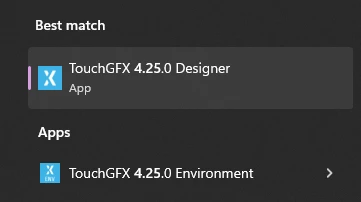
Best answer by LouisB

You can search in your windows search bar for "TouchGFX X.XX.X Environment",

LouisB_0-1747301349420.png

Open It should open a terminal, then run your commands inside.

2 replies

ST Employee
May 15, 2025

Hello @unsigned_char_array,

Can you try to run the command from the TouchGfx environment ?

BR,

Louis BOUDOST Software Engineer | TouchGFX
Lead III
May 15, 2025

@LouisB wrote:

Hello @unsigned_char_array,

Can you try to run the command from the TouchGfx environment ?


How do I do that?

"Kudo posts if you have the same problem and kudo replies if the solution works.Click ""Accept as Solution"" if a reply solved your problem. If no solution was posted please answer with your own."
LouisBAnswer
ST Employee
May 15, 2025

You can search in your windows search bar for "TouchGFX X.XX.X Environment",

LouisB_0-1747301349420.png

Open It should open a terminal, then run your commands inside.

Louis BOUDOST Software Engineer | TouchGFX
Lead III
May 16, 2025

Thanks. It works.

open "TouchGFX 4.25.0 Environment"
cd "path_to_project\TouchGFX\assets\texts"
"C:\TouchGFX\4.25.0\touchgfx\framework\tools\textconvert\translations.rb" export texts.xml translations.xlsx


"Kudo posts if you have the same problem and kudo replies if the solution works.Click ""Accept as Solution"" if a reply solved your problem. If no solution was posted please answer with your own."