
TYAMA.2
Associate II
September 19, 2025
Solved

Add Custom Service

  • September 19, 2025
  • 2 replies
  • 503 views

I want to add a custom BLE service in STM32CubeMX. I saw on a website that the Add Custom Service feature could be used for this. However, I don't know the procedure for adding a service using this feature. Please tell me the steps to add a service using the Add Custom Service feature in the latest IDE and MX environment.
Best answer by STTwo-32

Hello @TYAMA.2 

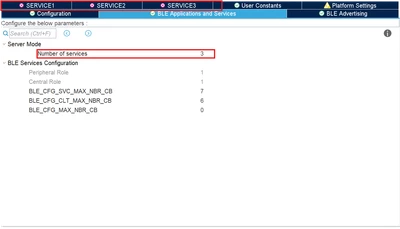
On the BLE Applications and Services tab, you have to select the number of services you want to implement. Once this is done, N new tab will be added to your configuration view (N is the number of services you selected): 

STTwo32_0-1758298987298.png

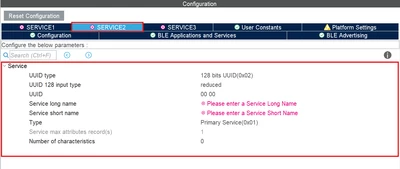
On each of the new tab you can configure the service you are looking for: 

STTwo32_1-1758299223017.png

Best Regards.

STTwo-32


2 replies

TYAMA.2
TYAMA.2Author
Associate II
September 19, 2025

Thanks for your reply.

Is "Number of services" where I add new services? (Please see the attachment.)

Is there an item called "Add Custom Service"?

If possible, please show me with a screenshot.

STTwo-32
STTwo-32Answer
Technical Moderator
September 19, 2025

Hello @TYAMA.2 

On the BLE Applications and Services tab, you have to select the number of services you want to implement. Once this is done, N new tab will be added to your configuration view (N is the number of services you selected): 

STTwo32_0-1758298987298.png

On each of the new tab you can configure the service you are looking for: 

STTwo32_1-1758299223017.png

Best Regards.

STTwo-32


To give better visibility on the answered topics, please click on Accept as Solution on the reply which solved your issue or answered your question.
TYAMA.2
TYAMA.2Author
Associate II
September 22, 2025

Thank you for your reply.
I understand that the normal way to add services is "Number of services".
Thank you.

STTwo-32
Technical Moderator
September 22, 2025

Since your question is answered. Please accept the comment that answer your question as solution to close this post.

Best Regards.
STTwo-32

To give better visibility on the answered topics, please click on Accept as Solution on the reply which solved your issue or answered your question.