
BNist.1
Associate III
June 18, 2020
Question

PCB cannot see the COM port

  • June 18, 2020
  • 2 replies
  • 1602 views

Hello,

I developed a PCB for a project using STM32WB55 and after getting it manufactured I am trying to connect it to the computer in order to run the code on it.

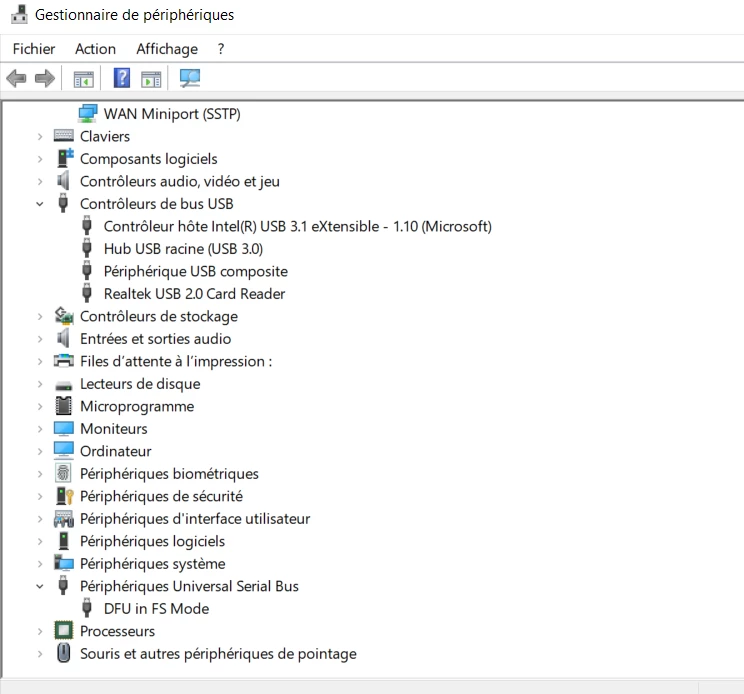
However, when I connect it to the PC I cannot see the COM port for it. It seemly doesn't detect the COM port. All I can see is the DFU in FS Mode under Universal Serial Bus which I am not that sure what it is or how to make use of it. ( see picture below. Sorry for it being in French)

I want to run the code on the PCB by using the bootloader, however in order to do that in to use the STM tools, I need to see the COM port.

What do you think I should do?0693W000001qzVYQAY.png
This topic has been closed for replies.

2 replies

TDK
Super User
June 18, 2020

It looks like the chip is in bootloader mode. You can flash the chip with ST-Link or STM32CubeProgrammer to put your code on there. Make sure BOOT0 is low when the chip resets to run your own code.

"If you feel a post has answered your question, please click ""Accept as Solution""."
BNist.1
BNist.1Author
Associate III
June 18, 2020

Thank you so much! Now I can connect to the board through STM32CubeProgrammer.

However, do you have any tutorial on how we could make this work? How we could run a code on the board? For example to blink a led let's say in the beginning.

Thank you,

Bogdan