LW.1
Associate II
March 4, 2020
Question

STLink doesn't detect WB55 on custom board

  • March 4, 2020
  • 8 replies
  • 3377 views

Hi everyone,

My group has made a custom board for the STM32WB55RG and included a 6-pin configuration for connecting it to a STLink V2 via SWD (target: VCC, SWO, SWDIO, SWCLK, NRST, GND). However in STLink Utility we keep getting an error message when trying to connect (it also happens when using CubeProgrammer):

 Can not connect to target!
 
 Please select "Connect Under Reset" mode from Target->Settings menu and try again.
 
 If you're trying to connect to a low frequency application , please select a lower SWD Frequency mode from Target->Settings menu.

The Utility settings are SWD port at 4.0 MHz, Normal mode, and Hardware Reset mode. The firmware on the STLink has also been updated.

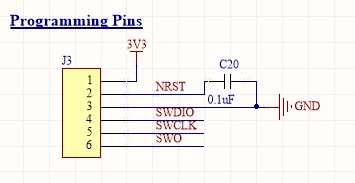
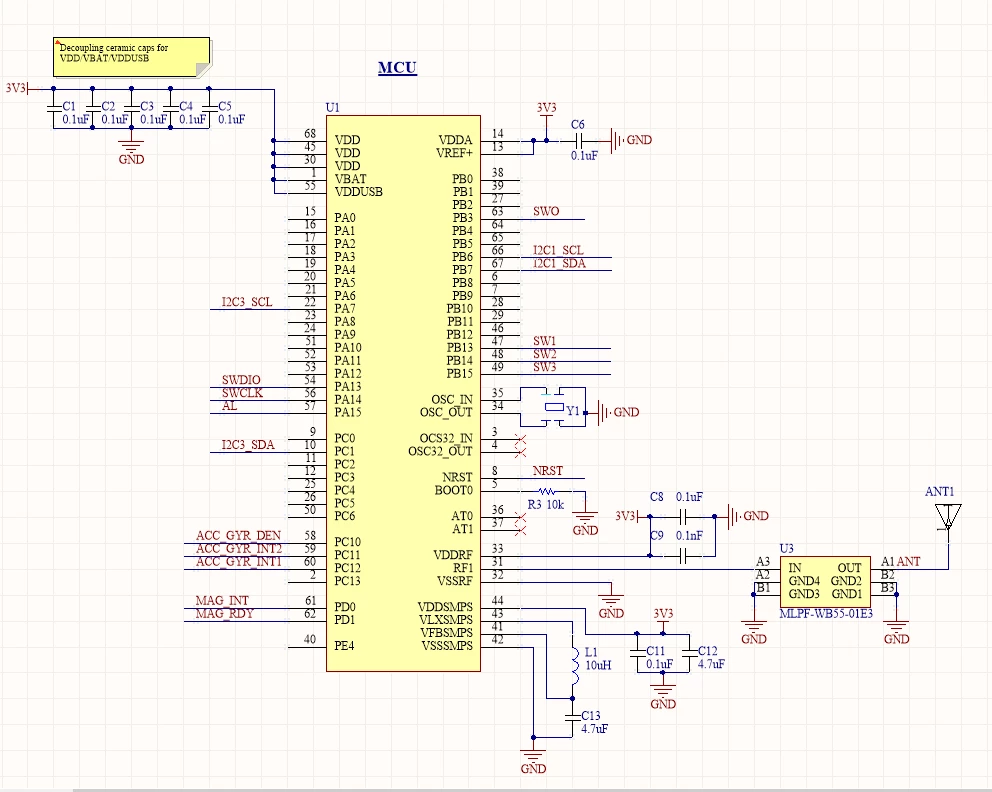
These are our MCU and programming pin schematics:
0690X00000DYbbsQAD.png

0690X00000DYbbxQAD.png

We're really unsure of what the problem could be; from our past projects and looking at what other people have done online, we can't find anything wrong with our schematic. We've also short tested the SWD pins and verified the MCU voltage is at 3.3V several times.

Furthermore, we soldered another MCU onto another of our boards by itself - so the BOOT0 pin is floating and there aren't any decoupling caps, which we don't think should be an issue unless the BOOT0 pin is supposed to be pulled down - and powered it with 3.3V. Here too we can't get STLink to connect and our short testing doesn't turn up anything.

The only thing we can think of right now is that our short testing gave us a false positive and thus something somewhere is soldered poorly. What else could we check, and is there an error in our schematics after all? Thanks for any suggestions you may have.

This topic has been closed for replies.

8 replies

Remi QUINTIN
Technical Moderator
March 4, 2020

​I am surprised that the NRST pin is not having this kind of 3V3_STLINK pull up as on the picture below.

Could you check this?

Tesla DeLorean
Guru
March 4, 2020

Perhaps because you create different expectations in the Data Sheet for the parts? https://www.st.com/resource/en/datasheet/stm32wb55cc.pdf

0690X00000DYiWVQA1.jpg

You shouldn't need R or C parts externally, or any connectivity, for the part to start properly. Here you have a C to give some stickyness to the reset button, and the contact bounce.

The NRST usually gets clamped to ground when the POR circuit detects a brown out, or most often the absence of VDDA in STM32 designs.

Tips, Buy me a coffee, or three.. PayPal VenmoUp vote any posts that you find helpful, it shows what's working..
Remi QUINTIN
Technical Moderator
March 4, 2020

..

Remi QUINTIN
Technical Moderator
March 4, 2020

​You can get the schematics of our Nucleo board MB1355 on the st.com site.

Remi QUINTIN
Technical Moderator
March 4, 2020

​Could you also check that the following option bytes are correctly set:

If you want to rely on the external PH3/BOOT0 pin value to define the start up , set the nSWBOOT0 option byte to 1.

If you want to rely only on SW values, set the option bytes as follow: nSWboot0=0  nboot1=1  nboot0=1

LW.1
LW.1Author
Associate II
March 4, 2020

Good point, we don't have any pullup with the NRST on our board. Is this why the STLink can't detect anything? If so, we only have 10K resistors right now; will that work or does the pullup have to be 100K?

As for setting the option bytes, I assume that step is for after we get STLink to detect the MCU?

Tesla DeLorean
Guru
March 4, 2020

The device has an internal pull-up on the pin, around 40K per docs. It is basically to ensure that the pin follows the supply ramping, and the pin is internally clamped to zero by the POR/BOR circuit.

Relying on RC time constants for reset circuits on synchronous designs is fraught with issues.

Tips, Buy me a coffee, or three.. PayPal VenmoUp vote any posts that you find helpful, it shows what's working..
LW.1
LW.1Author
Associate II
March 8, 2020

An update: turns out the NRST wasn't going high, so for now we've soldered a new board with just the MCU and the BOOT0. On this we see NRST go high after powering on the board with 3.3V, and BOOT0 is low, but STLink still doesn't recognize it. The debugger pins are also connected properly, all the VDD/VDDA/VSSA are powered properly, and the MCU is oriented correctly. Does the board need anything else? What else could possibly be wrong?

Tesla DeLorean
Guru
March 8, 2020

For a standalone ST-LINK make sure pin 1 is powered by the Target VDD and the voltage correctly reported in ST-LINK Utilities.

For a NUCLEO or DISCO base ST-LINK make sure you have fully disconnected the on board target device.

A secondary signs of life method is to pull BOOT0 high and try to ping the system loader UART directly, ie at 9600 8E1 sending 0x7F pattern, look for 0x79 response.​

Tips, Buy me a coffee, or three.. PayPal VenmoUp vote any posts that you find helpful, it shows what's working..
LW.1
LW.1Author
Associate II
March 9, 2020

Another update: on our Nucleo board, when it powers on, we see NRST go high, SWDIO go high, and SWCLK remain low. However on our board we only see NRST go high; SWDIO stays low. Should it be the same behaviour as the Nucleo? What could cause SWDIO to stay low in this case?

LW.1
LW.1Author
Associate II
March 10, 2020

Okay, we finally got it working. The reason SWDIO wasn't going high was because we hadn't soldered on the buck converter for it; once that was on and the MCU connections double-checked, we can connect to it now. Thanks @clive1 for your time!