
Louis Loving
Senior
June 14, 2019
Solved

Trying to get custom STM32WB55 board to advertising state.

  • June 14, 2019
  • 9 replies
  • 1914 views

I am using STM32Cube FW_WB V1.1.1 and built a new project.

I have programmed stm32wb5x_BLE_Stack_fw.bin into the memory space for CPU2 (0x80CB000).

I have added the following interrupt handlers:

void IPCC_C1_TX_IRQHandler(void)
{
 HW_IPCC_Tx_Handler();
 
 return;
}
 
void IPCC_C1_RX_IRQHandler(void)
{
 HW_IPCC_Rx_Handler();
 return;
}

I have configured STM32_WPAN as follows:
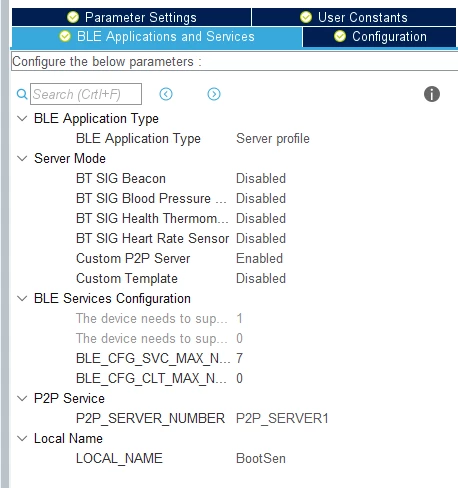
0690X000008igDVQAY.png

My small application runs fine but I get no indication that the BLE is running at all. I am using ST BLE Sensor to scan but do not see my device.

Any pointers on where to look or what to check would be greatly appreciated.

-Louis
This topic has been closed for replies.
Best answer by Louis Loving

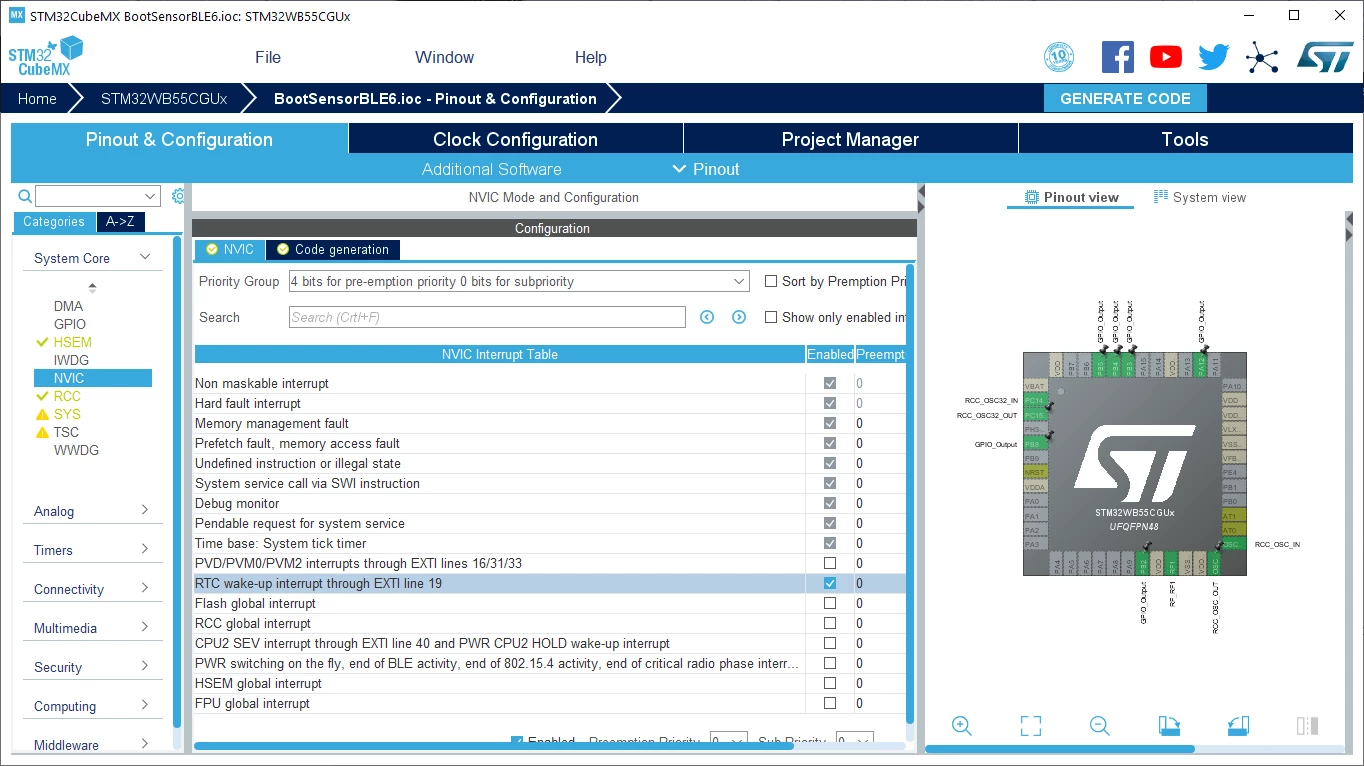
I had missed this step:

0690X000009XiV5QAK.png

Works great now.

9 replies

Louis Loving
Senior
June 17, 2019

I see that the Release Notes for STM32WB Copro Wireless Binaries actually say to program stm32wb5x_BLE_Stack_fw.bin at 0x080CC000 so I have made that change. I am still not seeing any BlueTooth activity.

-Louis

Louis Loving
Senior
June 17, 2019

I am using STM32CubeProgrammer v2.1.0 to program the Copro Wireless Binaries. Is it required that I use the command line interface, STM32_Programmer_CLI.exe, via the on-chip USB port? Is it possible to use ST-Link connected to JTAG on my custom board?

Thanks.

-Louis

Louis Loving
Senior
June 17, 2019

Moving on.

I now have STM32_Programmer_CLI.exe connected to my custom board using UART1. Now I am getting the "firmware not authentic" error message and can't seem to program the new stm32wb5x_FUS_fw.bin file.

Here is the last part of the attempt.

0690X000008iqBFQAY.png

Louis Loving
Senior
June 17, 2019

Ok, I am past this now. I used STM32CubeProgrammer to select all sectors and then Erase selected sectors. Full chip erase did not work. Once this was done the "firmware not authentic" error disappeared.

I now get:

0x20030030 : 01000200 (as expected)

Louis Loving
Senior
June 19, 2019

I am still not having any luck getting to the advertising state.

I have used the bootloader to program stm32wb5x_BLE_Stack_fw.bin at 0x080CC000. I believe that FUS and the BLE stack are both properly programmed.

I have included the call to SCH_Run(~0) in my main while(1) loop.

My program never hits APPE_SysUserEvtRx().

C2BOOT is set to 0x1 when I break in my while(1) loop.

Here are the settings from my Security Configuration Option Bytes:

0690X000008ixwwQAA.png

Any ideas on what to check next would be greatly appreciated.

-Louis

Louis Loving
Senior
June 28, 2019

My board is finally working. To get it there I had to add the following code along with the two IPCC IRQ handlers.

/**
 * @brief This function handles RTC wake-up interrupt through EXTI line 19.
 */
void RTC_WKUP_IRQHandler(void)
{
 /* USER CODE BEGIN RTC_WKUP_IRQn 0 */
 
 /* USER CODE END RTC_WKUP_IRQn 0 */
 HAL_RTCEx_WakeUpTimerIRQHandler(&hrtc);
 /* USER CODE BEGIN RTC_WKUP_IRQn 1 */
 
 /* USER CODE END RTC_WKUP_IRQn 1 */
}

Louis Loving
Louis LovingAuthorAnswer
Senior
June 28, 2019

I had missed this step:

0690X000009XiV5QAK.png

Works great now.

plusquam
Visitor II
July 28, 2019

Hello,

@STM: I would like to remind, that month has passed and problem is still present on STM32Cube FW_WB.

According to the STM's workshop presentation, there is an information, that WPAN middleware handles IPCC and HSEM, but apparently not...

0690X000009ZYPIQA4.png

For further newbie developers like me: keep in mind, that you have to add IPCC_C1_TX_IRQHandler and IPCC_C1_TX_IRQHandler definitions manually, make all steps which were described by Louis and remember to make sure, that you have SCH_Run(~0) in your main while loop. You will save lot of time.

@STM: Can we expect some fixes or changes for STM32Cube FW_WB in the near future?

Thank you in advance.

Regards

Louis Loving
Senior
July 28, 2019

I have also found 2 more things that caused me a great deal of lost time.

We designed a custom board using the same STM32WB55CG that the Nucleo dongle uses and experienced very erratic behavior. Our board would come up and advertise for less than a second and then we would see no further activity on the bluetooth core. The problem ended up being our antenna circuitry. If you are designing a custom board, you really need some expertise in that area or a great deal of luck.

The second issue that caused me some grief was really odd behavior with my IAR IDE when using the #pragma pack(1). The tools did not give me a warning or error but I would mysteriously get a hard fault when executing my code. IAR apparently does not support that pragma and fortunately there are other methods to accomplish this needed behavior.

Good luck.

Louis Loving
Senior
August 2, 2019

After further review, the problem was not with #pragma pack(1) per se. The #pragma pack directive "affects declarations of structures following the pragma directive to the next #pragma pack or the end of the compilation unit. Once the structures that I wanted packed were covered", I added the #pragma pack() with an empty list. This "restores the structure alignment to default" and the hard fault went away. (From the IAR Workbench Development Guide)