
Dave Nadler
Senior III
October 21, 2018
Solved

Atollic/STM32cubeMX generates code but fails to open project (Java version problem?)

  • October 21, 2018
  • 3 replies
  • 1673 views

I just installed the latest Atollic package, and the latest STM32cubeMX 4.27.0 plug-in.

Created a cube project, edited the configuration, generated code.

After code generation I clicked Open Project, but it failed:
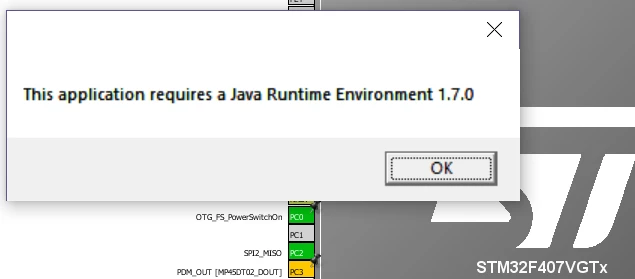
0690X000006CDv5QAG.png

The newly generated project doesn't show up in the workspace where it was created.

If I add the project manually to the workspace, it does not build.

How can I get past this?

Thanks!

PS: Java(s) installed on this workstation:

c:>java -version

java version "11" 2018-09-25

Java(TM) SE Runtime Environment 18.9 (build 11+28)

Java HotSpot(TM) 64-Bit Server VM 18.9 (build 11+28, mixed mode)

c:>"C:\Program Files (x86)\Atollic\TrueSTUDIO for STM32 9.1.0\ide\jre\bin\java" -version

java version "1.8.0_181"

Java(TM) SE Runtime Environment (build 1.8.0_181-b13)

Java HotSpot(TM) Client VM (build 25.181-b13, mixed mode)

This topic has been closed for replies.
Best answer by Cyril FENARD

Hi @Dave Nadler​ ,

Let me share my personal experience and solution:

I have Eclipse (Photon + AC6 plugins) and Atollic TrueStudio installed on my Windows 7 PC.

I generated a STM32CubeMX project for TrueSTUDIO "Toolchain / IDE"

- With STM32CubeMX, open -> Eclipse -> Compilation: can not be launched

 This seems to conflict with with eclipse installation and default program set for this type of project.

- With TrueSTUDIO® (9.0.1) -> import -> project build -> OK

 I checked .cproject and .project generated by STM32CubeMX and they seem well formed.

- With TrueSTUDIO® (9.1.0) -> the same as 9.0.1

The solution that worked for me was to go into the folder were the .cproject was and thanks to 

Properties contextual popup, I changed the "Open with" updated with TrueSTUDIO.exe

I regenerated the project and open from STM32CubeMX launches the correct IDE now.

Hoping it gives ideas where to go.

Regards.

Cyril

3 replies

Technical Moderator
October 22, 2018

Hello @Dave Nadler​ ,

I will raise this internally to CubeMx team and we come back to you soon.

Kind Regards,

Imen

When your question is answered, please close this topic by clicking "Accept as Solution".Thanks Imen
Cyril FENARD
ST Employee
October 30, 2018

Hi @Dave Nadler​ ,

Let me share my personal experience and solution:

I have Eclipse (Photon + AC6 plugins) and Atollic TrueStudio installed on my Windows 7 PC.

I generated a STM32CubeMX project for TrueSTUDIO "Toolchain / IDE"

- With STM32CubeMX, open -> Eclipse -> Compilation: can not be launched

 This seems to conflict with with eclipse installation and default program set for this type of project.

- With TrueSTUDIO® (9.0.1) -> import -> project build -> OK

 I checked .cproject and .project generated by STM32CubeMX and they seem well formed.

- With TrueSTUDIO® (9.1.0) -> the same as 9.0.1

The solution that worked for me was to go into the folder were the .cproject was and thanks to 

Properties contextual popup, I changed the "Open with" updated with TrueSTUDIO.exe

I regenerated the project and open from STM32CubeMX launches the correct IDE now.

Hoping it gives ideas where to go.

Regards.

Cyril

Dave Nadler
Senior III
January 15, 2019

@Cyril FENARD​ Thanks Cyril, that works here as well.