Sangkyu Kim
Associate II
July 25, 2017
Question

Difference Yellow marker and Red marker in CUBE MX

  • July 25, 2017
  • 1 reply
  • 2908 views
Posted on July 25, 2017 at 04:35

0690X00000607g4QAA.png

Hi

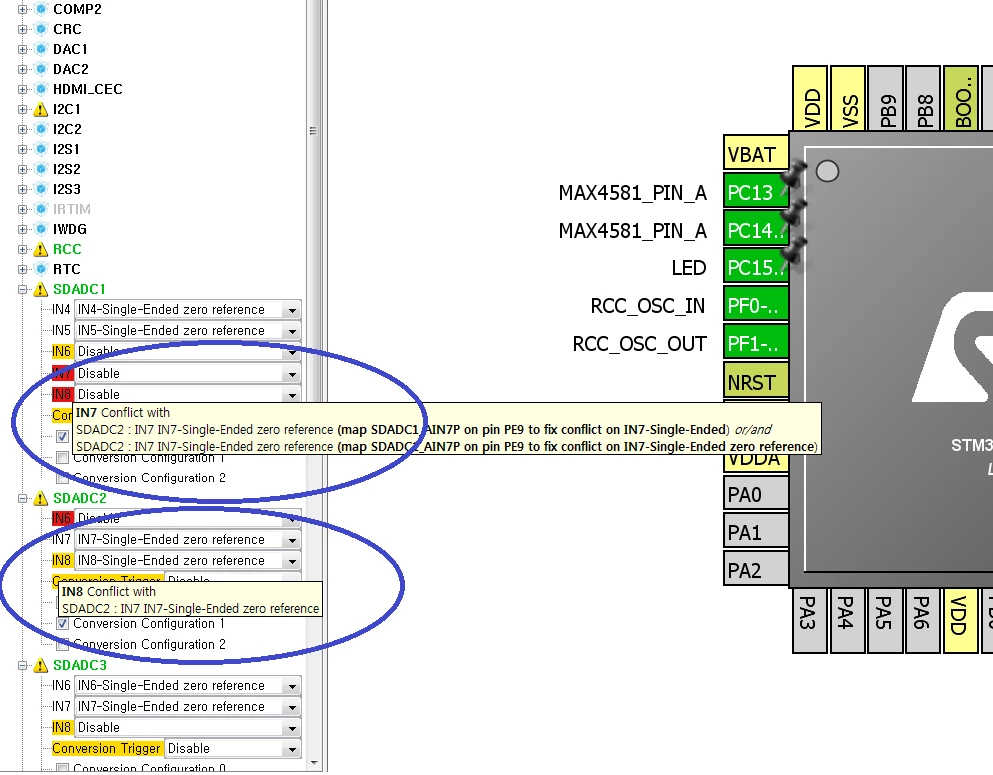
What is the difference Yellow marker and Red marker in CUBE MX?

Can I ignore the Yellow message and use that function?

I want to use 6 channel of SDADC, but the Yellow message make me confuse.

Is there any problem?

i attach my CUBE MX project.

#cubemx
This topic has been closed for replies.

1 reply

Elkin Granados
Associate II
July 27, 2017
Posted on July 27, 2017 at 21:27

Hi Sangkyu Kim,

When you select a peripheral in the CubeMX it allows all the pins of the peripheral itself and show to you all the pins related. Some pins could have multiple features to work and some of this features are not available for multiple reasons, in your case if you deploy the IN6 menu that is in yellow you can see that this pin can not  be configured in differential mode (because the pin that allows to you to use the SDADC in this mode is currenly configured has other single input), but you can configure it as single ended. The yellow mark indicates that some features of this pin are not available, and the red mark indicates that difinitely the pin is not available in any mode. So in this case, you can use the pin only in the available modes.

0690X00000607hkQAA.png