Félix TREFOU
Associate III
April 16, 2018
Question

High frequency clock signal generation

  • April 16, 2018
  • 6 replies
  • 3955 views
Posted on April 16, 2018 at 23:34

Hi,

I'm facing a problem i can't solve. It seem so simple but i think i need an other point of view.

For a project using a led driver (LED1642GW) i need a clock in 20MHz~30MHz.

I forgot this oscillator in my hardware so i want to generate it with my MCU (and it will be cheaper).

I made the most simple project for my stm32L476VGT:

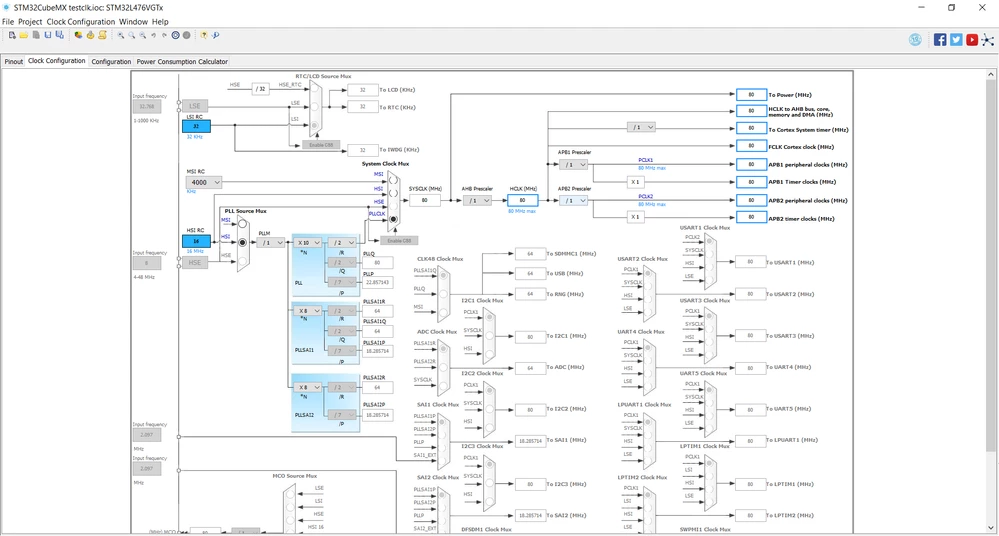
- HSI (or MSI) speeded up to 80MHz through PLLCLK.

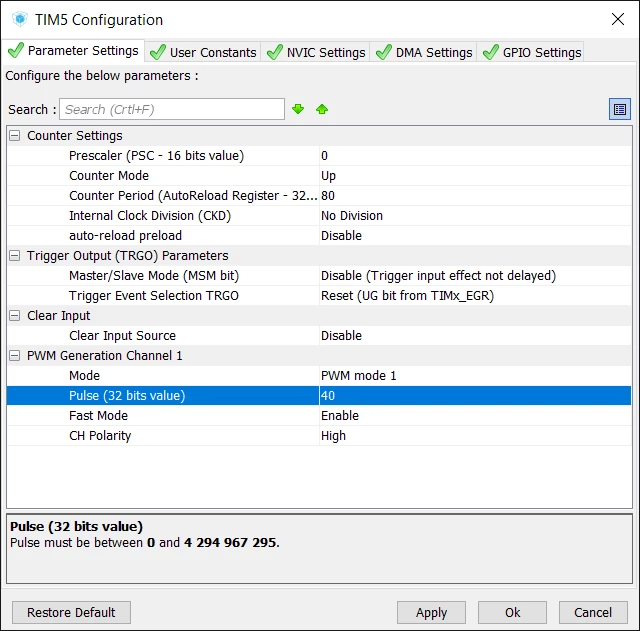
- TIM5 with PWM or CC on Channel 1

- PA0 on Alternate function (TIM5 ch5) with very high speed

Reference manual is saying that internal clock of the timer is APB (so 80MHz).

Despite of my differents trys, i don't managed to get an output signal at 20MHz.

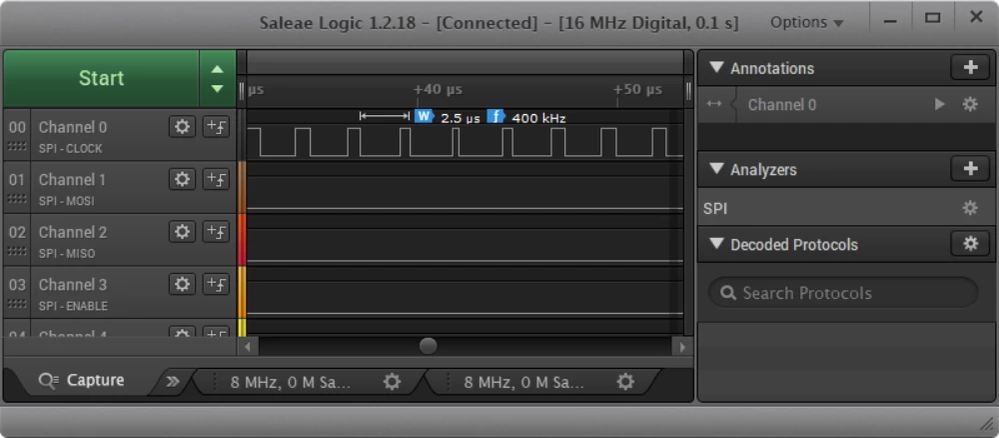
With the example bellow i expected a signal at 80/80 = 1MHz but i only get 400kHz...

Here is some screens:
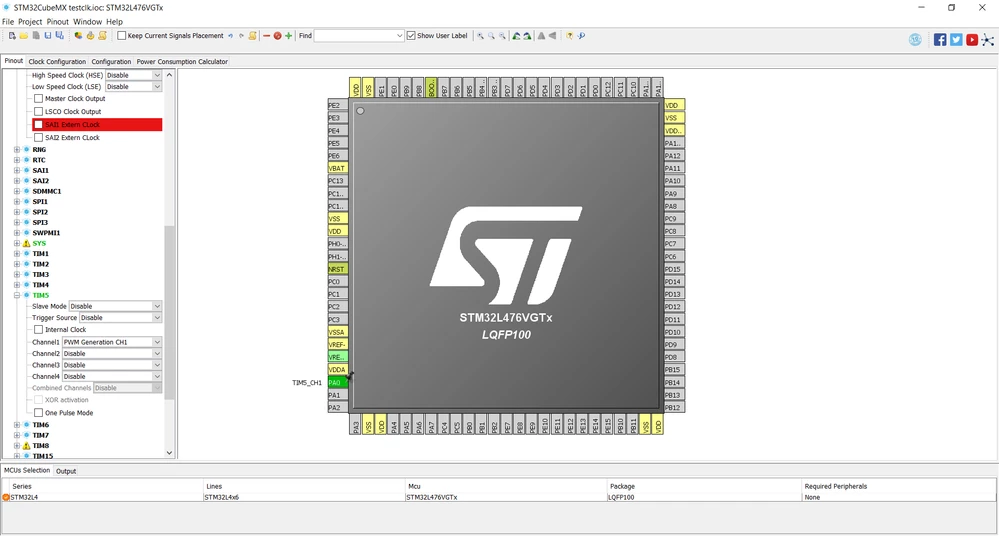
0690X0000060AYIQA2.png0690X0000060AJIQA2.png0690X0000060AbpQAE.png0690X0000060AcTQAU.png

Did i miss something? Or does the GPIO not made for this purpose?

Thanks!

#cubemx #pwm #clock #signal-generation
This topic has been closed for replies.

6 replies

waclawek.jan
Super User
April 17, 2018
Posted on April 17, 2018 at 10:13

Read out and check/post the content of RCC and TIM5 registers.

JW

Félix TREFOU
Associate III
April 17, 2018
Posted on April 17, 2018 at 22:35

Here are the registers:

0690X0000060AcnQAE.png0690X0000060AdHQAU.png

While trying to debug these register, i found the MCO capability, and i investigated:

0690X0000060AdMQAU.png

So taking my SYSCLK at 80MHz and divide it by 4 will output my 20MHz frequency!?

But, even if this solution work, i want to find where i am wrong with this timer TIM2! :o

waclawek.jan
Super User
April 17, 2018
Posted on April 17, 2018 at 23:42

Yes, MCO would help you. And that would also reveal that your RCC settings are different from what you've shown as CubeMX screenshot in the first post. And also in the first post you are talking about TIM5, whereas you've given registers for TIM2.

It's impossible to help based on inconsistent information.

JW

Félix TREFOU
Associate III
April 18, 2018
Posted on April 18, 2018 at 10:26

Oups i changed from timer5 to timer2 between screens! But problem seem to be at System PLL, look at my next post!

Félix TREFOU
Associate III
April 18, 2018
Posted on April 18, 2018 at 10:47

Ok, the problem seems comming from the PLL ( perhaps CubeMX has error?)

So, for the tests, i've put my MSI at 16MHz set it to my SYSCLK. I configured MCO on PA8 with prescaler /8 and measured output on oscilloscope, for each test, i changed MCO source to measure clocks:

- MCO on MSI:

No problem here, MCO output was at 16/8 = 2MHz

0690X0000060AeKQAU.png0690X0000060AeFQAU.png

-MCO on SYSCLK

Problem, MCO output was at 4MHz instead of 80/8 = 10MHz

0690X0000060AdqQAE.png0690X0000060AdvQAE.png

-MCO on PLLCLK (to target the problem)

Problem, MCO output was at 4MHz too.

0690X0000060Ae0QAE.png0690X0000060Ae5QAE.png

So i think my first problem was not an error on my timer but directly an error on PLLCLK.

Here is the PLLCFGR register:

0690X0000060AePQAU.png

PLLN has a wrong configuration...

It's comming from this MACRO in stm32l4xx_hal_rcc.c, all values of RCC_OscInitStruct are correct:

0690X0000060AeUQAU.png0690X0000060AeZQAU.png

When i manually modify register values, MCO output is correct!

Here is the macro defined:

#define __HAL_RCC_PLL_CONFIG(__PLLSOURCE__, __PLLM__, __PLLN__, __PLLP__, __PLLQ__,__PLLR__ ) \

(RCC->PLLCFGR = (uint32_t)(((__PLLM__) - 1U) << 4U) | (uint32_t)((__PLLN__) << 8U) | \

(uint32_t)(((__PLLP__) >> 4U ) << 17U) | \

(__PLLSOURCE__) | (uint32_t)((((__PLLQ__) >> 1U) - 1U) << 21U) | (uint32_t)((((__PLLR__) >> 1U) - 1U) << 25U))
Félix TREFOU
Associate III
April 18, 2018
Posted on April 18, 2018 at 13:01

Ok problem solved!

When PLLM is set to /1, CubeMX don't initialize RCC_OscInitStruct.PLL.PLLM, and when the macro substract 1, it overflow. So the value set on PLLCFGR is 0xfffffff1

henry.dick
Associate II
April 18, 2018
Posted on April 18, 2018 at 13:06

That's the problem with software like Hal. You have to spend time debug it or you don't know when and where it may bite you.

In the end, it is much more efficient you just code to the data sheet. My experience anyway.

AvaTar
Senior III
April 18, 2018
Posted on April 18, 2018 at 13:37

That is the catch-22:  Cube ist most attractive to the unexperienced, who are sometimes oblivious of or unwilling to consult the data sheets ...

Nawres GHARBI
Technical Moderator
April 19, 2018
Posted on April 19, 2018 at 10:25

Hi Felix, 

As a workaround you can use the LL driver for the RCC, the PLLM will be then well configured. 

This issue has been fixed and will be delivered in the next release. 

Nawres GHARBI
Technical Moderator
May 3, 2018
Posted on May 03, 2018 at 16:52

4.25.1 fixing this issue will be available by the end of this week