misagh
Associate II
June 27, 2017
Solved

STM32CubeMX display resolution problem

  • June 27, 2017
  • 7 replies
  • 4322 views
Posted on June 27, 2017 at 16:27

Hello ST team,

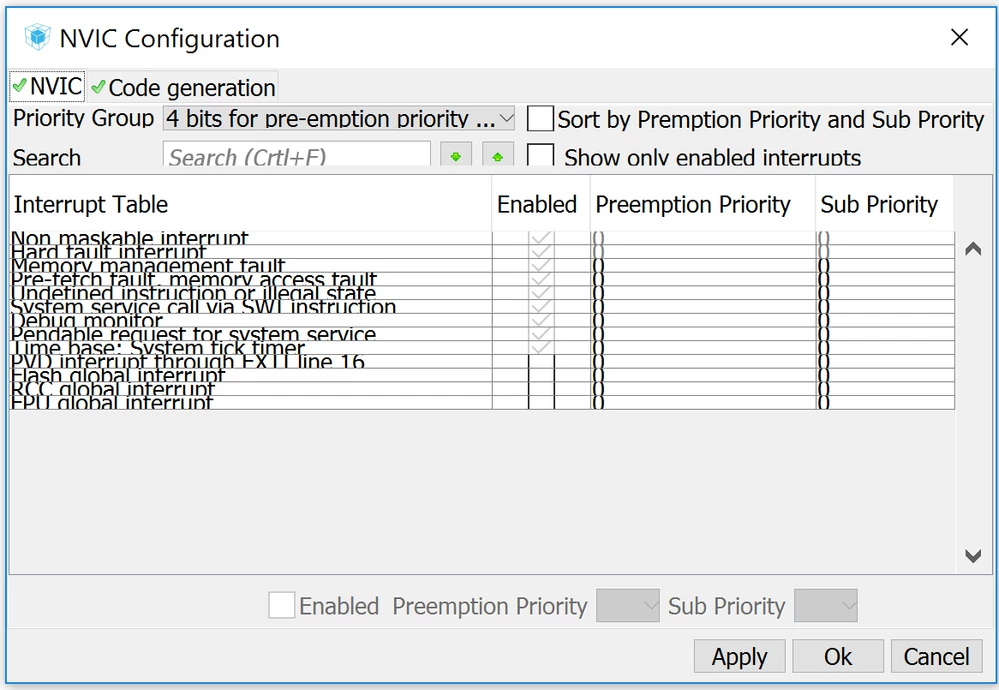
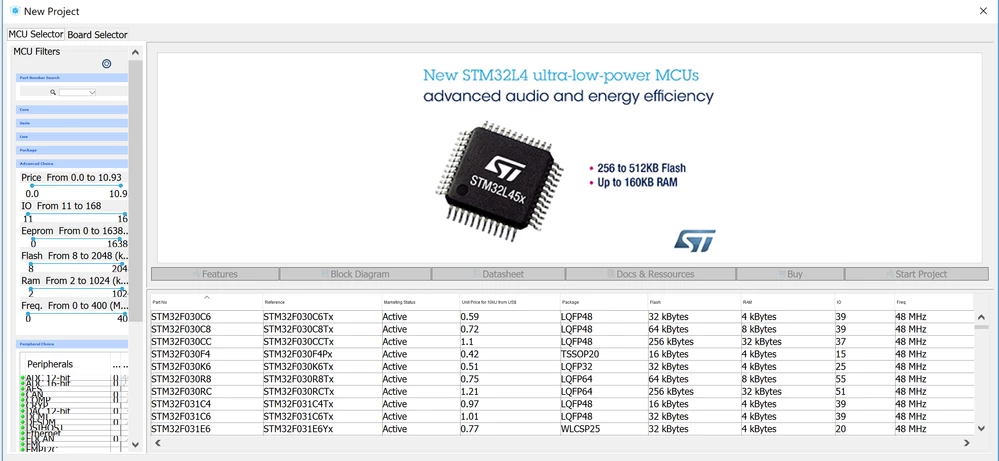
I think the STM32CubeMX code generator has a big problem with screen resolution. I'm using a laptop with 4K display, so my CubeMX appears like following screenshots, which are annoying in many cases: Almost half of most table rows appear vertically, the texts sometimes are too small or too large and so on:

0690X00000607RtQAI.png0690X00000607UdQAI.png

Can this problem fix?

Bests,

Misagh

#cube-mx #stm32cubemx
This topic has been closed for replies.
Best answer by misagh
Posted on October 21, 2017 at 05:53

Hello everybody,

Finally I

found a really simple solution:

Create a batch file (for example cubeMX.bat) and write following code on it:

java -Dsun.java2d.uiScale=2.5 -jar '$path\STM32CubeMX.exe'

which $path is your cubeMX installed path. For example my path is 'C:\Program Files\STMicroelectronics\STM32Cube\STM32CubeMX' so my bat file contains:

java -Dsun.java2d.uiScale=2.5 -jar 'C:\Program Files\STMicroelectronics\STM32Cube\STM32CubeMX\STM32CubeMX.exe'

Then save the file and run it. The resolution problem should be fixed.

Bests,

Misagh

P.S: I tasted this method on windows 10 with jre-9 and worked!

7 replies

Tesla DeLorean
Guru
June 27, 2017
Posted on June 27, 2017 at 16:51

Dale has been pushing this issue for awhile, there were threads/complaints before this one

https://community.st.com/0D50X00009XkfPjSAJ

 
Tips, Buy me a coffee, or three.. PayPal VenmoUp vote any posts that you find helpful, it shows what's working..
misagh
misaghAuthor
Associate II
June 27, 2017
Posted on June 27, 2017 at 17:28

Hey

Turvey.Clive.002

‌,

Thanks for reply. You are right! I should do some search on forums before new post. However, the bad news is there are newer versions of CubeMX after that report, but they didn't fix it

:(

Regards,

Misagh

Technical Moderator
June 27, 2017
Posted on June 27, 2017 at 19:22

Hi

Salmanzadeh.Misagh

,

I will raise your feedback internally to CubeMx team.

Regards

Imen

"When your question is answered, please close this topic by clicking ""Accept as Solution"".ThanksImen"
Dalmo Lima
Visitor II
July 10, 2017
Posted on July 10, 2017 at 17:58

Hello ST Team,

The Cube is BAD with 4K resolution monitor,  but the ST MCU Finder is REALLY BAD.

Please, do something quickly!

Best regards,

Dalmo

Tesla DeLorean
Guru
July 10, 2017
Posted on July 10, 2017 at 19:09

Quickness is clearly not something I'd rely on. Dale's complaint is over 6 months old, and I'm pretty sure it wasn't the first, the Apple guys have been complaining longer, I'm just not that bothered to dig up cites. Screen resolution issues with user interfaces have been a problem for decades. Usually someone on the dev team has some UI skills, and an appreciation for people having different displays, with different settings and preferences. The 'one size fits all' mentality has never worked, ever.

Tips, Buy me a coffee, or three.. PayPal VenmoUp vote any posts that you find helpful, it shows what's working..
Greg Smith
Associate II
July 10, 2017
Posted on July 10, 2017 at 19:28

I also use a 4K display and find the cube output difficult to read. Please consider scaling the font sizes by real physical size, or allow us to set a larger font size. Also, the toolbar icons are stupidly small. I have attached an image illustrating how the icons are too small... In our own Windows software we calculate the physical size of the fonts and icons taking into account the scaling set for the monitor. You need to use icons of at least 32x32 if not 48x48 or more to work with 4K displays. I run with scaling set to 175%.

0690X00000607XBQAY.png

Perhaps you could get someone in the development team to try to use a 28'' 4K display and see how they cope with the tiny fonts and icons...

Tesla DeLorean
Guru
July 10, 2017
Posted on July 10, 2017 at 19:54

>>

In our own Windows software we calculate the physical size of the fonts and icons taking into account the scaling set for the monitor.

Exactly, we had to deal with this back in the day when most people had 640x480 or 800x600, screens, and no one else in the office had any appreciation for things outside the parameters they were used too. I had to source my own monitors and video cards otherwise I just get the catch-of-the-day crap the store was buying. A Viewsonic P815 and video card to drive it maximal (

1800 x 1440 at 76 Hz

) ran about $2K. Engineers need better screens than accountants...

When you ship product to tens of thousands of individuals with different computers, screen sizes, preferences, and vision characteristics, you have to make sure this stuff is right otherwise your phone is on fire unnecessarily. And I really liked my front-line tech-support staff, and they appreciated I had their backs.

The Register and Inquirer <G>

Tips, Buy me a coffee, or three.. PayPal VenmoUp vote any posts that you find helpful, it shows what's working..
Daniel Debrunner
Visitor II
October 10, 2017
Posted on October 10, 2017 at 16:10

Hello CubeMX developers

I am sorry to be back with this issue, but 4K screens and CubeMX do not go together. We are here more than two dozen people facing this issue almost daily. No way to project educational slides with this kind of nonstandard dialog windows:

0690X00000608RZQAY.png

or speedbuttons that are as tiny as 2x2mm on some screens and not decipherable.

To ST HMI developers: Please keep in mind, that the first front-end impression to critical students may make it difficult for the instructor to pass a positive message about CubeMX to students.

Thank you very much for a soon release after 4.22.1 of software where listbox line height calculation and list item font size is being computed by the underlying native environment API and not apparently by the development tool which fails in this respect.

Otherwise, CubeMX has made tremdous progress during the last two years. Congratulations!

Daniel Debrunner, Bern University of Applied Sciences

misagh
misaghAuthorAnswer
Associate II
October 21, 2017
Posted on October 21, 2017 at 05:53

Hello everybody,

Finally I

found a really simple solution:

Create a batch file (for example cubeMX.bat) and write following code on it:

java -Dsun.java2d.uiScale=2.5 -jar '$path\STM32CubeMX.exe'

which $path is your cubeMX installed path. For example my path is 'C:\Program Files\STMicroelectronics\STM32Cube\STM32CubeMX' so my bat file contains:

java -Dsun.java2d.uiScale=2.5 -jar 'C:\Program Files\STMicroelectronics\STM32Cube\STM32CubeMX\STM32CubeMX.exe'

Then save the file and run it. The resolution problem should be fixed.

Bests,

Misagh

P.S: I tasted this method on windows 10 with jre-9 and worked!

fauvarque.daniel
ST Employee
October 24, 2017
Posted on October 24, 2017 at 10:14

The uiScale Java option unfortunately works only with Java9.

Another possible option if you are on Windows 10 is to change the compatibility mode.

Right click on STM32CubeMX.exe and go the Properties -> Compatibility screen

Change the scaling behavior from Application to System.

We'll see if it is possible to force this option by default at installation time

Regards

Daniel

​In order to give better visibility on the answered topics, please click on 'Accept as Solution' on the reply which solved your issue or answered your question.
misagh
misaghAuthor
Associate II
October 24, 2017
Posted on October 24, 2017 at 13:10

Unfortunately I don't have this option in my windows 10.

In compatibility tab I have 'disable display scaling on high dpi' option which doesn't effect on application UI.

Regards,

Misagh

fauvarque.daniel
ST Employee
October 25, 2017
Posted on October 25, 2017 at 19:21

I found another possible workaround to the issue (Warning it is a hack :) )

The actual problems comes from the manifest file embedded in the java.exe where it declares to be dpiAware.

So the trick is to change the manifest to set dpiAware false.

  • locate your java.exe binary (generally in C:\Program Files\Java\jrexxx\bin\java.exe)
  • copy java.exe into javanodpi.exe (better safe than sorry)
  • edit the Manifest with a resource editor like XNResourceEditor
  • change dpiAware, it should look like <dpiAware>false</dpiAware>, on my java.exe it was in the last section of the file
  • run CubeMX using
    • javanodpi.exe -jar STM32CubeMX.exe
    • Don't forget to put the right path for the 2 exe in front of the names, you can create a .bat for that

FYI I've forced <dpiAware>false</dpiAware> in STM32CubeMX.exe manifest but it doesn't work because STM32CubeMX.exe calls java.exe

Regards

Daniel

​In order to give better visibility on the answered topics, please click on 'Accept as Solution' on the reply which solved your issue or answered your question.