
dale
Associate III
December 24, 2016
Solved

STM32CubeMX on UHD (4K) display - clock configuration diagram too small to see

  • December 24, 2016
  • 13 replies
  • 8553 views
Posted on December 24, 2016 at 21:51

Using STM32CubeMX version 4.18.0 on Windows 10 Pro (build 1607) with an UHD (4K) display results in tiny toolbar icons and a very tiny Clock Configuration diagram.  Please see attached screen capture image.  Not that this application window is not maximized.

Is there any way to scale these images within the STM32CubeMX application so that I can see them with human eyes?

Additionally, the screen looks the same even when I drag the STM32CubeMX application to a different, lower-resolution monitor.

Any help would be appreciated.

Thanks,

Dale

#stm32cubemx
This topic has been closed for replies.
Best answer by Teemu Ikonen
Posted on September 16, 2017 at 20:06

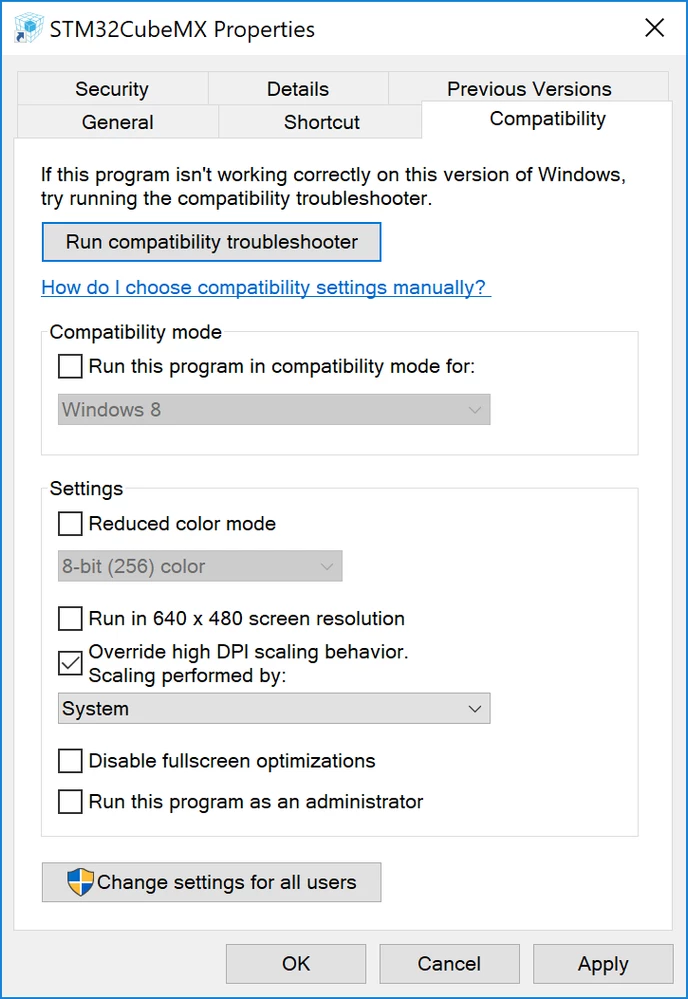
This is my workaround on a Windows 10 laptop.

  1. Right click STM32CubeMX launcher on the desktop and select Properties
  2. Open 'Compatibility' tab
  3. Check ''Override high DPI scaling behavior'
  4. Select 'System' from the combobox and click OK.

Now CubeMX should be lot more readable on a high resolution display.

0690X00000608G7QAI.png

13 replies

Teemu Ikonen
Associate
September 16, 2017
Posted on September 16, 2017 at 20:06

This is my workaround on a Windows 10 laptop.

  1. Right click STM32CubeMX launcher on the desktop and select Properties
  2. Open 'Compatibility' tab
  3. Check ''Override high DPI scaling behavior'
  4. Select 'System' from the combobox and click OK.

Now CubeMX should be lot more readable on a high resolution display.

0690X00000608G7QAI.png
dale
daleAuthor
Associate III
September 18, 2017
Posted on September 18, 2017 at 12:10

This solution works perfectly on my system. In fact, it helps other

Windows apps that don't deal with high DPI displays as well.

Thank you very much!

Thank you,

Dale Wheat

http://dalewheat.com

(330) 732-5307

On Mon, Sep 18, 2017 at 3:06 AM, Teemu Ikonen <

hanieh mohammadi
Visitor II
October 6, 2017
Posted on October 06, 2017 at 11:15

hello,i have a problem! my laptop display is 4k, when i want to run stmcube the icons are very small,my windows is 8.1.please help me, how can i fix it ? ,thank 

mattiadelloca
Associate
October 16, 2017
Posted on October 16, 2017 at 22:54

Hi everyone, same problem! Hope to get a solution for this issue.