
YKim.7
Associate
August 16, 2018
Solved

STM32CubeMX USB CDC Library Problem.

  • August 16, 2018
  • 3 replies
  • 2833 views

MCU : STM32F446RET

CubeMX Version : 4.26.1

===

Hi! I'm currently developing usb CDC(Communication Device Class / USB-OTG-FS) through STM32CubeMX.

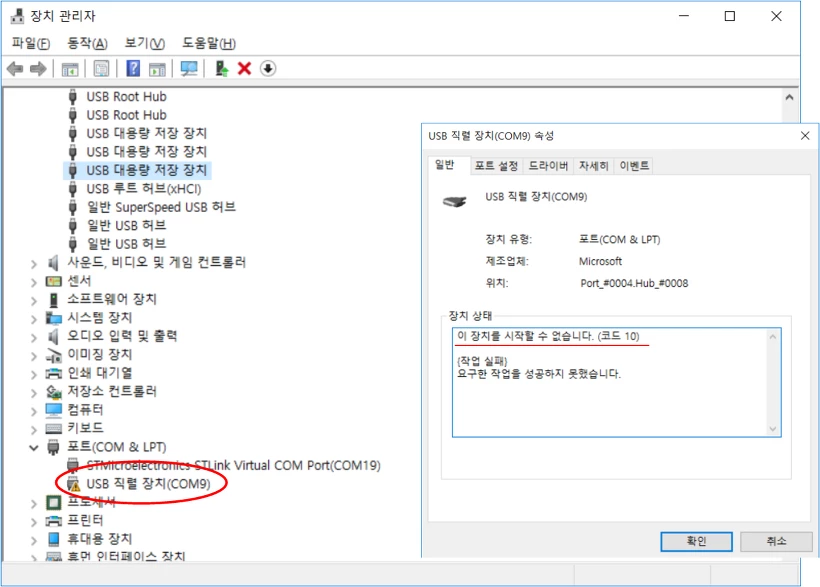
​When I upload the automatically generated code without changing any settings, the usb device will not be recognized properly as follows.(Error code 10)
0690X000006BtkfQAC.png

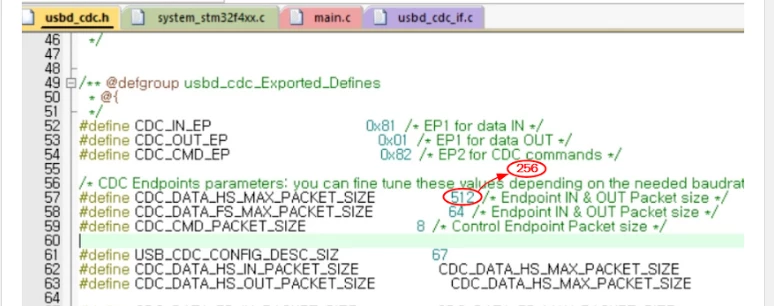
​However, ​following this YouTube video https://youtu.be/oDoavXrQdEg, change the CDC_DATA_HS_MAX_PACKET_SIZE value of usbd_cdc.h file from 512 to 256, and you can see that it is normally recognized.
0690X000006BtkkQAC.png

Is this a problem with the STM32CubeMX library?

Thanks! =)

This topic has been closed for replies.
Best answer by YKim.7

I found a solution! In the CubeMX Setting, setting heap size over 0x1000 makes usb cdc to work properly.

3 replies

YKim.7
YKim.7AuthorAnswer
Associate
August 16, 2018

I found a solution! In the CubeMX Setting, setting heap size over 0x1000 makes usb cdc to work properly.

Khouloud GARSI
Technical Moderator
August 17, 2018

Hi @YKim.7​ ,

Correct! When creating your USB CDC application using STM32CubeMX tool, you should take care of increasing the heap size; Otherwise, USB will not be functional (Using Keil for example, the heap size is 0x200 by default which is too low for USB applications). If you increase it to 0x800, the USB device will be successfully enumerated.

Khouloud.

Pavel A.
Super User
August 17, 2018

Please note: this size belongs to High speed mode, but your USB controller is FS (Full speed). It cannot work in High speed mode so the max. transfer size is limited to 64. How it works for you with larger size? A miracle, perhaps?