
gil_dobjanschi
Associate III
May 2, 2026
Solved

Issue with Save As feature in STM32CubeMX2

  • May 2, 2026
  • 2 replies
  • 681 views

Hi @STackPointer64 ,

I wanted to note one issue related to the 'Save As' feature.

After I enter the project name (I2C_new_project_name) and the project repository (/home/gil/.../I2C_new_project_name) I click the Save button. I open the newly created ioc2 file with a text editor and I notice that the source code path is the one of the old project:

"CMake": {
"outputPath": "I2C_old_project_name_cmake",
"toolchain": "GCC",
"exportSource": "include-packs-from-local",
"removeBoard": true
}

I was expecting to see the source code path of the new project. Sure enough if I generate the project with this ioc2 file it will write to the I2C_old_project_name_cmake directory. 

I edited the ioc2 file  to change the source code path to the new path to fix this issue.


Regards,

Gil

Original post: Starting a new project with an existing ioc2 file. This discussion has been moved here for better tracking and follow-up.
Best answer by Oussama_TROUDI

Hello @gil_dobjanschi 

I'm glad that you found a workaround. The issue has been reproduced and reported to the dev team for a fix. I’ll keep you posted.

Internal ticket number: CDM0062334 (This is an internal tracking number and is not accessible or usable by customers).

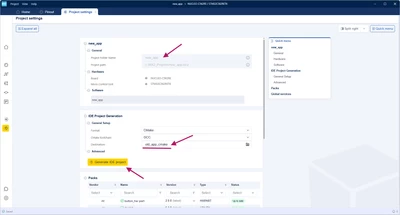
As a workaround, I suggest editing the Destination before generating the new project to update the source code path to the new location and avoid this issue.

Oussama_TROUDI_0-1777908025495.png

Regards,
Oussama

2 replies

Oussama_TROUDI
Technical Moderator
May 4, 2026

Hello @gil_dobjanschi 

I'm glad that you found a workaround. The issue has been reproduced and reported to the dev team for a fix. I’ll keep you posted.

Internal ticket number: CDM0062334 (This is an internal tracking number and is not accessible or usable by customers).

As a workaround, I suggest editing the Destination before generating the new project to update the source code path to the new location and avoid this issue.

Oussama_TROUDI_0-1777908025495.png

Regards,
Oussama

In order to give better visibility on the answered topics, please click on 'Accept as Solution' on the reply which solved your issue or answered your question.
gil_dobjanschi
Associate III
May 4, 2026

Thank you @Oussama_TROUDI !