
AMend.7
Associate III
April 6, 2026
Solved

STM32C5 using STM32CubeIDE

  • April 6, 2026
  • 3 replies
  • 376 views

Hi,

How do I generate a project for STM32CubeIDE using STM32cubeMX2? Apparently, the only options are cmake, IAR, and open-cmsis (Keil). And is it possible to open examples from STM32CubeC5 using STM32CubeIDE?

Ari

Best answer by Karl Yamashita

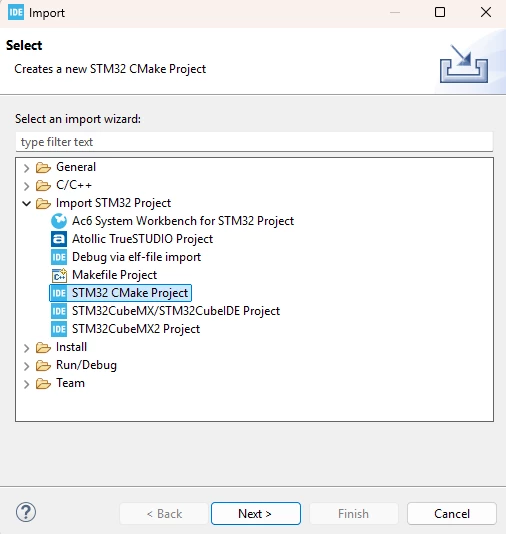
Import the generated CMake project from CubeMX2 as a "STM32 CMake Project"
 

Screenshot 2026-04-06 122232.png

3 replies

Bowman32
ST Employee
April 6, 2026

To generate a project for STM32CubeIDE using STM32CubeMX, you must select STM32CubeIDE as the Toolchain/IDE in the Project Manager | Code Generator section. If you only see options like CMake, IAR ..., and not STM32CubeIDE, this is likely due to limitations in your CubeMX installation.

If you have generated a CMake project with STM32CubeMX, you can import it directly into STM32CubeIDE as a CMake project. For detailed guidance, refer to the application note on using CMake in STM32CubeIDE: AN5952

AScha.3
Super User
April 6, 2026
AMend.7
AMend.7Author
Associate III
April 6, 2026

Hi,

 I asked how to open a project generated by STM32CubeMX2 (STM32C5) or an example from STM32CubeC5 in STM32CubeIDE 2.1.1.

Thanks,

 Ari

Karl Yamashita
Principal
April 6, 2026

Import the generated CMake project from CubeMX2 as a "STM32 CMake Project"


Screenshot 2026-04-06 122232.png

If a reply has proven helpful, click on Accept as Solution so that it'll show at top of the post.CAN Jammer an open source CAN bus hacking toolCANableV3 Open Source