
isikli
Associate III
March 25, 2026
Solved

How to erase rtc backup register with cube programmer

  • March 25, 2026
  • 3 replies
  • 430 views

Could I erase rtc backup registers with STM32CubeProgrammer ?
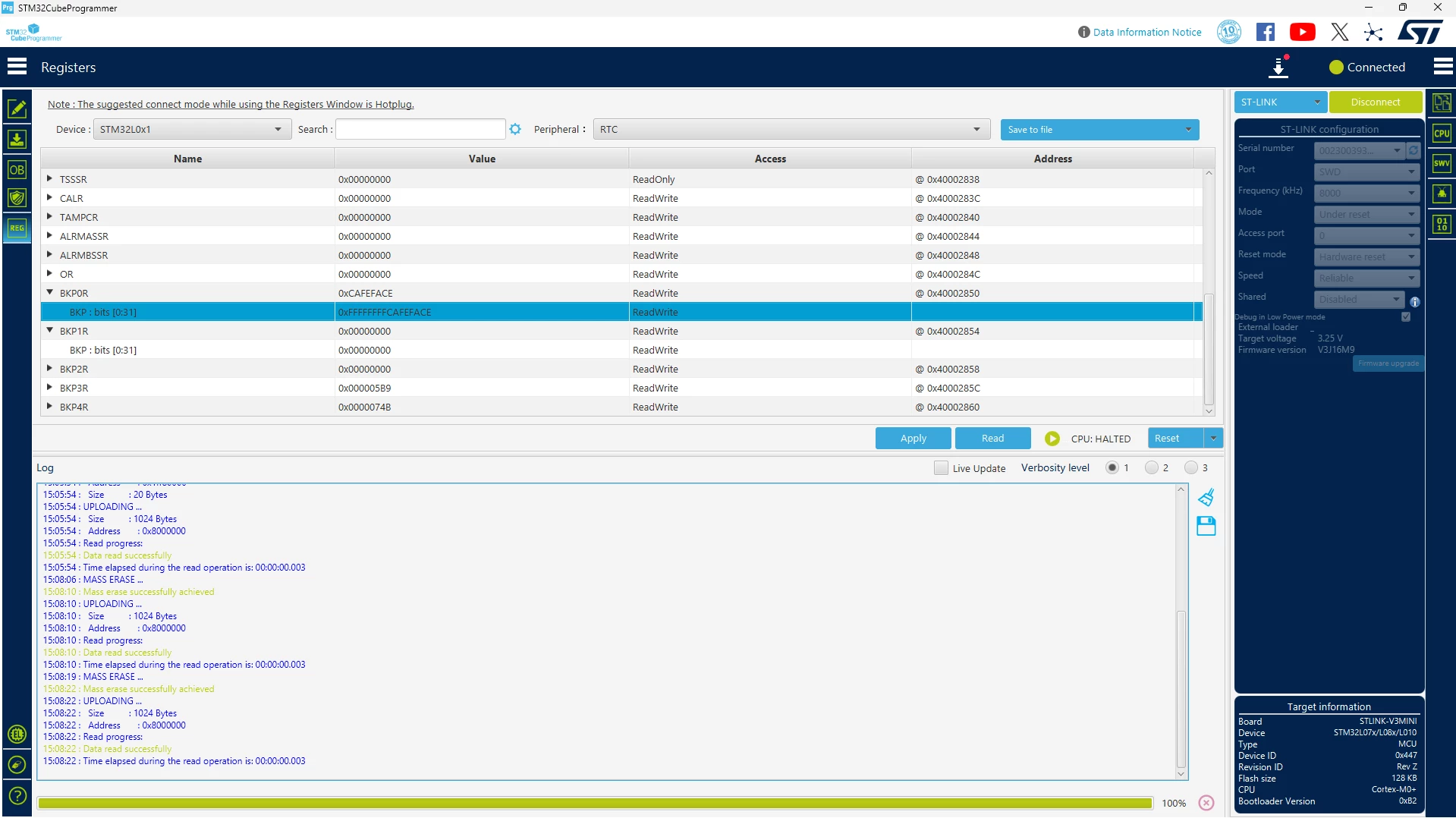
image.png

Best answer by waclawek.jan

... and, to be able to write into PWR registers, you have to set RCC_APB1ENR.PWREN first... :)

JW

3 replies

Peter BENSCH
Technical Moderator
March 26, 2026

Yes, it is possible, but not via the standard mass erase in STM32CubeProgrammer.

For STM32L010/L07x/L08x you have two practical options:

  1. Directly in STM32CubeProgrammer
    • Connect in Hotplug/Halt mode
    • Open Registers → RTC
    • Manually write 0x00000000 (or any value) to BKP0R, BKP1R, etc., then Apply.
  2. Via firmware (backup‑domain reset)

Program and run the following HAL code once; this clears all RTC backup registers:

__HAL_RCC_PWR_CLK_ENABLE();
HAL_PWR_EnableBkUpAccess();
__HAL_RCC_BACKUPRESET_FORCE();
__HAL_RCC_BACKUPRESET_RELEASE();
HAL_PWR_DisableBkUpAccess();

Only if both VDD and VBAT are completely removed will the backup registers be lost automatically.

Does that answer your question?

Regards
/Peter

In order to give better visibility on the answered topics, please click on Accept as Solution on the reply which solved your issue or answered your question.
isikli
isikliAuthor
Associate III
March 31, 2026

I try your suggestion via cubeprogrammer but I can't delete rtc bkp register. Please, check my video.

waclawek.jan
Super User
March 31, 2026

I don't use CubeProgrammer, but I believe you still need to enable the backup-domain access by setting PWR_CR.DBP before trying to overwrite the backup registers.

JW

isikli
isikliAuthor
Associate III
March 31, 2026

I try that PWR_CR.DBP register set firstly, still I can't delete. I guess I can't write to register via cubeprogrammer.

waclawek.jan
Super User
March 31, 2026

... and, to be able to write into PWR registers, you have to set RCC_APB1ENR.PWREN first... :)

JW

isikli
isikliAuthor
Associate III
March 31, 2026

Thank you, That is worked.