CaueEvangelista
Associate
May 19, 2026
Question

Programmer not able to find target

  • May 19, 2026
  • 4 replies
  • 125 views

Hello everyone,

I'm using STM32CubeIDE 2.1.0 and STM32CubeProgrammer on Ubuntu 24.04.4 LTS.

Yesterday I was able to flash my firmware to an module based on the STM32H755 MCU via ST-LINK using the following settings:

  • Port: SWD

  • Mode: Normal

  • Reset mode: Software reset

Everything worked fine. Today I made some modifications to the firmware, but when I tried to connect again, I got this error:

Error: No STM32 target found! If your product embeds Debug Authentication, please perform a discovery using Debug Authentication

Things I have already tried (none worked):

  • Changing Mode to "Under Reset"

  • Changing Reset Mode to "Hardware reset" and "Core reset"

  • Holding the reset button while clicking connect

  • Testing with a different ST-LINK programmer

  • Testing with a different board (same MCU)

Here is what st-info --probe returns:

Failed to enter SWD mode
Found 1 stlink programmers
 version: V3J15
 serial: 004100223235511237333439
 flash: 0 (pagesize: 0)
 sram: 0
 chipid: 0x000
 dev-type: unknown

The ST-LINK is detected (I see stlinkv3_0 and stlinkv3_5 in /dev), but it fails to enter SWD mode. The chip ID reads as 0x000, which suggests no communication with the target.

The board is powered externally (not by the ST-LINK). The flat cable is connected properly. I verified that the same setup worked yesterday.

Any suggestions on how to recover SWD communication?

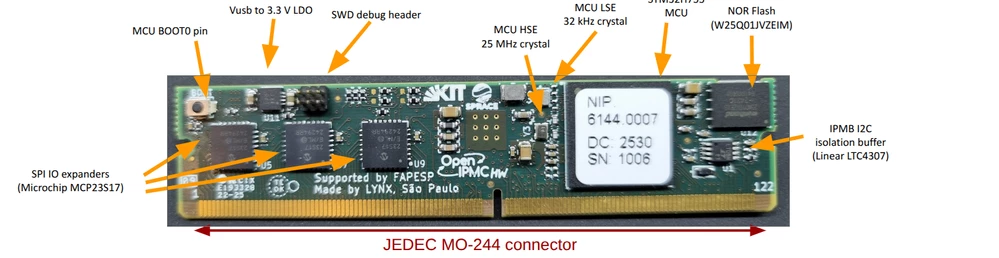
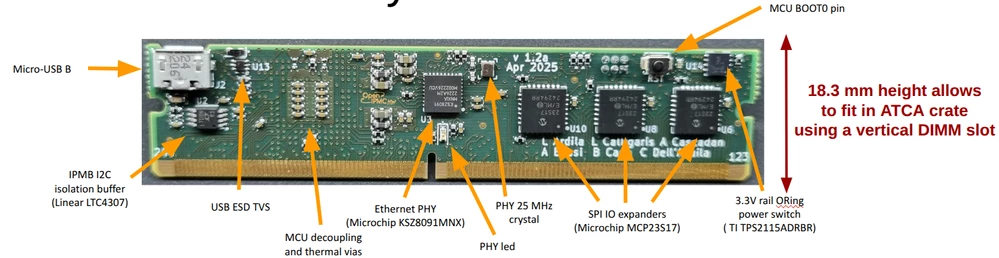
I also attached two pictures showing the front and back of the module I'm using.
BoardFront.png

BoardBack.png

Thank you in advance.

4 replies

MM..1
Chief III
May 19, 2026

Start specify ... Today I made some modifications to the firmware

Pavel A.
Super User
May 19, 2026

> Testing with a different ST-LINK programmer

> Testing with a different board (same MCU)

On the same motherboard? Does the card get good power?


CaueEvangelista
Associate
May 20, 2026

@MM..1 : My firmware has a section that generates a DHCP Client ID. My modification was regarding the way some of the fields of the Client ID are generated, nothing that affects clock config or debug pins, it was logic wise. The problem is that I'm not even able to connect the board in order to flash this new firmware. Maybe something on the old one "blocked" the board?

@Pavel A. : Yes, I tested a second module board (same motherboard though) and got the same error. Power seems fine: the board is externally powered, LEDs are on. The setup worked yesterday with the same hardware.

I also tested on different computers (Ubuntu 24.04 and Windows11), with different ST-LINK programmers and the same result. So it's not an issue with USB ports, drivers, or something specific to the machines.

Any ideas why SWD would stop responding after a firmware update? Could the old firmware be disabling the SWD pins?

MM..1
Chief III
May 20, 2026

SWD is primary under reset always accesible, except protection level enable.
Next SWD kill internal or external corruption circuit.

And too internal system loader can block it based on ... As first your SWD connector on board is 2x2 , exactly you have here NRST GND CLK DATA ? 

If you kill pins on MCU only replace new one reenable SWD...

Main basic test is use internal bootloader and erase MCU for example over UART ... AN2606

And read this How can I recover my STM32H7/STM32H7RS board after... - STMicroelectronics Community

Pavel A.
Super User
May 20, 2026

@CaueEvangelista Can debugger connect to another BMC card *before* your firmware update? IOW does the update alone cause the problem? If so, maybe the update changed something in the option bytes?

Also, as @MM..1 suspects, maybe NRST on your connector is not actually connected so "under reset" does not work? You wrote that you pressed the RESET button, but maybe it did not work. Try to press the BOOT button.


Could the old firmware be disabling the SWD pins?

Not in any documented way, if a debugger actually connects "under reset" and RDP2 was not activated by mistake.