
JKapp.1
Associate II
January 7, 2026
Question

Remote flashing via TCP with STM32_Programmer_CLI and stlink_server

  • January 7, 2026
  • 1 reply
  • 440 views

Hi all,

I'm looking for a way to remotely *flash* a B-U585I-IOT02A | Product - STMicroelectronics eval board using the built-in STLINK-V3.

Remotely means over TCP. Can be at the same computer (e.g., to pass-through debuggers to Docker containers), or across computers.

This works well with GDB for debugging, but I need this to get running with flashing, too.

Questions:

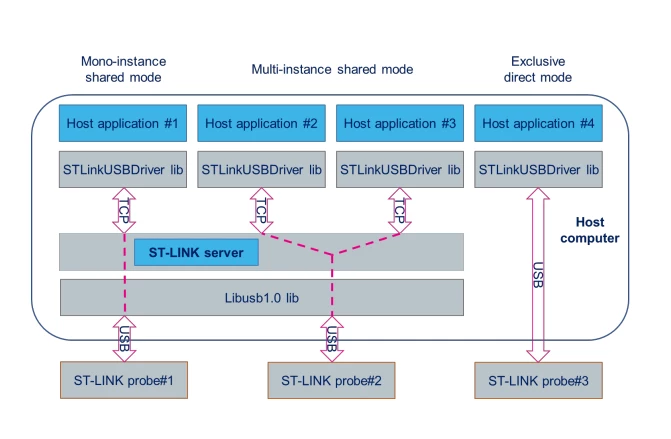
  1. Is there a way to make STM32_Programmer_CLI or related ST apps connect via TCP instead of directly to the debugger? I found ST-LINK-SERVER | Software - STMicroelectronics which seems to create the TCP bridge, but do any ST tools actually use it?
    JKapp1_0-1767785762344.png
  2. Are you aware of this working with free tools like openocd?

I could also flash via GDB, but I'm concerned about the special parts like trust-zone, option bytes, etc. Plus, I'm evaluating Zephyr, and the default way to flash the board is to use the stm32cubeprogrammer: B-U585I-IOT02A Discovery kit — Zephyr Project Documentation

Thanks.

1 reply

Ozone
Principal
January 7, 2026

A SSH session ?

JKapp.1
JKapp.1Author
Associate II
January 7, 2026

Not sure if I can follow. Yes, I can use SSH to forward ports etc, but how to make `STM32_Programmer_CLI` to actually *use* that port?

JKapp.1
JKapp.1Author
Associate II
January 7, 2026

Thanks for your answer.

The ST-Link will be at the same host as the CubeProgrammer. I'd like to remote control CubeProgrammer in the same way as it works with GDB servers, but for flashing.

I would like not to go the SSH + shell way, because this depends on local install paths etc, but look for other options first.

What works here is:


Host-only experiment (cubeprogrammer + st-link, attached via USB)

- spawn stlinkserver via `& 'C:\Program Files (x86)\STMicroelectronics\stlink_server\stlinkserver.exe'`

JKapp1_0-1767794256625.png

- connect via cube programmer UI, make sure to use "shared" probe, connection works:

JKapp1_1-1767794344340.png

JKapp1_2-1767794361334.png

- connecting to the same stlink server via command line does also work:
`& 'C:\Program Files\STMicroelectronics\STM32Cube\STM32CubeProgrammer\bin\STM32_Programmer_CLI.exe' -c port=SWD freq=10 shared`

JKapp1_6-1767794583839.png


JKapp1_5-1767794567742.png

So the linkserver seems to work locally.

Client-to-host experiment

Same experiment as above, but running STM32_Programmer_CLI from a Docker container:

`/opt/st/stm32cubeclt_1.20.0/STM32CubeProgrammer/bin/STM32_Programmer_CLI -c port=SWD freq=10 shared`

JKapp1_7-1767794727885.png

But the port is accessible:

JKapp1_8-1767794828844.png

That means, the linkserver's port is accessible inside the container via telnet, but cubeprogrammer searchs for a connected device (via USB?) first and exits, before the remote connection is used.

Can this be fixed? Is remote usage of cubeprogrammer possible?

Thanks :)