
SamHansen42
Associate II
October 2, 2023
Solved

STM32CubeProgrammer does not install

  • October 2, 2023
  • 2 replies
  • 2843 views

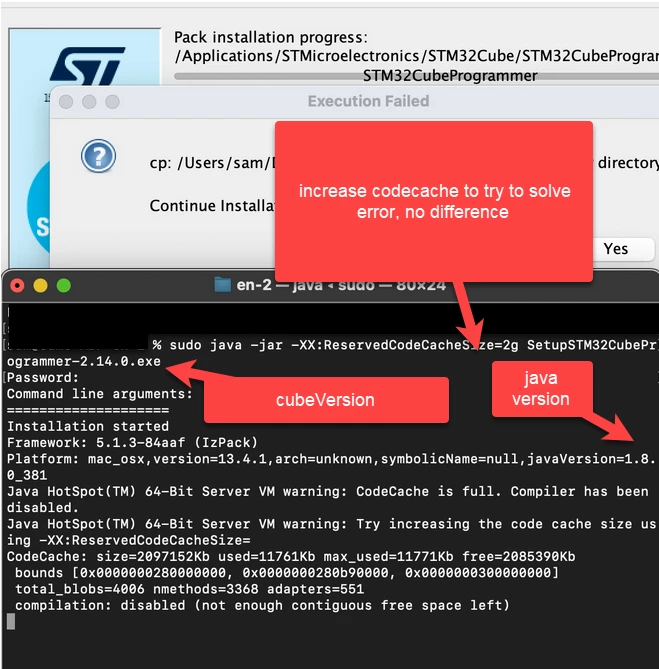
Hello, STM32cubeprogrammer fails to install, can you assist?

M1 Macbook Pro (Ventura 13.4.1)
Java Version = 1.8.0_381
STM32CubeProgrammer = 2.14.0
SamHansen42_0-1696273742002.png


This topic has been closed for replies.
Best answer by Sara BEN HADJ YAHYA

Hello @SamHansen42 ,

Thanks for your feedback,

Please try one of the following solutions:

1- Install CubeProgrammer using the command:

sudo xattr -cr ~/SetupSTM32CubeProgrammer-macos.app

2- In case you used the .exe installer (sudo java -jar SetupSTM32CubeProgrammer-2.14.0.exe.) and the popup occurs during the install indicating the following:

""

cp: en.stm32cubeprg-mac_v2-14-0/../../../jre: No such file or directory

Continue Installation?

""

Continue the installation and copy the downloaded jre folder manually into the CubeProg install folder. To do so, please follow the steps below:

- Copy the jre folder from the downloaded en.stm32cubeprg-mac_v2-14-0

- Open CubeProgrammer install folder

- Right click on STM32CubeProgrammer.app and select "Show Package Contents"

- Paste the jre folder

3- After the install, if CubeProgrammer couldn't be launched via GUI, please try to lanch it via CLI as follows,

- Navigate to the /Applications/STMicroelectronics/STM32Cube/STM32CubeProgrammer/STM32CubeProgrammer.app/Contents/MacOs/bin/

- type the command:

java -jar STM32CubeProgrammer

- If the jre folder exists in CubeProgrammer install folder, type the following command:

../../../jre/bin/java -jar STM32CubeProgrammer

I hope this helps!

Sara.

2 replies

Sara BEN HADJ YAHYA
Technical Moderator
October 16, 2023

Hello @SamHansen42 ,

Thanks for your feedback,

Please try one of the following solutions:

1- Install CubeProgrammer using the command:

sudo xattr -cr ~/SetupSTM32CubeProgrammer-macos.app

2- In case you used the .exe installer (sudo java -jar SetupSTM32CubeProgrammer-2.14.0.exe.) and the popup occurs during the install indicating the following:

""

cp: en.stm32cubeprg-mac_v2-14-0/../../../jre: No such file or directory

Continue Installation?

""

Continue the installation and copy the downloaded jre folder manually into the CubeProg install folder. To do so, please follow the steps below:

- Copy the jre folder from the downloaded en.stm32cubeprg-mac_v2-14-0

- Open CubeProgrammer install folder

- Right click on STM32CubeProgrammer.app and select "Show Package Contents"

- Paste the jre folder

3- After the install, if CubeProgrammer couldn't be launched via GUI, please try to lanch it via CLI as follows,

- Navigate to the /Applications/STMicroelectronics/STM32Cube/STM32CubeProgrammer/STM32CubeProgrammer.app/Contents/MacOs/bin/

- type the command:

java -jar STM32CubeProgrammer

- If the jre folder exists in CubeProgrammer install folder, type the following command:

../../../jre/bin/java -jar STM32CubeProgrammer

I hope this helps!

Sara.

In order to give better visibility on the answered topics, please click on 'Best answer' on the reply which solved your issue or answered your question.
SamHansen42
Associate II
October 23, 2023

TLDR: DO STEP 2 OF SOLUTION PROVIDED BY SARA, INSTALL THE EXE AND MANUALLY COPY THE JRE AS INDICATED

1. When entered this command I got no response from terminal.


2. OK, performed


2- In case you used the .exe installer (sudo java -jar SetupSTM32CubeProgrammer-2.14.0.exe.) and the popup occurs during the install indicating the following:

""

cp: en.stm32cubeprg-mac_v2-14-0/../../../jre: No such file or directory

Continue Installation?

""

Continue the installation and copy the downloaded jre folder manually into the CubeProg install folder. To do so, please follow the steps below:

- Copy the jre folder from the downloaded en.stm32cubeprg-mac_v2-14-0

- Open CubeProgrammer install folder

- Right click on STM32CubeProgrammer.app and select "Show Package Contents"

- Paste the jre folder


I would like to point out for other users, somehow I had a copy of .app directly under Applications/STMicroelectronics/. This was possibly installing using the .app instead of .exe. This caused confusion when performing step 2, i copied the jre here. Now I got rid of this. when you copy the jre I think you should copy to the .app file inside Applications/STMicroelectronics/STM32Cube.

I did this of step 3, but then realized my mistake above and corrected that. App starts


3- After the install, if CubeProgrammer couldn't be launched via GUI, please try to lanch it via CLI as follows,

- Navigate to the /Applications/STMicroelectronics/STM32Cube/STM32CubeProgrammer/STM32CubeProgrammer.app/Contents/MacOs/bin/

- type the command:

java -jar STM32CubeProgrammer

Thank you!