
Best answer by Peter BENSCH

There should be the option J-LINK behind the turquoise drop down button, per default showing ST-LINK:
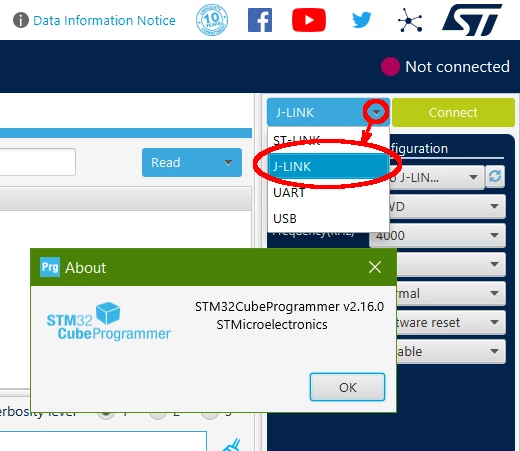
J-LINK.png


3 replies

AScha.3
Super User
April 16, 2024

Hi,

i just downloaded CubeProgrammer , newest version , 2.16.0.

and can select J-Link now :

AScha3_0-1713276085960.png


"If you feel a post has answered your question, please click ""Accept as Solution""."
ASatt
ASattAuthor
Associate II
April 16, 2024

Hi 

Thank you very much for your immediate reply. I have version 2.16.0. But there is no J-link supported in it. Drop down manue does not show  j-link.

ASatt_0-1713291878015.png

regards

A.SATT

Peter BENSCH
Technical Moderator
April 16, 2024

J-LINK is supported since CubeProgrammer 2.16.0 and CubeMonitor 1.8.0.

Does it answer your question?

Regards
/Peter

In order to give better visibility on the answered topics, please click on Accept as Solution on the reply which solved your issue or answered your question.
ASatt
ASattAuthor
Associate II
April 16, 2024

Hi Peter,


I just downloaded the new version. But it did not help as well. There is no option to select J-link. I have windows 11 Home edition installed. Can you please look into this. I had old version installed and i also updated directly from the old version that also did not help. I think something is wrong with installation file.

ASatt_1-1713292305336.png


Peter BENSCH
Technical Moderator
April 16, 2024

There should be the option J-LINK behind the turquoise drop down button, per default showing ST-LINK:

J-LINK.png


In order to give better visibility on the answered topics, please click on Accept as Solution on the reply which solved your issue or answered your question.
ASatt
ASattAuthor
Associate II
April 16, 2024

Hi Peter,


Thank you very much there it is. I missed that option.