
Lars Beiderbecke
Senior III
April 19, 2020
Question

Bug: STM32CubeIDE: Perspectives are a total mess

  • April 19, 2020
  • 1 reply
  • 1317 views

STM32CubeIDE makes a total mess of perspectives!

I have a custom layout for the C/C++ perspective. Whenever the debugger is invoked, that layout is trashed. I can reorder the Debug layout and save it under Debug, but the next time the debugger is invoked, it's again a mess.

Part of the program could be that there seem to be two different Debug perspectives:

0693W000000W3OKQA0.png

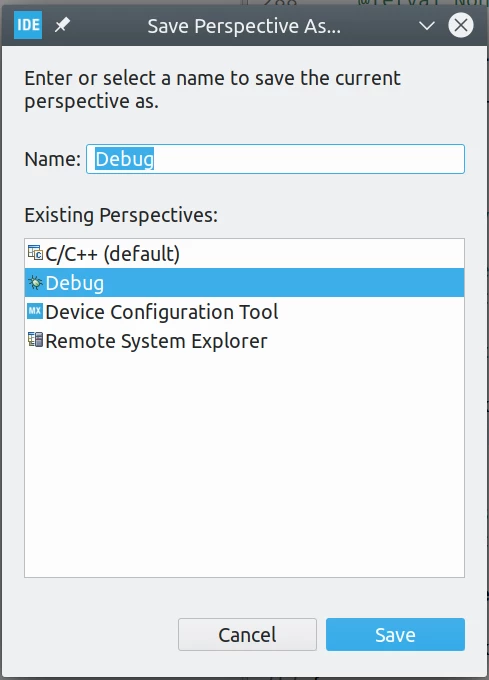
But when I try to save my layout, I'm offered only one of these perspective:
0693W000000W3OPQA0.png

Please fix this mess! TrueStudio got it exactly right.

This topic has been closed for replies.

1 reply

Markus GIRDLAND
ST Employee
April 21, 2020

This is default Eclipse behavior so it should be the same behavior as in TrueSTUDIO.

I believe this behavior is because you've saved your custom "Debug" perspective with the same name as the default "Debug".

The perspective list will still only show one instance of the “Debug�? perspective using the “Debug�? icon, but the perspective “toolbar�? in the top right can now show both the proper Debug-Debug perspective and your Custom-Debug perspective.

It seems that launching a debug session will actually open your Custom-Debug perspective instead of the Debug-Debug perspective.

I would recommend to click on your Custom-Debug perspective in the perspective toolbar menu and then select save as again, but now call it “Debug2�? or something other than an existing perspective.

After this, launching a debug session again will open the original Debug-Debug perspective, not “Debug2�?.