
H.Ahmed
Associate II
October 25, 2022
Solved

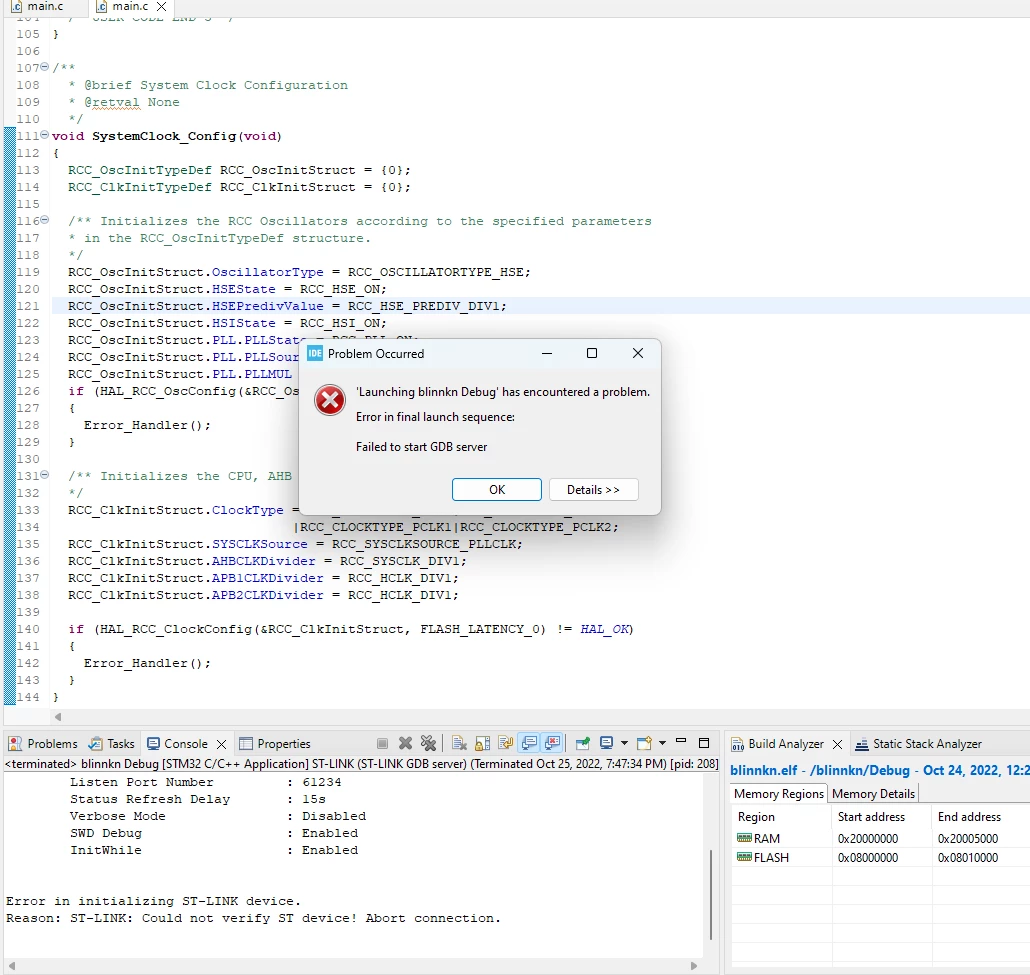
Can anyone help me solve the "failed to start GDB server" error.

  • October 25, 2022
  • 15 replies
  • 22277 views

I'm trying to program STM32F103C8T6 using CUBEIDE. After solving so many errors now I have this error " failed to start GDB server" tried different PORT NUMBERS and also changed debug prob from " OPEN OCD" to "GDB SERVER" but could not help.
0693W00000UomRtQAJ.png

This topic has been closed for replies.
Best answer by MM..1

Seems your ST-Link or MCU dont work. Checkthis all first in STLink utility or STMCubeProgrammer sw.

After work try back in debuger.

15 replies

PHolt.1
Senior
October 27, 2022

Can the "More answers" feature be disabled, please? It is horrible. Just show the whole thread.

". I will reply below to your console output."

I cannot see a reply anywhere.

mattias norlander
ST Employee
October 28, 2022

Hi @PHolt.1​ ,

Sorry for lack of reply.

Had to seek some info internally to understand some error messages I am not familiar with:

  • Error: ST-LINK error (DEV_TARGET_CMD_ERR)
  • ...
  • Error: ST-LINK error (DEV_TCP_CMD_ERR)

These error messages are propagated from ST-LINK firmware. Will see if we can get some experts on the ST-LINK into the loop. Why? Not sure. Normally, long wires, too fast SWD speeds. Could also be an ST-LINK firmware bug.

@PHolt.1​ , looking at your screenshots it looks like you are running CubeIDE 1.10.0? Reason for asking is that we previously had a "race condition" inside CubeIDE on Windows only when terminating debug sessions. That bug could put the ST-LINK in a state where it did not accept new connections. It has was fixed in 1.9.0 if I remember well...

Will see if I can get the eyes of the ST-LINK expert on this thread. Please hold :)

PHolt.1
Senior
October 28, 2022

Yes, Version: 1.10.1

Build: 12716_20220707_0928 (UTC)

This intermittent debugger loss (which, once it happens, is permanent until USB unplug, or PC reboot) has always been there.

This is not related to the SWD clock speeds.

I also find that if the SWV ITM data console is enabled, with

0693W00000VONFfQAP.pngthis can fairly rapidly make the debugger lose contact with the target. The target runs ok but of course no breakpoints anymore.

Earlier versions of Cube were more reliable in some other respects e.g. I sometimes find, after some hours, that breakpoints don't work until Cube is exited and restarted. I certainly cannot do debug builds all day without Cube getting into a mess.

PHolt.1
Senior
November 1, 2022

Could I please have a reply to my debugger log question please?

Also where is the log file stored? It doesn't exist after the failed debug process.

PHolt.1
Senior
November 5, 2022

Is anyone from ST reading this forum?