
JPiet.3
Associate III
October 13, 2022
Solved

How to create a static library for dual core processors in Cube IDE?

  • October 13, 2022
  • 2 replies
  • 1884 views

Hi,

how does it work to create a static library for a dual core processor? While starting under CubeIDE with "New Project", the point "Static Library" is not usable, for instance, when use the STM32H745 (M4 & M7 Core). Is an application note available, how to do it?

Thanks,

Jan
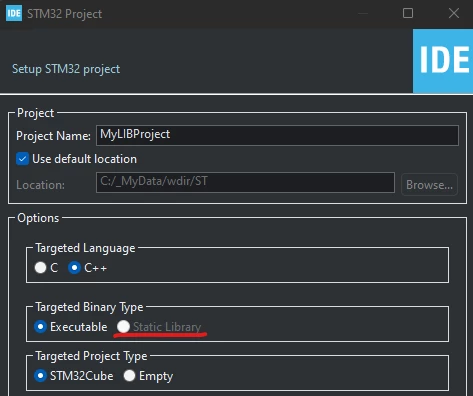
0693W00000UnzZeQAJ.png

This topic has been closed for replies.
Best answer by KDJEM.1

Hi @JPiet.3​,

I recommend you to have a look to the User Manual UM2609 available on our Website and precisely Section 2.2.2 Creating a new STM32 static library project.

Maybe this post helped you.

When your question is answered, please close this topic by choosing Select as Best. This will help other users find that answer faster.

Thank you

Kaouthar

2 replies

KDJEM.1
KDJEM.1Answer
Technical Moderator
October 14, 2022

Hi @JPiet.3​,

I recommend you to have a look to the User Manual UM2609 available on our Website and precisely Section 2.2.2 Creating a new STM32 static library project.

Maybe this post helped you.

When your question is answered, please close this topic by choosing Select as Best. This will help other users find that answer faster.

Thank you

Kaouthar

To give better visibility on the answered topics, please click on Accept as Solution on the reply which solved your issue or answered your question.
JPiet.3
JPiet.3Author
Associate III
October 17, 2022

Yes, thanks, it's working now. More difficult was to link the .a-File to my code because for the include path, you need the miscelaneous tab and not the libraries-tab to use the new object file.