
Ax111_
Associate II
May 17, 2022
Question

No st link connected

  • May 17, 2022
  • 5 replies
  • 13383 views

I have st-link v2 with Firmware version V2J39S7.

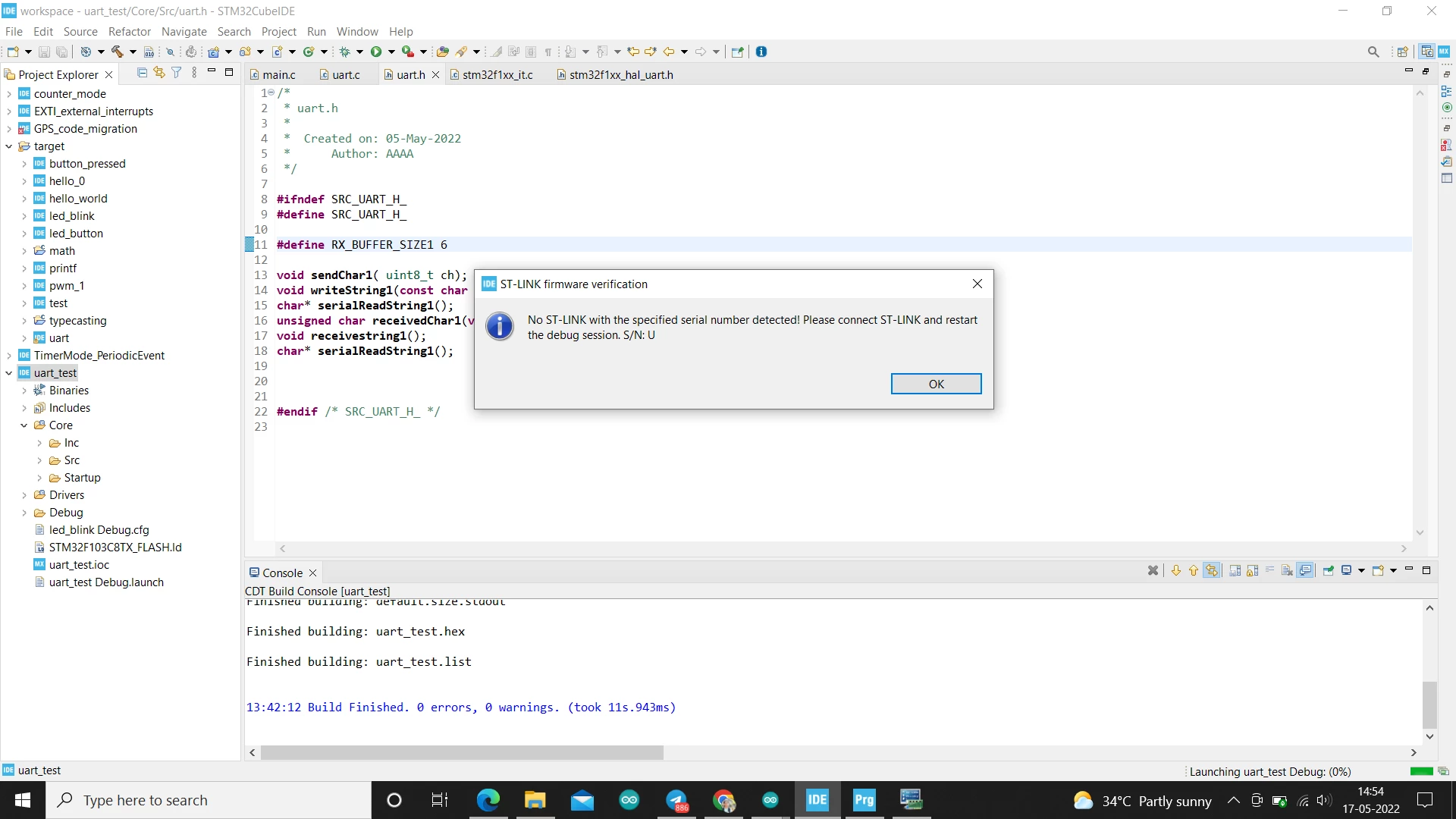
I have been trying to debug through STM32 cube ide but it says " NO ST-LINK DETECTED".

I have also tried via Cube programmer and updated the stlink but still of no use. Have done the boot thing too.0693W00000Nq5d4QAB.pngCould anyone say whats possibly going wrong.
This topic has been closed for replies.

5 replies

Andrew Neil
Super User
May 17, 2022

Try to think where you last saw it ...

A complex system that works is invariably found to have evolved from a simple system that worked.A complex system designed from scratch never works and cannot be patched up to make it work.
Andrew Neil
Super User
May 17, 2022

Is it connected to the Host computer?

Does the Status LED light correctly on the ST-Link?

What computer is it - Windows? Mac? Linux? a VM? other ... ?

Does the PC detect it; eg, on Windows:

0693W00000Nq5kPQAR.png

A complex system that works is invariably found to have evolved from a simple system that worked.A complex system designed from scratch never works and cannot be patched up to make it work.
Ax111_
Ax111_Author
Associate II
May 17, 2022

hello, i am using windows and it is being detected under Universal serial like you mentioned in your picture

Andrew Neil
Super User
May 17, 2022

See below - check your ST-Link Serial Number in the debug configuration ...

A complex system that works is invariably found to have evolved from a simple system that worked.A complex system designed from scratch never works and cannot be patched up to make it work.
Andrew Neil
Super User
May 17, 2022

It seems to be looking for an ST-Link with the Serial Number 'U':

0693W00000Nq5koQAB.pngThat's not a valid serial number - check your debug configuration!

A complex system that works is invariably found to have evolved from a simple system that worked.A complex system designed from scratch never works and cannot be patched up to make it work.
Ax111_
Ax111_Author
Associate II
May 17, 2022

i have tried with the SN number of ST link and everytime it shows me this:0693W00000Nq5pAQAR.png

Andrew Neil
Super User
May 17, 2022

It's telling you that the ST-Link is stuck in Upgrade mode:

0693W00000Nq5qDQAR.png 

ie, it started doing an upgrade, but it failed.

What happens if you hit 'Open in update mode' again?

This is probably best done in the Cube Programmer - rather than trying to do it from the IDE while it's trying to start a debug session ...

BTW, the IDE Serial Number ("SN", or "S/N") setting is here:

0693W00000Nq5rGQAR.pngjust uncheck the box if you don't need to specify a particular ST-Link.

A complex system that works is invariably found to have evolved from a simple system that worked.A complex system designed from scratch never works and cannot be patched up to make it work.
Amel NASRI
Technical Moderator
May 17, 2022

Hi @Ax111_​ ,

Several hints are provided in the article How to solve debugger connection issues?

Keep us informed. If problem is resolved, please precise which hint helped you.

-Amel

To give better visibility on the answered topics, please click on Accept as Solution on the reply which solved your issue or answered your question.
Ax111_
Ax111_Author
Associate II
May 18, 2022

yeah, sure.

KWOOJ
Associate II
October 14, 2022

I am also in the same situation.

Is your problem solved?

If so, how did you solve the problem?

I have several STlinks, and as a result of testing, the new stlink I bought shows the same problem as you, but there was no problem with the old STlink.

Ax111_
Ax111_Author
Associate II
November 23, 2022

Hello, I didnot find any. so I thought of buying a nucleo Board instead