
LCE
Principal II
November 21, 2022
Solved

st link server is required to launch the debug session

  • November 21, 2022
  • 1 reply
  • 23078 views

Hello,

using: STM32CubeIDE 1.10.1 on Windows 10

I have not used the debugger for a week or so, I didn't do any updates (okay, Win 10 probably has, managed by company...), but all of a sudden when I want to start a debug session, this message pops up:

st link server is required to launch the debug session

Why's that?

Edit: I am an absolute beginner when it comes to STM debugging tools.

Because I always worked on many different platforms, I mostly rely on LEDs and UARTs for debugging...
This topic has been closed for replies.
Best answer by FBL

Hello @Community member​,

Please make sure to close all instances of STM32CubeIDE, STM32CubeProgrammer.

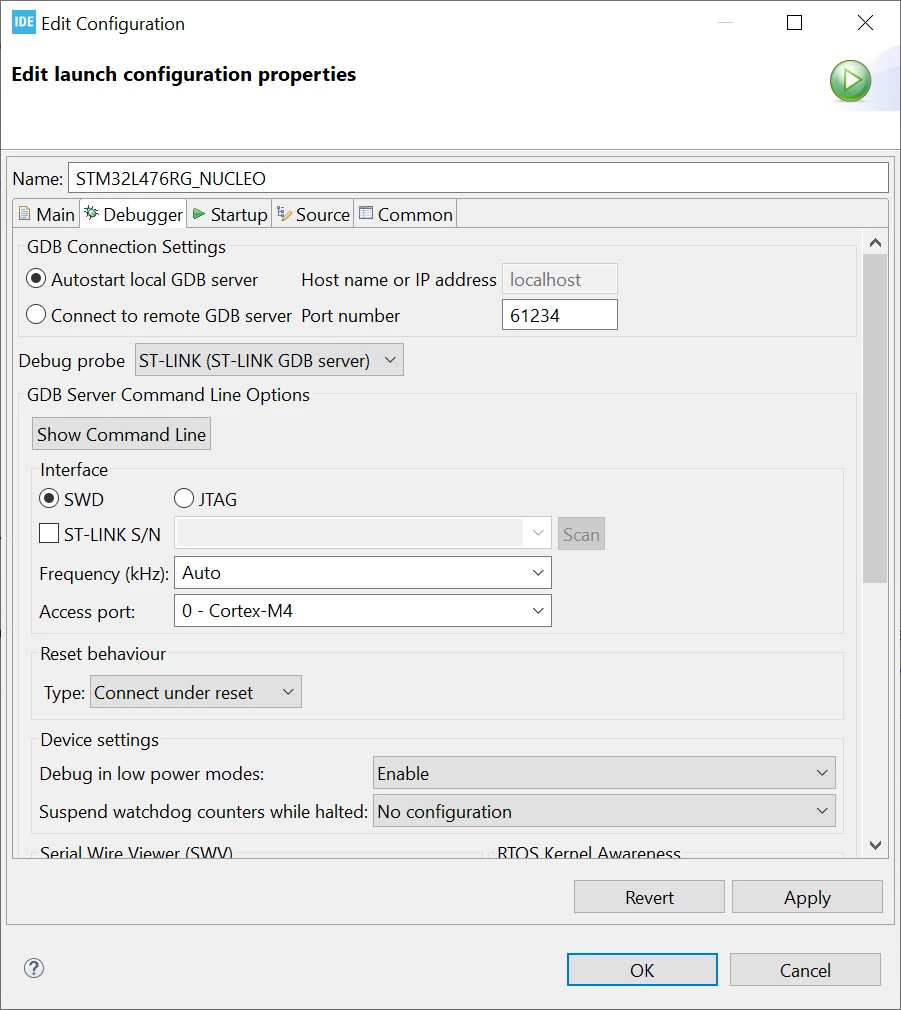
If it doesn't work, you better update the firmware version check debugger settings. For example:

0693W00000WJ0BAQA1.pngOtherwise, it would be better to re-install ST-LINK server software.

1 reply

FBLAnswer
Technical Moderator
November 21, 2022

Hello @Community member​,

Please make sure to close all instances of STM32CubeIDE, STM32CubeProgrammer.

If it doesn't work, you better update the firmware version check debugger settings. For example:

0693W00000WJ0BAQA1.pngOtherwise, it would be better to re-install ST-LINK server software.

To give better visibility on the answered topics, please click on Accept as Solution on the reply which solved your issue or answered your question.Best regards,FBL
LCE
LCEAuthor
Principal II
November 23, 2022

Thanks, now after a re-installing of the ST-LINK server software and a computer restart, it's working again.

Although Win 10 didn't like the install file, came with a warning.