
MSale.1
Senior
March 31, 2024
Solved

STM32Cube IDE 1.15.0 issue

  • March 31, 2024
  • 1 reply
  • 3183 views

After updating Cube IDE to version 1.15.0 the memory details & memory regions map in the build analyzer are not showing any informations beside the linker script file name in all my projects start to be bold!!!

Best answer by STTwo-32

Hello again @MSale.1 

After checking, You have to click on the "Refresh" button:

STTwo32_0-1711956447073.png

Refer to the UM2609, section 2.5 where this new button is explained and how you can change the behavior:
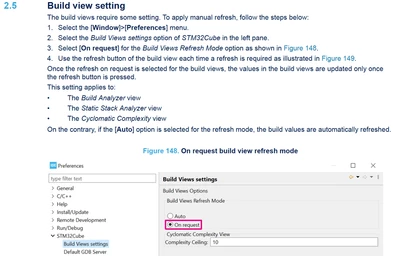
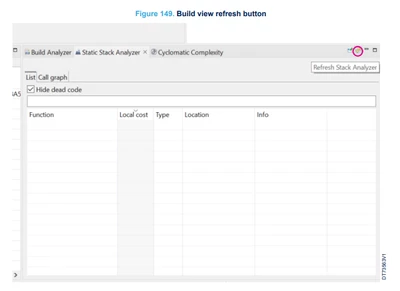
STTwo32_1-1711956498006.png

STTwo32_2-1711956649043.png

Best Regards.

STTwo-32

1 reply

STTwo-32
STTwo-32Answer
Technical Moderator
April 1, 2024

Hello again @MSale.1 

After checking, You have to click on the "Refresh" button:

STTwo32_0-1711956447073.png

Refer to the UM2609, section 2.5 where this new button is explained and how you can change the behavior:

STTwo32_1-1711956498006.png

STTwo32_2-1711956649043.png

Best Regards.

STTwo-32

To give better visibility on the answered topics, please click on Accept as Solution on the reply which solved your issue or answered your question.
Associate
June 28, 2024

Thanks! That worked. What about the bold linker script name problem though? Please see the screenshot below.

Screenshot 2024-06-28 at 22.21.19.png


In the "project explorer" view, The linker script file name is bold (and clipped at the end) for some reason.

EDIT:

It seems like that the project explorer view will slightly clip the end of the longest file name:

Screenshot 2024-06-28 at 22.26.46.png

Visitor II
September 13, 2024

Ever find an answer to this? I've tried to find the answer in the documentation but was unsuccessful. It's annoying because I can't tell if it's telling me there's a problem or not. There are no errors or warnings from a build., so what's it saying????