
Romain1
Associate III
December 16, 2019
Solved

STM32CubeIDE Project setup issue

  • December 16, 2019
  • 6 replies
  • 3492 views

When trying to create a Debugger configuration for a project opened from sources + Makefile, STM32CubeIDE fails to create the configuration and shows the following error messages:

" Not able to get board target."

" An internal error has occurred. Update LCD"
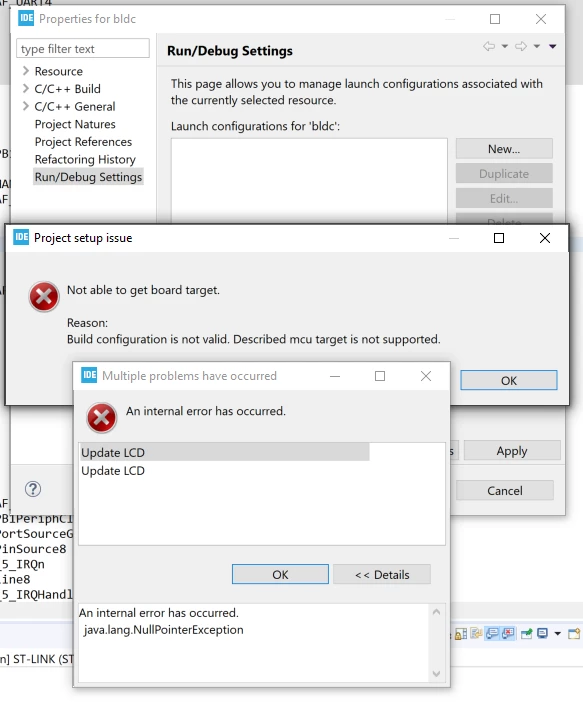
0690X00000Buf7sQAB.png

The project is using the STM32F405RGT6.

How can I create this configuration and start debugging the project?

Thanks

This topic has been closed for replies.
Best answer by Cartu38 OpenDev

My guess is STM is adding some automation on top of Eclipse if STM32Cube usage. No magic here to allow such some private setup is done. You should lack of right now.

I would foresee two options then:

1) Either create a STM32 project (File>New>STM32 Project) selecting "Empty" mode. Then promote your source code into. Such should allow you to take benefit of common settings.

2) Or rely only on native Eclipse capabilities which are always available, STM32CubeIDE being "only" some addon on top of a regular Eclipse core.

Feel free to share your trial outcomes !

6 replies

Romain1
Romain1Author
Associate III
December 18, 2019

Updated to STM32CubeIDE v1.1.0, the issue is still present.

Romain1
Romain1Author
Associate III
January 7, 2020

Hi, any update on this please?

Cartu38 OpenDev
Graduate II
January 7, 2020

How have you created your project ? Sounds tool is complaining about non legal project setup ...

Please provides more details if expecting some help ...

Romain1
Romain1Author
Associate III
January 7, 2020

Sure, project was created by importing a Makefile project, the VESC. The project compiles just fine from CLI running make. The "Release" configuration exists but it's impossible to start debugging. Any idea what settings could be causing this issue?

Cartu38 OpenDev
Graduate II
January 7, 2020

My guess is STM is adding some automation on top of Eclipse if STM32Cube usage. No magic here to allow such some private setup is done. You should lack of right now.

I would foresee two options then:

1) Either create a STM32 project (File>New>STM32 Project) selecting "Empty" mode. Then promote your source code into. Such should allow you to take benefit of common settings.

2) Or rely only on native Eclipse capabilities which are always available, STM32CubeIDE being "only" some addon on top of a regular Eclipse core.

Feel free to share your trial outcomes !

Romain1
Romain1Author
Associate III
January 8, 2020

Solution 1 worked. Thanks!

Note that I had to disable the Makefile generation to use the existing Makefile:

0690X00000BviVkQAJ.png