
CDyer.1
Associate III
August 23, 2022
Solved

Where should I initialise Git when creating a CubeIDE project?

  • August 23, 2022
  • 2 replies
  • 4725 views

Hi,

This may be more of a general Git usage question, but I am currently learning how to use Git so I can begin to implement version control with my projects. There doesn't seem to be many examples online of embedded use, it's mostly web stuff. I use CubeIDE exclusively but am learning Git from the command terminal as I also want to learn another skill (using GUIs seems to be cheating a bit). My question is: where would one want to initialise the Git repository when wanting to implement version control in a CubeIDE project? So far I have initialised Git within the project folder itself as seen here:
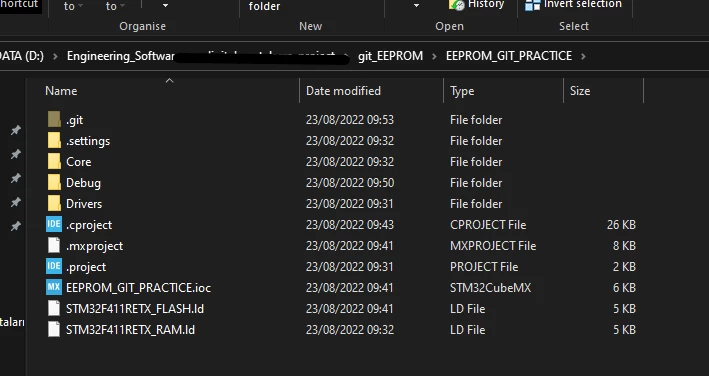
 0693W00000QOIFkQAP.pngand when I've made any substantial changes, I stage and then commit. Is this the best way to implement? Obviously this will then include all the drivers and other files that are auto generated.

This topic has been closed for replies.
Best answer by KnarfB

Debug and Release folders contain build artefacts. The content is changing whenever you clean/build/rebuild your project and usually not tracked by a source code revision tool like git. Anyway, you may have a specific reason doing so.

> uses absolute paths for some things

Check it out by using grep to find (parts of the) absolute path in any config files. In your example project

grep Engineering_Software .* *

For Windows, grep comes with the git bash for example. In most cases you should not find the absolute path. Try checking out your project in a different folder.

hth

KnarfB

2 replies

KnarfB
Super User
August 23, 2022

Looks good. In the long run, the auto-generated code will change after a firmware/tool upgrade. So you can perfectly track changes.

Add a .gitignore and exclude Debug/ and Release/ folders from git because they contain the build artefacts.

hth

KnarfB

CDyer.1
CDyer.1Author
Associate III
August 23, 2022

Thanks for the reply, could you explain a little more about the reasons for excluding Debug and Release? I have seen that Eclipse (and in turn CubeIDE) uses absolute paths for some things and so that can cause errors if someone else was to download and compile this project from GitHub for example?

KnarfB
KnarfBAnswer
Super User
August 23, 2022

Debug and Release folders contain build artefacts. The content is changing whenever you clean/build/rebuild your project and usually not tracked by a source code revision tool like git. Anyway, you may have a specific reason doing so.

> uses absolute paths for some things

Check it out by using grep to find (parts of the) absolute path in any config files. In your example project

grep Engineering_Software .* *

For Windows, grep comes with the git bash for example. In most cases you should not find the absolute path. Try checking out your project in a different folder.

hth

KnarfB

Pavel A.
Super User
August 30, 2022

Debug and Release are build directories created with names of configurations in your Eclipse project.

You can rename configurations or add new, then the Debug & Release will change accordingly.

Everything in these build directories is by-product of build and should not be checked in.

Create a .gitattributes file with a single line: "* -text" to prevent git from tinkering with cr/lf line end translations. It was something from the past century. These days, all decent editors and compilers on Windows understand "unix" line ends.