
scott h
Associate II
April 2, 2020
Solved

Why can't I build my demo project?

  • April 2, 2020
  • 3 replies
  • 2679 views

I have a STM32F407VG DISCOVERY kit and I'm trying to load a project from

C:\Users\<user>\STM32Cube\Repository\STM32Cube_FW_F4_V1.25.0\Projects

I'm using File->"Open Projects from Existing System".

In the Project Explorer it shows:
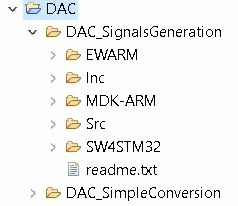
0693W000000VDf9QAG.jpg

But the "hammer" is grayed-out so I cannot compile the code.

Is there something else I need to do.

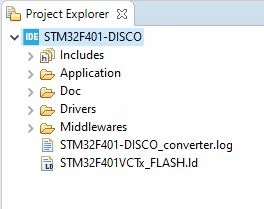
I noticed that projects which I can compile have an IDE symbol will let me build, eg:

0693W000000VDg7QAG.jpg

I can build BGT_Part but not UART.

thank you,

Scott
This topic has been closed for replies.
Best answer by emil28

You need something like this in your project explorer window:0693W000000VEUvQAO.jpg

When you are importing your project, select the folder "SW4STM32", accept the conversion, it should work.

3 replies

emil28
Associate III
April 2, 2020

Hello,

What software do you use to compile the code ?

Emil

scott h
scott hAuthor
Associate II
April 2, 2020

I'm using:

STM32CubeIDE Version: 1.3.0

emil28
emil28Answer
Associate III
April 2, 2020

You need something like this in your project explorer window:0693W000000VEUvQAO.jpg

When you are importing your project, select the folder "SW4STM32", accept the conversion, it should work.

scott h
scott hAuthor
Associate II
April 2, 2020

That worked. Thank you!!